People are talking about you online. Whether it’s a direct @ mention on social media or involvement in an untagged rant—the likelihood is, there’s a lot of conversations occurring on “dark social” that you don’t know about.
For the most part, brand mentions are a marketing score (even when the words themselves are negative). It means your brand’s reach is growing, you’re developing a presence, and people are using your products or services.
Typically, social listening helps you stay on top of all the gossip, gauge brand sentiment, and have engaging conversations with your audience. However, you are bound to find that some people will misspell your brand name or other important keywords and hashtags you’re looking out for.
How do you catch all the praise, complaints, and potential new business if someone’s clumsy thumb gets in the way?
By monitoring misspellings and typos.
It’s a super-sleuth approach to stay on top of all your mentions, develop a robust social listening strategy, and inform business decisions. Not only will you find new leads that are valuable to your marketing efforts, but there is a ton of other benefits to improving your awareness online.
What Is Social Listening?
Social listening involves tracking brand and competitor mentions alongside industry conversations on social media. It helps you listen in on what people are saying online and gives your brand opportunities to act on positive or negative sentiments.
“But isn’t that run-of-the-mill social media monitoring?” you ask.
Nope.
While the two concepts are similar, there are some key differences.
Social monitoring is about collecting data like brand mentions, relevant hashtags, and industry trends. You would typically use this information for monitoring your ROI on social media campaigns or A/B testing. There is no direct engagement with your audience.
Social listening is when you take action with the data and add a human element to your business front by responding to conversations.
Why Should Brands Care About Misspellings and Typos in Social Listening?
OK, so why are misspellings important to your business?
Consider your own thumbs.
Sometimes when you’re in a rush, you might accidentally bash the wrong letter on your keyboard, or your smartphone might autocorrect your spelling without you realizing it, causing unintentional high jinks and drama.
It’s something so common that there are dozens of articles tracking the biggest autocorrect fails of all time.
Who’s to say the same thing isn’t happening to your brand or competitors?
If your company name (or other related terms) are misspelled, it is harder for your team to monitor social media mentions. You could miss out on potentially making a sale or stopping customer dissatisfaction by not covering all your bases.
Here are a few benefits of monitoring misspellings and typos of your brand’s name:
Find more conversations about your company and manage crises: If a person says something negative about your brand on Twitter and uses the wrong spelling of your brand name, then your research provides you with a perfect opportunity to engage with them and try to fix the problem.
Track competitors: If your competitor’s brand name is misspelled or has a typo in their brand name, you can find these conversations and start tracking them.
Discover industry pain points: Monitoring misspellings around topics in your industry is a gold mine. You’ll get a ton of insight into what is and isn’t working and use the information to create a new product or improve your marketing strategy.
Find new leads: If someone is venting about a competitor or complaining about a problem you solve but has a common typo or abbreviation in their Tweet that you’re monitoring, you can swoop in, start a conversation and potentially make a sale.
All of this data and its benefits wouldn’t even be on your radar if you only stuck to monitoring the correct spelling—imagine missing out on hundreds of potential leads every year.
Tips to Capitalize on Misspellings and Typos in Social Listening
Ready to turn those typos into profit? Follow these tips to stay on top of misspellings and reply to users as soon as the mention happens.
1. Use Ubersuggest to Gauge Typo Volumes
Ubersuggest is my personal keyword research tool which can double as a social listening research tool.
You can use it to see how many people are misspelling your brand name or a phrase every month. This can give you an idea of which words you want to monitor.
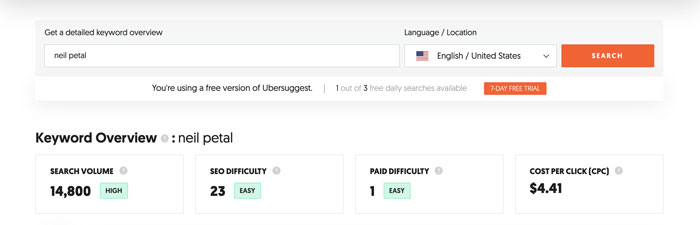
For example, a common misspelling of my name is “Neil Petal.” According to Ubersuggest, that search term gets 14k hits a month. That tells me it’s a lucrative typo to monitor with a social listening tool. That’s 14,000 new leads, conversations waiting to be had, or traffic that I could redirect to my website.
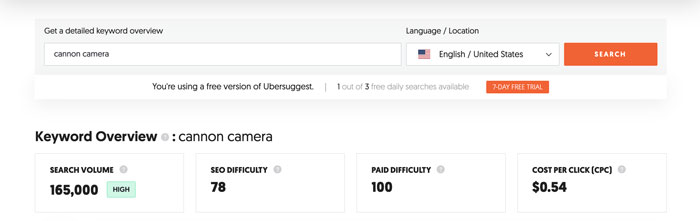
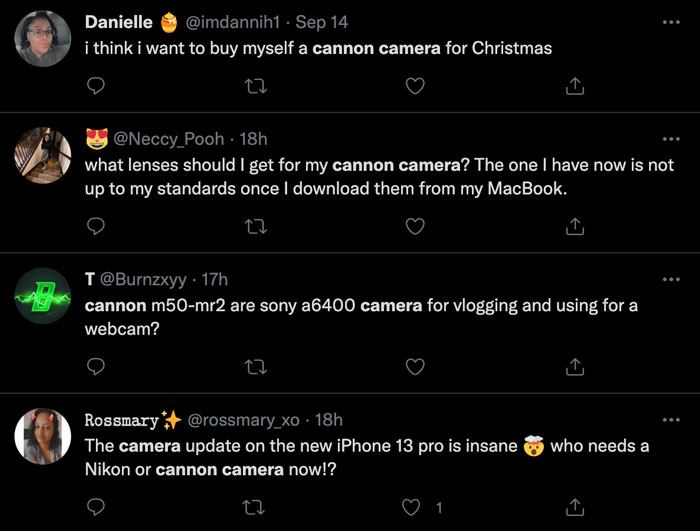
Another good example is Canon. A typo for the brand “cannon camera” gets 165k searches per month. If we head on over to Twitter, we can see that the misspelling is popular there, with hundreds of Tweets mentioning “cannon” instead of “Canon.”
As you can see below, a lot of the conversations referring to “cannon cameras” are potential business opportunities for Canon.
Canon could solve one Twitter user’s problems by writing a blog comparing their m50-mr2 to the Sony a6400 for vlogging, or they could increase their chances of a sale by directing @Neccy_Pooh to their favorite lens comparison lists, published by popular reviewers like DigitalCameraWorld, Shotkit, and PCMag.
Over the years, I’ve used it to build backlinks and carry out PPC research, but it doubles as a way to monitor brand mentions as well.
What are Google Alerts? It’s essentially a notification tool that will send you an email every time a specific word or phrase you’re watching is used.
The tool lets you monitor sources like:
blogs
news
web
video
discussions
Only operating in a specific location or use a word that means something else in another language? You can further filter results for a particular country to make sure you’re only getting pings for the most relevant results.
Some of the typos you’ll want to monitor include:
your brand name
domain names
product names
industry terms
your email address
How to Set Up Google Alerts for Social Listening
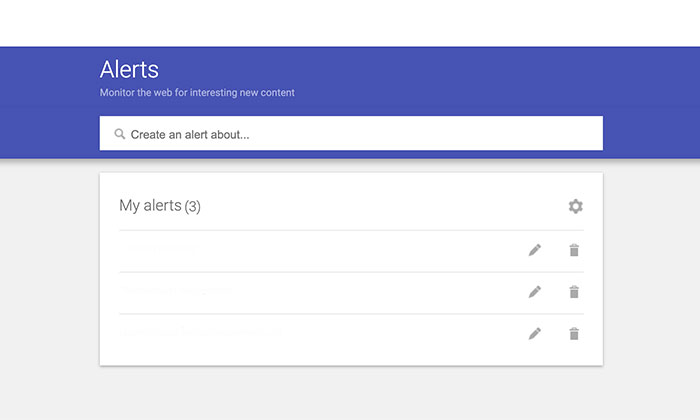
Step 1: Sign in to your Google Account and go to google.com/alerts. You’ll see a screen that looks like this.
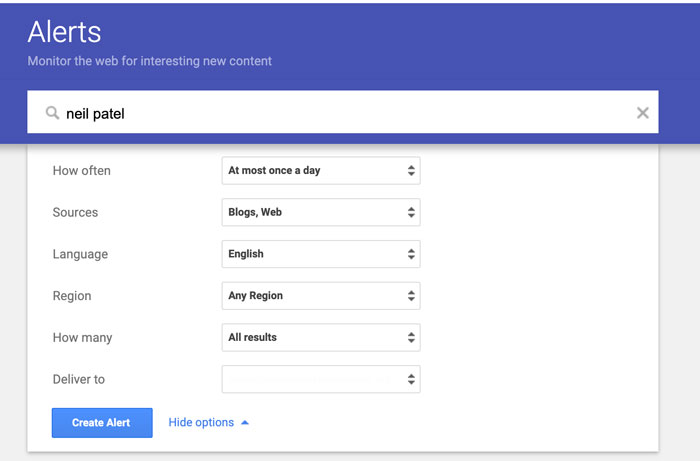
Step 2: Enter the misspelled word you phrase you want to monitor in the search bar.
Step 3: Click on show options to fine-tune your results. These are the settings that I recommend you use:
How often: At most once a day.
Sources: Blogs, Web (and any others that are relevant to you).
Language: Choose the language you are targeting.
Region: Any region (unless your audience is region-specific).
How many: All results.
Deliver to: Enter your email address.
When creating your Google Alerts, use quotation marks around phrases for example, “digital marketing.” It will return results with an exact match for your brand name or industry keywords.
This is one way to make sure you don’t miss out on any opportunities and are able to respond without missing a beat.
3. Monitor Common Misspellings of Your Competitors
Keeping an eye on your competition is an important part of any social media strategy. By keeping tabs on what they are up to, you can quickly adjust your marketing efforts and respond to any trends. Monitoring the misspellings of their brand mentions and keywords helps you understand their audience and start conversations which could lead to onboarding a new customer.
Is there something your competitor is doing that you don’t?
You can use these mentions as clues to adapt your business and give your competition a run for their money.
4. Track Common AutoCorrect Misspellings and Website Mentions
As mentioned earlier, autocorrect is a blessing but also a curse at the same time. If you have a brand name like “Readr,” it will most likely change it to “Reader.”
Research your common misspellings and add them to your list of words and phrases to monitor.
Lastly, don’t forget about brand domain mentions. Include misspellings for your domain and include results for with and without the “www” for example, reader.com, and www.reader.com.
5. Keep an Eye on Branded Hashtag Typos
One of the best misspellings to monitor on social media is hashtag typos. Customers who are over-excited to write something online (or just plain angry) might let their clumsy thumbs get in the way. Combined with general bad spelling, you may miss an opportunity to turn a customers’ mindset around and solve their problems before it is too late and they have already requested a refund or left a bad review.
If you don’t already have one, create a running list of hashtags to monitor. You can then start your search by hopping onto Instagram and typing in different ways to misspell your brand name and branded hashtags.
For example, the camera brand Nikon has 197,423 Instagram posts using the misspelled hashtag #Nikkon. Their branded hashtag #NikonNoFilter has 300 posts using the typo #NikkonNoFilter as well.
How to Monitor Misspellings and Typos in Social Listening
The best way to monitor branded spelling mistakes on social media is with a social listening tool. These tools help you instantly find and monitor conversations about your brand online.
Instead of manually entering a keyword across multiple platforms, listening tools streamline the entire process, saving you time and keeping track of opportunities to engage with your audience.
Simply enter in the keywords and hashtags you want to monitor, and you’ll get daily reports on brand sentiment, popular hashtags your audience is using, words that are used most frequently with your keywords, and you can track anywhere from 5,000 to 250,000 mentions per month.
Once you have your daily report, your social media marketing team can go in and start meaningful conversations with raving fans, disgruntled customers, and potential leads.
It’s the easiest way to manage your online reputation and grow your business at the same time.
If Brand24 isn’t in your price range or doesn’t have all the bells and whistles you’re looking for, some other social listening tools worth checking out are:
Mention: Enables you to listen to your mentions across the web and social media. Monitor over one billion sources like review sites, and forums as well as conversations on Facebook, Twitter, and Instagram. You can publish your responses without having to leave the application, streamlining the entire process.
Hootsuite Stream: This feature from Hootsuite is a built-in feed that monitors activity across all your social media accounts. You can use it to track keywords, competitors, and hashtags.
Keyhole: Helps you shave off hours from your workweek by helping you automatically monitor conversations about your brand and competitor. It has a suite of other features including influencer tracking, social publishing, and campaign tracking.
Social Listening Frequently Asked Questions
What Are Some Social Listening Strategies?
Some of the top social listening strategies include monitoring misspellings and typos of brand names and hashtags, identifying influencers promoting your business, monitoring competitor content, and keeping tabs on industry trends.
How Is Social Listening Measured?
You can measure social listening by tracking the number of mentions of your brand. Looking at the sentiment or tone of the conversation helps you measure if people feel positive or negative towards your brand.
What Is Social Listening Used For?
Social listening is used for online reputation management and identifying ways to start meaningful conversations with customers or potential customers. It’s also used for keeping tabs on your competition and how their audience feels about them.
How Does Social Listening Work?
Social listening helps you monitor conversations happening on any particular platform so that you know what people are talking about when they mention your brand. Keep an eye on what’s happening in your industry and capitalize on any opportunity for new business.
Misspellings and Typos in Social Listening Conclusion
In conclusion, misspellings and typos can be a gold mine for your social media marketing team.
To capitalize on these mistakes, make sure you’re tracking them with a social listening tool to see what people are saying about your brand online. Use this feedback as an opportunity to start conversations, increase engagement, and improve online sentiment about your brand.
How has social listening helped you grow your business online?
For the past several months both John Mueller and Gary Illyes from Google have been telling webmasters and SEOs that image search is something they should be paying more attention to. Well, now we know why – not just the 3D images but Google announced support for higher resolution images and also swipe up from an image to an AMP story from image search.
I covered this in detail at Search Engine Land but here is the summary. First, you can watch this starting at the 25 minute mark into the State Of Search session given by John Mueller and Martin Splitt yesterday at I/O. This embed below jumps you to where it all starts:
Higher Resolution Images
You’ll be able to feed Google a higher resolution image via special markup that they can then use to serve in places like image search, AMP, Google Discover and other places where searchers may appreciate a much higher quality image. It will be an opt in only feature – of course the question is, if you do not opt in, what traffic are you missing out on?
Here are those two slides with the announcement and the potential markup to be used – not it is not like yet, so don’t do anything:
Swipe Up To Navigate
We actually saw this feature back in March – Google was testing from Google Images the ability to swipe up to see the article associated with it. You need AMP for this. Google hasn’t announced exactly how this will work, what markup you need, but the information will be “coming soon.”
3D Images in Search
Okay, this we covered yesterday – in short, the ability to see 3D images in search, then use AR to place them into locations through your phones camera. But here is the potential markup you will be able to use to implement this:
Last week, 9to5Mac pointed out that Apple had changed its App Store guidelines to allow push notifications to be used for marketing and advertising. This is a reversal of a policy that prohibited notifications for being used for direct marketing purposes.
The relevant language reads as follows (emphasis added):
Push Notifications must not be required for the app to function, and should not be used to send sensitive personal or confidential information. Push Notifications should not be used for promotions or direct marketing purposes unless customers have explicitly opted in to receive them via consent language displayed in your app’s UI, and you provide a method in your app for a user to opt out from receiving such messages. Abuse of these services may result in revocation of your privileges.
App Store Review Guidelines 4.5.4
Opt-in and opt-out. Consumers must already consent to push notifications. The App Store guidelines don’t say anything about a second opt-in for marketing messages or ads. Accordingly, publishers should thus be able to send direct marketing messages if users consent to notifications, without any specific ads-related opt-in.
The new guidelines also require app developers “provide a method in [the] app for a user to opt-out from receiving such messages.” (Apple’s settings allow users to block notifications for any app.) This creates something of a dilemma for mobile marketers. If ads and “informational” notifications are co-mingled, and a user opts-out because of too many or irrelevant ads, that will kill the publisher’s ability to send any notifications.
If users are spammed, winbacks will be very hard. I haven’t seen data on what percentage of users will opt back in to receive notifications after an opt out, but I would imagine it’s very small. According to multiple data sources, the general iPhone notifications opt-in rate is between 40% and roughly 45%.
Why we care. Ads or marketing notifications could work very well for retailers, for example, who could personalize promotional notifications when items go on sale — as with email marketing. It might also work well for streaming and entertainment apps, to promote upcoming shows or other content that users have expressed interest in. It could work for real estate, jobs, restaurants, sports and a few other categories where the promotion is closely tied to the content of the app.
However, apps that push third party ads or marketing notifications that have nothing to do with the content of the app itself will undoubtedly fail.
What this all means is that marketers will need to be careful about the promotional notifications they push. Developers and mobile publishers should be very transparent about introducing ads into push notifications. If the publisher is clear about what they’re doing and takes care to only deliver ads relevant to the end user via explicit consent and personalization the new capability could work extremely well. But sloppy or thoughtless execution, or spam, will guarantee failure.
About The Author
Greg Sterling is a Contributing Editor to Search Engine Land, a member of the programming team for SMX events and the VP, Market Insights at Uberall.
If you’re looking to build an SEO-friendly website, Squarespace is a solid choice. It offers easy-to-use templates and plenty of SEO tools to help your site rank better in Google search results.
Not sure where to get started? I’ll guide you through everything you need to know about Squarespace SEO, including what best practices to follow and the tools Squarespace offers.
Why Should You Care About SEO for Squarespace?
Even the most elegant website won’t do you much good if no one sees it. SEO is the act of optimizing a website so your target audience can easily find it.
SEO for Squarespace is about ensuring your Squarespace website plays well with search engines.
If you’ve used other website builders such as WordPress, you might be familiar with SEO plugins like Yoast. Unfortunately, those won’t work with Squarespace.
Other site builders, like Wix, offer minimal SEO tools that make it challenging to improve your ranking.
The good news is Squarespace comes with a ton of advanced SEO tools built-in. Understanding how to use them to optimize your site is crucial to your online success.
10 Tips for SEO for Squarespace
It’s easy to get overwhelmed by all the SEO advice out there. There’s on-page SEO, off-page SEO, and even SEO best practices for developers.
With Squarespace, you don’t have to worry about the most technical aspects of SEO. For example, all their sites are mobile responsive out of the box.
However, several steps will help your site rank well in Google, Bing, and other search engines. Here are ten best practices to improve your Squarespace SEO.
1. Perform Keyword Research
The core of SEO is keyword research. No matter what builder you use, it’s essential to take the time to find out what keywords your site should target. I’ve written several in-depth guides about keyword research, but I’ll explain the basics here.
Keywords are the words or phrases users type into search engines to find your website.
Sometimes they are pretty obvious; for example, a dentist in Chicago will probably target keywords like “chicago dentist.”
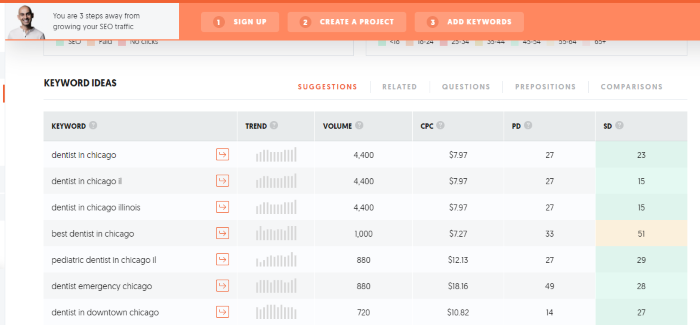
Other terms might be less obvious, such as “dentist near me” or “root canal.” That’s where a good keyword research tool, like my tool Ubersuggest (it’s free!), can be helpful.
Type in your main keyword and see what other terms come up:
These are terms you’ll want to use on your website in your domain name, URLs, and SEO page titles. (Don’t worry, we’ll cover how to do all that later.)
Consider researching what terms your competitors use as well. This can provide insight into what terms users are searching for.
2. Optimize Your Domain Name
While domain names aren’t a direct SEO factor, they can impact your overall SEO performance.
For example, if someone wants a dentist in Chicago, do you think they’ll click on a site like www.chicagodentist.com or www.marymandyddc.com?
Using keywords in your domain name is a simple way to clarify what your site is about and start building your brand.
If you already have an established website that is ranking well, there’s no need to change it (though you could redirect your site to a more SEO-friendly domain if you wanted).
If you are just getting started, make sure to include keywords in your domain name and make it easy to remember.
3. Use Keywords in Your URLs
Remember those keywords we looked at in step one? Make sure to include them in your URLs.
You’ll also want to make sure your URLs are clean and easy to understand, especially for service or product pages.
For example (sticking with the dentist example from above), the pediatric dentist service page should be www.chicagodentist.com/pediatric, not www.chicagodentist.com/he12909vhsw#.
Clean URLs perform better in search, and they look more trustworthy to users.
Here’s how to change your URL in Squarespace:
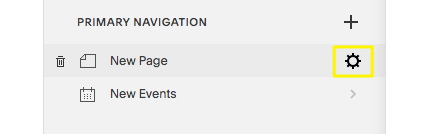
From the Home menu, click Pages.
Click the gear icon to open page settings.
Type your new URL in the URL slug field.
Select Save.
4. Integrate With Google Search Console
Google Search Console is a free tool that helps you monitor and maintain your Google presence. Integrating it with Squarespace allows the two sites to share data and makes it easier to see where your SEO efforts are paying off and where they’re falling flat.
The console makes it easy to verify your site and lets you see all that awesome Google data right in your Squarespace Analytics dashboard—no need to visit two sites.
To integrate, follow this guide on the Squarespace support page.
5. Add SEO Page Titles and Descriptions
SEO page titles and descriptions (also called meta titles and descriptions) are short blurbs displayed in the search results that tell users what they’ll find on your page.
Get these right, and your traffic can skyrocket. Ignore them, and Google will create them for you—and they might not be as effective.
Here’s how to update your SEO page titles and descriptions on Squarespace:
In the Home menu, select Pages.
Click the gear icon next to the title.
Select the SEO tab, then add your title to the SEO title field.
Select Save.
You can (and should) add SEO titles to all your pages, including blog posts and product pages. This guide to meta titles and descriptions will walk you through how to create SEO-friendly titles.
In general, meta titles and descriptions should:
include the main keyword you want to target
offer clear details about what the user will find if they click
6. Integrate With Google My Business
If you have a brick-and-mortar business, this is a step you can’t ignore. Google My Business is a free tool that lets you manage how your business appears in Google Maps and the search results.
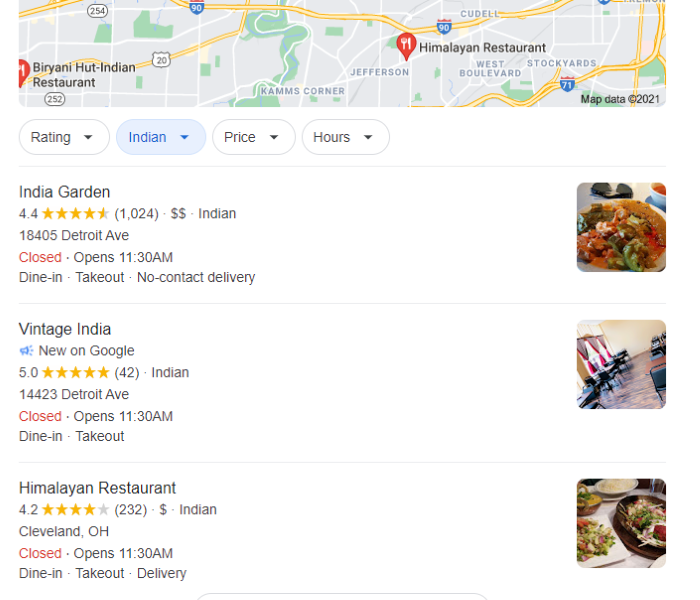
For example, you might have seen the “Google three-pack” when you search for a local business:
Google pulls the information about reviews, pricing, and hours from the Google My Business account.
GMB is valuable, but for many smaller businesses managing another platform is a hassle. Squarespace makes it easy by interacting directly with Google My Business to manage your listing.
Here’s how to integrate your Squarespace site with GMB:
From the Home menu, select Marketing, then Location Management.
Select Add Location.
Click Import from Google.
If you don’t already have a GMB account, you can set it up in Squarespace by following the prompts. Once you’ve integrated, you can push and pull data from your website to Google automatically.
7. Create a Custom 404 Page
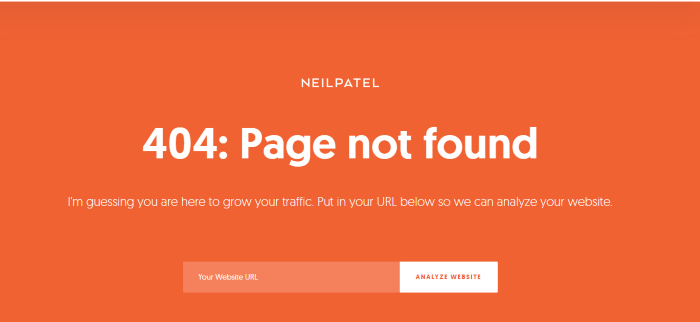
A 404 page is the page users see when they click on a link that doesn’t exist or has been moved but not redirected. Here’s mine:
I use it to direct users to my SEO tool, but you can also direct users to blog posts, product pages, or other important site pages. This keeps users on your site and helps them find the information they need.
A custom 404 page increases time on page, which can improve SEO.
SSL certificates (secure sockets layer) encrypt the data that passes between your website and your server. It improves website security, making it crucial for all websites but especially e-commerce sites.
In addition to just being a good idea, it’s also a Google ranking factor, which means enabling SSL on Squarespace is beneficial for SEO.
Luckily, Squarespace makes this process pretty easy. In fact, all their sites are automatically protected with an SSL certificate. However, you can adjust several settings based on your needs.
Here’s how to check your SSL certificate settings in Squarespace:
From the Home menu, select Settings, then Advanced.
Choose SSL.
Select Security Preferences.
Check the box for Secure and HSTS Secure.
Click Save.
9. Create High-Quality Content
High-quality content is a cornerstone of good SEO. It provides fresh content (which Google likes) and offers useful information your users want and need.
Squarespace makes it easy to add a blog to your website, though many themes come with them already in place.
Once you’ve created your blog page, it’s time to get writing. You can write yourself or outsource it to a freelancer. I recommend writing yourself at first to get an idea of what type of content your target audience wants.
Start by coming up with topic ideas. What questions do you answer most often? What pain points do your customers share? Aim to solve those problems.
Offer useful information: Answer a question, provide a step-by-step guide, or give advice. Keyword research can help with this.
Break up content: Use headings, lists, and pictures to break up longer content and make your piece easy to read.
Be specific: Don’t write for everyone; instead, write for your specific target audience (or even a subset of your audience). For example, this post isn’t just about SEO in general; it’s specifically for Squarespace users. A dentist could write about “how to brush your teeth,” but “how to teach your kids to brush their teeth properly” is likely to be more useful.
Optimize your content: Once you’ve created your useful, high-quality content, review Squarespace’s content best practices to ensure your audience can find your great content.
10. Add Internal Links to Important Content
Internal links are links on your website to other pages on your site. They improve user experience by helping users find pages, but they’re also great for SEO.
Internal links help Google understand which pages on your site are most important. Search engines also use internal links to pages on your site.
However, don’t go overboard with internal links. I aim for 5 to 10 internal links per 2,000 word article, which seems to be a happy medium. If you only have 10 pages on your site, you’d include fewer links.
Finally, make sure the internal links you add are useful. This isn’t a place to spam users about your newest product; it’s about leading them to useful pages.
Most Squarespace templates are pretty SEO-friendly. However, Brine gets top marks for the ability to customize headers, content insets, and adjust mobile styles. You can also add advanced features like parallax scrolling.
Is Squarespace good for SEO?
Yes. Squarespace offers plenty of SEO tools and features to help you optimize your website. While there are some things you can’t access, it offers a number of SEO tools and features.
Is optimizing SEO for your Squarespace free?
SEO features are included in their paid plans, so it is free in the sense that you don’t have to pay extra just for SEO. However, some features are only available to Business or Commerce customers. Make sure to consider your SEO needs when comparing plans.
What are the downsides to Squarespace, and how can you overcome them?
One of the major downsides to Squarespace is the lack of control. Although many templates are easy to adjust, the customization is limited. You can overcome these issues by carefully considering your template options and choosing a format that will grow with your business.
Squarespace SEO Conclusion
Understanding how to implement successful SEO practices on Squarespace is crucial to online success. While SEO for Squarespace is a little different than other website builders, they still offer a wide range of SEO tools.
If you haven’t built your site yet, I strongly recommend starting with keyword research. If you get stuck, my team is happy to help.
Do you use Squarespace? Have you had success with their SEO tools?
Google had a slew of Google Search related announcements at the Google Search On 2021 event. The announcements ranged from improvements and more uses for MUM, to the about this result expanding, to shoppable search experiences, in-store inventory, Google Lens updates and a bunch of features and redesigns to the Google Search experience.
Google’s John Mueller said on Twitter that directory submissions, article submissions and bookmarking links are generally against Google’s webmaster guidelines. He said they are generally seen by Google as artificial links and thus you should likely avoid a link building strategy using those.