For over a year, Google said it is working with the WordPress team to build in to the core of WordPress the ability to generate XML Sitemaps. Well, now with WordPress 5.5 it is now out. Pascal Birchler from Google announced on WordPress.org “in WordPress 5.5, a new feature is being introduced that adds basic, extensible XML sitemaps functionality into WordPress core.”
With version 5.5 of WordPress your WordPress site will expose a sitemap index at /wp-sitemap.xml. This is the main XML file that contains the listing of all the sitemap pages exposed by a WordPress site, Pascal said. The sitemap index can hold a maximum of 50000 sitemaps, and a single sitemap can hold a maximum of 2000 entries or URLs. All public and publicly queryable post types and taxonomies, as well as for author archives and of course the homepage of the site, will be available in these Sitemap files by default.
For this to work, you need to render the sitemaps on the frontend and that requires the SimpleXML PHP extension.
I guess if you have an XML sitemap already on your WordPress site, you can use that and maybe disable this or leave both. I assume plugins like Yoast will handle it and I also think it is fine for Google to consume the same URL more than once in more than one sitemap – although, it is probably not the most efficient way to have things.
July ‘s HubSpot releases include new ways to track spending, collaborate, manage cookies, leverage Conversational Intelligence and more. Here’s a friendly guide to them.
Identify over/under budget campaigns
The soon-to-be-released Campaign ROI feature includes a “campaign budgets” report to track which campaigns are over or under budget. It should help users allocate budgets and demonstrate ROI.
Campaign budgets has two new features: a numeric field and a currency setting. This is a marked improvement from the previous version which had a text box for inputting both the currency and numbers. This made impossible to use it as a calculated numeric field for reports.
Your team may need to complete clean-up work on past campaigns to use this field for historical reporting. Fill in the new budget field with the values from the old, read-only budget field before the old budget field disappears on September 8.
Voice conversations are rich sources of information and insight for managers, but they’re extremely difficult to mine. Few managers have time to join or listen to all of their team’s calls. The new tracked terms feature looks to help with that.
It lets users define phrases — tracked terms — that HubSpot’s conversation intelligence functionality can find. These terms can be set to trigger automated workflows (i.e., refer the contact to customer service for follow-up) or send her manager a notification (i.e., additional training is required).
Creating lists based on tracked terms can make it easier and faster for your team to personalize outreach.
The Marketing Emails commenting feature allows teams to collaborate on email creative and settings. Modifications and corrections can be made more efficiently by adding comments and tagging other users on sections of emails. This is an improvement on the previous cumbersome process for reviewing and modifying email creative which usually required multiple browser tabs or windows.
In our previous release notes, we reported the commenting feature was expanding across more tools for better collaboration between teams, departments and managers.
As a manager, you’re likely responsible for ensuring your team’s work complies with an alphabet soup of privacy laws that require blocking cookies until consent is given.
The cookie scanning feature lets you scan, categorize and block cookies until consent is received. It works on all cookies: external, third-party and HubSpot.
If you don’t use this feature, HubSpot’s cookie banner will only manage cookies from HubSpot and native integrations.
Also. there is now a built-in dismiss button that closes the banner if your website does not use the “Require Opt-in” functionality. This option previously required custom code, so this release can improve both user and customer experience if it complies with applicable privacy policies.
How’s this for “meta”? HubSpot is rolling out (in beta) a feature that makes features in public beta more accessible.
Super Admins will soon be able to opt-in to beta features themselves instead of contacting your HubSpot rep or locating buttons in obscure locations in the user interface.
Have your Super Admin check out this video tutorial to get started.
The other day we reported that Google Discover was showing the author name under the article and not the site name, for some stories. Well, Google Discover can now let you hide content from showing up based on who writes it, despite where it might be published.
A burning challenge in a world of IoT and technology is the need to stay ahead of the curve. As more and more businesses adopt cutting-edge technologies, those that lag behind will inevitably be left behind. This is especially true in the field of SEO services, but also in website development and design. In order to stay competitive, businesses must constantly update their websites with the latest trends and technologies.
A prime example of this is low-code and no-code technologies. These technologies are becoming increasingly popular among businesses of all sizes. But what exactly are they? And how can they help you get ahead of the competition?
In this article, we’ll take a detailed look at low-code and no-code technologies. We’ll also explore how they can be used to improve your website in a number of different ways.
What are low-code and no-code when it comes to website tech?
Low-code and no-code technologies are exactly what they sound like. They allow businesses to create websites and applications with little to no coding experience.
Low-code and no-code platforms are becoming increasingly popular for website creation and management. These platforms allow users to create and manage websites without having to write code or hire a developer. This can be a great way to save time and money, especially if you’re not familiar with coding.
How do these low-code and no-code platforms actually work?
Typically, low-code and no-code platforms provide an easy-to-use drag-and-drop interface, similar to a traditional website builder tool. This makes it possible to create a website without any coding knowledge.
In some cases, you may need to use a bit of code to add advanced features or integrations. However, for the most part, these platforms allow you to create a fully functioning website without writing any code.
What are the benefits of using a low-code or no-code platform?
First and foremost, they save businesses a lot of time and money. Rather than hiring developers to create a website from scratch, businesses can use low-code or no-code platforms to do it themselves.
Not just that, these platforms are also much easier to use than traditional coding languages. They allow businesses to create complex websites and applications without the need for extensive training.
Finally, low-code and no-code technologies are constantly evolving. This means that businesses can easily keep their websites up-to-date with the latest technologies, without having to make any changes themselves.
What are the opportunities for SEO?
One of the great things about using low-code or no-code methods is that it opens up new opportunities for SEO. Opportunities include:
Better target customers through local SEO – Local SEO is a great way to improve your website’s visibility in search engines, especially if you’re targeting customers in a specific geographic area.
Optimized code – One of the best ways to improve your website’s ranking in search engines is to ensure that it loads quickly. Low-code and no-code methods can help you do this by optimizing your website’s code and eliminating unnecessary elements.
Create better-targeted pages – Another way to improve your website’s ranking is to create pages that are more relevant to your customers’ needs. By using low-code or no-code methods, you can easily create custom pages that are tailored to your customers’ needs.
All of these opportunities can help you improve your website’s ranking in search engines, which will ultimately lead to more traffic and customers.
These are just a few of the ways that code or low-code methods can help you get smart about your website optimization.
Does Google like websites that use low-code tech?
Yes! In fact, Google has stated that they “see great potential in low-code development.” They see it as a way to make website creation more accessible and efficient.
Google also notes that low-code platforms can help improve website performance since they often come with built-in optimization features. This means that websites created with low-code methods are more likely to rank higher in search results.
How do low-code and no-code impact user experience?
One of the benefits of using low-code or no-code methods is that they can improve your website’s user experience. This is because page data can be better organized and structured for search engines, meaning that users are more likely to find what they’re looking for.
Low-code example: using JSON LD
A good example of low-code is JSON LD. This is used for linked data and means that you don’t need to put unnecessary code on your site as it is all done in the background. It also can speed up page load times as there is less code for the browser to load. JSON LD is a great way to save time with on-page SEO and create better-targeted pages.
What is JSON LD?
JSON LD is a type of code schema that can be used to add structured data to a web page. This structured data can be used by search engines to better understand the content on a page.
It can replace traditional HTML tags and provide more information about a website’s content. This means that JSON LD can be used to improve load times, local SEO, content, and images.
What’s the difference between JSON LD and plain JSON?
JSON LD is a type of code schema that can be used to add structured data to a web page. This structured data can be used by search engines to better understand the content on a page.
Plain JSON, on the other hand, is simply a format for storing and transmitting data. JSON LD takes it one step further by utilizing JSON for website data.
JSON LD compatibility
For the developers among you, JSON LD has a wide range of compatibilities:
Javascript
Java
Rust
Python
C#
Typescript
Ruby
Erlang / Elixir
Go
PHP
Four key benefits of JSON LD
Low-code techniques such as JSON LD have the potential to transform the performance of your web pages. Here are some benefits of using JSON LD:
1. Improved load times
One of the great things about JSON LD is that it can help improve load times. This is because JSON LD code is typically smaller and more efficient than traditional HTML tags. This means that your website will load faster and be more visible in search engines.
2. Improved local SEO
JSON LD can also be used to improve local SEO. This is because JSON LD code can provide more information about your website’s content.
This means that your website will be more relevant to customers in a specific geographic area. Examples of additional information include your website’s address, phone number, and hours of operation. And in ecommerce websites, product information such as pricing and availability.
3. Richer and better-formatted content
JSON LD can also be used to improve content. This is because JSON LD code can provide more information about the content on your website. This means that your website’s content will be more relevant to customers’ needs.
For example, if you’re a restaurant, you can use JSON LD to provide information about your menu, hours of operation, and location.
4. Better-performing images
JSON LD can also be used to improve images. This is because JSON LD code can provide more information about the images on your website, such as size and purpose. This means that your website’s images will be more relevant to customers’ needs and better formatted for SEO.
How does this help your SEO efforts?
Low-code technologies like JSON LD can make your SEO easier in a few key ways:
Save time
Low-code and no-code methods can save you a lot of time with on-page SEO. By using these methods, you can quickly and easily create well-structured and targeted pages that are easy for both users and search engines to understand.
Potential for more traffic
This can help you attract more traffic to your site and improve your chances of ranking high in search results.
Higher conversion rate
In addition, low-code and no-code methods can help you create pages that are more relevant to your customers’ needs. This means that you can attract more qualified leads and convert more sales.
Top tips for getting started with low-code and no-code on your website
Now that you know more about low-code and no-code methods, here are some tips to get started:
Start small – Don’t try to do too much at once. Choose one or two areas of your website to focus on first.
Don’t forget the basics – Make sure you still have a strong foundation in place with things like keyword research and competitive analysis.
Choose the right tools – There are a lot of different low-code and no-code tools available. Do your research to find the ones that are best for your needs.
Test, test, test – Always test your changes before you implement them on your live website. This will help you avoid any potential problems.
Monitor your results – Keep an eye on your website’s performance after you make changes. This will help you gauge the effectiveness of your efforts.
Get help if needed – If you’re not sure where to start or you need help with implementation, don’t hesitate to reach out to an experienced SEO professional.
Closing thoughts
Low-code and no-code methods can be a great way to improve your website’s SEO. These methods can save you time and help you create better-targeted pages. However, it’s important to remember that these methods should be used in addition to, not instead, the basics of SEO. But when used correctly, they can be a powerful tool in your SEO arsenal.
Joe Dawson is Director of strategic growth agency Creative.onl, based in the UK. He can be found on Twitter @jdwn.
Subscribe to the Search Engine Watch newsletter for insights on SEO, the search landscape, search marketing, digital marketing, leadership, podcasts, and more.
If you are tearing down your web site and rebuilding it completely from the ground up, you should expect a lot of search ranking fluctuations. If you want to control and track as much as you can on the SEO side, it is recommended you do it in stages and split the process up.
John Mueller of Google was asked about this on Reddit and John said “I’d try to split it time-wise so that you can recognize any negative effects in each part, and take action to improve them.”
The thing is, if you don’t split up the move then it can be really hard to understand what site changes impacted the Google ranking changes. John said “If you do everything at once, you’ll never know what to fix, and even if things end up “same as before”, you won’t know if one part went down, and was compensated by an improvement on the other part.”
“Keep things controllable & trackable,” John Mueller said.
Here is John’s full answer:
You’ll potentially see more fluctuations from the redesign / revamp than from the domain name change. Moving things 1:1 from one domain to another is – for the most part – a non-issue. Moving between CMSs, rebuilding a site, restructuring it: changing URLs, significantly changing the design, changing the internal linking, all of those things can significantly impact a site’s performance in search (and it can go up too, it’s not always down — you can do things to improve SEO after all). If you do that and move domains, you won’t know why there are changes, and that’s where a lot of the site move stories come from.
If you need to do both, I’d try to split it time-wise so that you can recognize any negative effects in each part, and take action to improve them. If you do everything at once, you’ll never know what to fix, and even if things end up “same as before”, you won’t know if one part went down, and was compensated by an improvement on the other part. Keep things controllable & trackable.
Sometimes you can’t split things out, if you need to revamp & move for reasons above your pay-grade, try to keep things as controlled as possible (track all the details), and set expectations appropriately. You can’t remove all risks, but knowing them makes it easier to make decisions, and to determine actions to take when they happen (which might be “hire more SEOs” instead of “fire all the SEOs”).
Whenever I do site migrations, even to new CMS platforms, I try to keep the URLs, content, meta data, etc all the same. But sometimes you can’t and if you cannot, you do want to isolate whatever you can.
Are you looking for how to use social media in your content strategy to improve SEO and Google search rankings? Do you want to boost your SEO campaign using social media? I will address those questions in this article with practical social media for SEO marketing tips.
Improving your SEO strategy is vital because it increases your search visibility and Google ranking. But fierce competition makes appearing on search results a challenge, mainly since more content gets published daily.
With this volume of content published and distributed every day, your odds to show up on search engine results are slim. But, you can improve your chances with the right content strategy.
This guide will go over several important questions, and offer some valuable tips:
How Does Social Media Impact SEO?
Social media does not directly contribute to SEO ranking, but the links you share across social platforms increase brand exposure. They add up and influence search engine optimization in six directions:
Extensive content distribution
Longer lifespan of your posts
Improve online visibility and organic traffic
Increase brand recognition.
Enhance brand reputation
Boosts local search engine optimization (SEO)
Your shares across social media sites have no place in SEO rankings. Still, when more people share your content throughout social media, it generates social signals that indicate your posts are useful to your target market.
Research by CognitiveSEO made some exciting findings. After analyzing 23 million social media shares on selected platforms, they discovered an equivocal link between social shares and SEO. The shares, likes, and comments your posts receive are vital signals which Google and other search engines use to rank your website.
Source graphic via CongnitiveSEO
However, although the links are helpful, Google doesn’t count them as it would a link from other authority sites. Despite that, you agree that the best ranking pages on SERP are often those with more social shares.
In describing how social media impacts SEO, Life Marketing notes that social media does not have a direct influence on SEO. But it indirectly has a positive effect on search ranking.
Social Media Mentions and Rankings
At Pubcon Pro 2017, Google’s Gary Illyes had a keynote discussion with SEO Eric Enge. Gary discussed how Google might use online mentions of a brand.
“The context in which you engage online, and how people talk about you online, actually can impact what you rank for.”
— Gary Illyes
So as you can see, social media success can influence your SEO. It is clear that Google is looking for the right metrics, not just vanity metrics — and so should you.
More on How Social Media Supports SEO
Why is social media important for SEO? Since social media indirectly influences the factors that impact search rankings, it is important because it has the potential to drive quality web traffic to your blog.
When you create and publish quality materials that connect with your target readers, they become advocates. Why? Because you offer them something of value. It means that your audience will read and share the articles with their friends and followers.
Their followers will do the same, and the circle continues. Keep in mind that content writing/creation is a fantastic way to attract more eyes to your site. Content can be in any format, as long as it engages your audience. Some types of content that drive traffic and social shares are:
Blog posts
Videos
Infographics
Podcasts
These materials offer your marketing persona useful information that makes them keep coming back and ultimately drive leads. That is content marketing — sharing valuable data that helps the reader. But you will make no significant impact if you don’t distribute them properly.
That is where social media comes into the picture. So when you share your posts, your audience amplifies your content by sharing it further. In this way, you increase visibility, improve traffic, and generate backlinks.
These are social signals that notify Google that your site content is incredible. Those signals could indirectly improve your search rankings.
Source infographic via Life Marketing
Here are some SEO social media marketing pointers to consider, on how social affects SEO:
Post useful materials on social media.
Useful materials will help you gain traction, increase your content reach, and generate backlinks.
Better info helps social media profiles rank in search results and gain traction (grow your followers and drive traffic).
Quality helps build your brand community.
You also enhance brand reputation.
Links from social can help Google with indexation your blog/posts.
Indexation can lead to more search traffic and improved rankings.
So, you need to start sharing content that engages your audience because it helps boost social shares. Also, make it effortless for people to share your posts to strengthen those signals.
Is Social Media a Google Ranking Factor?
I talked about it briefly in the above sections, let us look at it a little more. Social media is NOT an element of SEO ranking. The debate about the influence of social media on search ranking is long-standing.
However, as stated earlier, while many rightly conclude that social media does not directly affect SEO, it correlates with the elements that influence SEO rankings. Let us consider the correlation between SEO and social media marketing.
How Does Social Media Connect with SEO? An Example
Although social media is not a ranking factor, it has a link to search engine optimization. In the above section, I explained how social media and SEO correlate, through social signals.
Those signals strengthen the factors Google considers when ranking a website. You can accumulate those signals in mass sharing on different social media sites. The more you share useful content across social media, the more your audience will likely share the posts with their friends and followers.
So, as the sharing continues, several people could link back to the posts. Collectively, the shared materials could increase your blog content visibility and SEO ranking. Google values quality links and deems them a part of the ranking factors.
As a result, the article went up in rankings to #1 on page one of Google for several keywords. And, the post claimed first place mainly for the keyword terms, “Unhealthiest foods.” All thanks to the thousands of shares it gathered on social media.
Google search
The virality of the post also attracted more backlinks. Thus, the thousands of shares, likes, backlinks, and comments are valuable social signals that influence your SEO search rankings. Google uses those signals in favor of your site and can push it up in rankings.
Have a look at Matt’s findings or take away from their analysis of the content:
Source image via Matthew Woodworth
He noted that social media dramatically impacts SEO. In other words, social media and SEO have a meaningful connection. But you have to create and post quality content frequently.
What Are the Best Social Media Websites for SEO?
There are several social media sites for SEO. These websites are ideal for SEO and social media marketing because they appear in searches and rank high on SERPs. For most consumers, if they want to connect or buy from a brand, they will first visit the company’s social media profiles, not their websites.
Why is that so? Because social media provides a more personal experience, and the response time is often quicker. Also, social media is more effective when connecting with your buyer persona. Consequently, consumers use different social platforms to obtain marketing insights about a company or organization for business purposes and other vital matters.
Moreover, most users perform searches on social sites where they are hanging out. And you get real-time results. As an example, I entered a search for “freelance writing” on Twitter, and here is my result in the screenshot below.
Twitter search
And if you scroll down the results page a little, you will find more exciting outcomes. I also conducted the same search on Medium and LinkedIn, and I got similar results. Please have a look at the visual image below to see my Medium search results.
Source via Medium search
LinkedIn will also show you companies that are hiring and top articles on a topic.
So why did I get these fantastic results on social media platforms?
Because social sites have robust search engine functionalities that enable them to function as search engines.
The results reveal outstanding consistency across social platforms. It shows that users optimized their posts and social profiles with the keywords I was looking for in searches. If you are not using social media for SEO, it is never too late. You can start now!
That said, what are the top social media websites for SEO? Below are my top social sites for search engine optimization.
1. LinkedIn
The primary reason marketers use social media is to generate leads. Although the leads might not be high enough, LinkedIn is doing incredibly well as the top social site for lead generation. It is no wonder LinkedIn is the content marketing hub of 94% of B2B marketers. And almost 90% of marketers are using the platform for lead generation.
Source graphic via LinkedIn
The professional network is the top lead generation social media platform for B2B marketers. According to research, 62% of B2B leads come from LinkedIn.
So, using LinkedIn for SEO is ideal because the site will help you get found on search results. By placing the right keywords naturally in your profile, and strategically adding relevant search terms within your content, including the headings, the LinkedIn search algorithm could push you up to rank at the top of SERPs.
2. Medium
Why should you publish content on Medium?
You should consider this option if there is not enough of your target audience, visiting your blog to consume content. You could find them on Medium and other social sites. The platform allows users to publish all kinds of blog content, including:
Personal stories
Republished articles
Original pieces of content
Repurposing content
Medium helps you reach a broader audience you may not have met if you were only relying on your blog or website for exposure. Several Medium articles are taking the top spot on Google SERPs even for competitive keywords with high search volume.
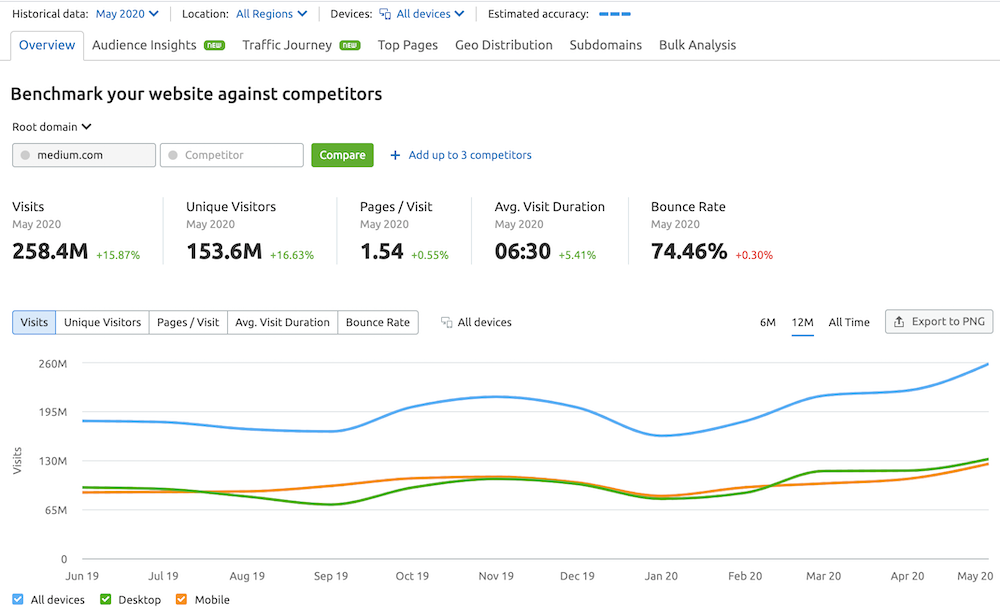
That is primarily because of the authority the site commands. So if you cannot rank your pages, take advantage of Medium’s audience of almost 154M unique visitors a month, and an average of 258M visits per month – that is, according to SEMrush Traffic Analytics.
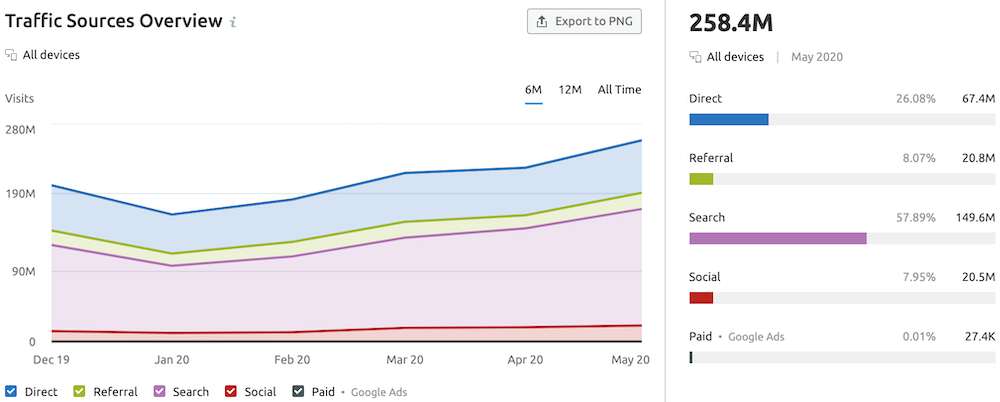
SEMrush tools also show that 58% of Medium’s traffic comes from organic search, while just over 26% is direct traffic, so you can see that these pages are ranking in the SERPs.
3. Facebook
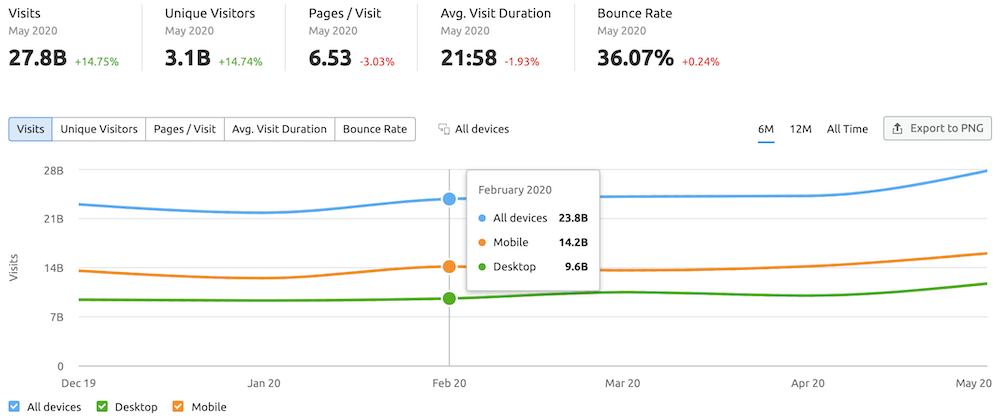
Facebook is, by far, the top social media platform in the world. According to SEMrush, the site ranks #3 globally behind Google and YouTube, and over the last 6 months, they have had over 20 billion visits per month, with May being very high at almost 28B.
Facebook made it simple for users to share content and post different materials. You can distribute links to your blog content, or share your post in its entirety for optimal traction. And the best part, reports say Google crawls and indexes links on Facebook.
Back in 2007, Facebook allowed Google and other search engines to crawl some of its pages. The social media giant has since unlocked more content for indexing, including Facebook comments.
It means that Google bots and other search engine crawlers can read content on its pages. As a result, when users perform searches, those pages on Facebook will appear on SERPs, and you will even see Facebook reviews in Google knowledge boxes.
So, take advantage of this social media site for SEO to drive more web traffic and improve SEO.
4. Twitter
Like Facebook, Twitter is also a fantastic social media website for SEO. Earlier I mentioned that more social signals positively impact Google rankings. The more your content gets shared on Twitter and other social media sites, the more it could help your website ranking on SERPs.
Twitter lets you share your posts to reach more people. To increase traction for your Twitter posts, ensure that you only share quality content that engages users. Also, add relevant hashtags to boost visibility.
Hashtags help people find your tweets quickly, which in turn builds your brand recognition and increases traffic. So if you are not using Twitter for SEO and content distribution, you are leaving money on the table.
Tweet your links frequently (but not in a repetitive and spammy way) to attract users and drive traffic to your blog. The likes, shares, and comments you receive are powerful social signals — useful elements that Google uses to rank your website.
5. Pinterest
Pinterest for SEO is ideal, and several marketers depend solely on Pinterest search traffic to grow their business. Although a social media platform, Pinterest also doubles up as a search engine website.
You must craft compelling Pin descriptions with the right keyword terms to improve your Pinterest SEO effort. According to this survey:
Users conduct over 2-billion searches per month on the site.
Of all the searches, 97% are unbranded, meaning that Pinterest users are willing to interact with companies they have not taken into account.
Each month, 600 million visual searches occur on the site.
70% of consumers use the platform for inspiration on how to make purchasing decisions, in contrast to 17% of Facebook users.
Source Infographic via Wishpond
The numbers speak volumes and show why you should consider SEO on Pinterest for your social media marketing strategy. Moreover, the Pinterest search feature is one of the widely used functions on the site. So, optimizing your profile and Pins will help you dive consistent traffic to your website.
Quora, as a social media website, is a hidden treasure for SEO. Why? Because people are always asking valuable questions on topics of interest. These queries have keywords your audience is searching on Google.
In other words, Quora users are consistently speaking languages that align with user search intent. You ask questions on a given topic and get the answers you need in real-time. When answering questions, users can direct participants to their blog or website by adding relevant links to the responses they provide.
Also, you can create content on Quora and drive quality traffic back to your site. The interactions on the website also appear on searches for specific keywords. So, with Quora, you can find helpful information on any subject, including:
From the results, you can tell that Quora’s organic search traffic is almost 67 million, with a 27.6 million keyword rankings in Google over the past year.
Source via SEMrush
And when you look closely at the keywords by country section, you realize that the 27.6 million search terms are from the US alone, with millions more globally. So, while using social media for SEO, does it make sense to take advantage of a site with millions of monthly web traffic and a massive monthly active user base? Of course, yes!
Other social media sites for SEO include:
Using these social websites for SEO will significantly increase your search rankings. But you have to make sure to optimize your profiles and content according to each platform’s guidelines.
7 Simple Social Media for SEO Best Practices For Increasing SEO Rankings
Contrary to popular belief, social media does have a connection with SEO, although not directly. That is why seasoned marketers are investing heavily in social media marketing. But what are the best social media practices for improving your SEO marketing effort?
Below, you will learn seven practical social media marketing tips on how to improve SEO with social media.
Whatever action you make towards improving your social media efforts should correspond with your SEO objective. That way, you don’t lose traffic from either side. To find success using social media for SEO, you shouldn’t ignore these successful social media and SEO integration tips.
1. Publish High-Quality Content
SEO has continued to evolve, and search marketing is not what it used to be. Google bots and search engine algorithms have developed to understand user intent and content relevance and quality.
These factors enable Google to offer users the most relevant content based on their search query. In other words, keyword stuffing is of the past, and quality content reigns supreme. For this reason, make your blog content perform well on social media and SEO by creating well-researched and helpful content — make this a priority.
Quantity vs. Quality
Don’t be in a hurry to publish blog posts every other day. Instead, take the time to research your materials and produce in-depth copies that connect with your readers. One of the best ways to create quality content is to understand your ideal reader.
Get into their shoes and understand their needs (and pain points). Also, reworking old blog content is a fantastic way of producing quality. Get your best-performing blog posts and add more valuable data to spike engagement on social media. This strategy can also help you get more social signals that will improve your SEO.
Also, look for under-performing blog posts and give them a face-lift. Follow the same process as you would your best-performing blogs. If the content is not doing well, the best approach is to add more valuable materials using skyscraper techniques.
The Skyscraper Techniques
The skyscraper technique is a content creation strategy that transforms your posts into link-worth materials. The concept of a skyscraper content strategy is to ensure that your articles perform better and outrank your competitors.
Such blog posts come with more value for the reader and more keyword variations that rank on search engines. The content will have the capability to rank for different keyword terms. And since it has more value, it will attract quality backlinks.
How The Skyscraper Technique Works
Primarily, you should apply these three fundamental steps:
Search for a blog post that performs well on search with a considerable amount of backlinks
Create similar content, but make yours even way better than the original (in length, thoroughness, and more up-to-date)
Find marketers who linked to the original piece of content and reach out to them to link to your updated version.
Since marketers found the original content useful and linked to it, they are more likely to also link to your content.
So get to work, optimize your content using:
Relevant keyword terms
The right visual materials, and
Make it more up-to-date than your competitors content by adding more helpful materials
These components will help you to improve your social media SEO.
Why is The Skyscraper Techniques so Important?
Brain Dean of Backlinko reveals the values of implementing the skyscraper content marketing strategy. After applying this blogging tip to his post about “Google’s 200 Ranking Factors,” his traffic numbers doubled in only two weeks.
Besides, inbound links to the article increased significantly at the same time.
Source graphic via Backlinko
The Benefits of Skyscraper Techniques
Some incredible benefits of the skyscraper techniques include:
Produces helpful content that adds value to your readers.
Improves blog engagement.
Increases social media shares.
Helps gain more blog comments.
It can add more quality backlinks.
Increases your brand recognition.
Boosts brand reputation and authority.
Producing such articles takes hard work, but the result justifies the means. So, go to work, and it will pay off big time!
2. Make Sharing Your Content Easy for Users
People use social media for various reasons. But for marketers, it is mainly to reach more consumers with their brand message. Reaching more people helps grow your brand awareness and generate leads.
But how can you get your message out if your followers cannot easily share it? That is where making content sharing easy for users comes in handy. With all the vital elements in place, such as social share buttons and compelling calls-to-action, readers will share your content.
Having those components on your blog encourages social sharing, which will effectively increase your reach. Also, when you post on social media sites, use calls-to-action to help your followers reshare your posts.
As an example, SEMrush uses this social strategy prominently. Have a look:
Hey hey hey, fellow SEMrushChatters ? We are here to brighten up your Wednesday! Hit ‘?’ and say hi if you are ready to socialize!
How is everyone doing? Describe your week using emojis only! #SEMrushChatpic.twitter.com/KDsoD02pwG
Helping others share relevant or valuable content helps your message reach a broader audience and boosts brand publicity. Keep in mind that a call to action is not all there is to make your content shareable. Ensure your content is share-worthy.? Make it more appealing, engaging, and of course, helpful to your target market.
Craft compelling headlines and or captions.
Use appealing visuals.
Ensure the content is useful to your social audience.
Users will have no choice but to share your posts with friends and followers.
3. Optimize Your Social Media Profiles
Most potential clients will examine your social media profiles before reaching out to you – they need to get a feel for who you and what you do. When you are writing a proposal or applying for a job, HR and hiring managers will often ask you to include your social profiles for the same reasons.
Furthermore, several would-be connections will also check your profile page before reaching out to you. Some will look you up on Google as well. Therefore, ask yourself:
How compelling is my profile?
Does it have all the secret ingredients that will attract the right people?
When people search for my name, will it appear on Google?
One of the many factors that negatively affect social media for SEO is the lack of profile optimization. This negligence is costing you money as it prevents you or your brand from appearing on searches throughout the web.
A well-optimized social profile enables your target market and eventual customers to find you online. However, you must regularly maintain consistency across channels. It means that your social profiles must align with your blog or website and brand message. Thus, your audience can quickly find you across different marketing platforms. Google loves it.
4. Optimize Your Images for SEO and Social
Visuals are an essential aspect of marketing communication. They are incredible content marketing tools since they help in developing your brand tone. Also, adding images in your blog and social media posts is the most efficient way to transmit information.
The human brain can process visual materials faster – that is why more people respond quickly to visual content than text materials. Studies have found that our brain can process about 36,000 images 60,000 times faster than other types of content.
Moreover, the brain can retain 80% of the visuals it processes, in contrast to only 20% of text content.
So, to make the most of images, you need to optimize them to increase your content popularity on social media and search results. If you optimize visuals correctly, they can play a vital part in improving your SEO campaign.
Also, for social media, quality photos are the key to increased engagement for your posts. So, choose top quality images and optimize them well. You can read this article for more on how to optimize your photos.
5. Build Relationships Through Active Conversations
One of the best ways to increase engagement on your social accounts is to build relationships (brand-customer alliance). Relationships foster trust and establish credibility. They also help you understand your target buyer, their needs, and the pains they are struggling to solve.
So, when they sense that you have an interest in their struggles, it becomes easier for them to engage with you. And the best place for such interactions is social media. You can interact with them via social groups, forums, and marketing profiles.
You don’t have to wait for your marketing persona to come to you. Take the initiative and strike up a conversation with your audience.
Ask relevant questions to know how and what they are thinking about your brand.
Ask for their thoughts about your latest blog post.
Look for questions they might have asked on the platform and provide helpful answers.
Respond to user’s comments.
Create a poll to understand what they would like to read next on your blog.
These are a few ways to start conversations that produce positive results and build long-term relationships. These discussions are essential for improving your SEO because you offer useful information and, at the same time, establish your expertise in your industry.
As a result, you will increase engagement, grow your followers, and improve other social media signals that Google uses to rank your site.
6. Evaluate Your Social Media Marketing Operations
Do you measure your social media activities? If you are not, you could be harming your business. Your marketing success relies heavily on quantifying your performance to understand how your effort is working out for you.
You need to know whether your social media marketing exploits are generating positive ROIs. Consider the following; over the past few months:
Are you making profits from your social activities?
Do you feel that you are wasting your time on nothing while on social media?
Are you losing money?
Can you identify what is working for you on social platforms?
What marketing tactics can you avoid, and what to improve?
You cannot make sure you are successful if you do not measure your marketing metrics. So, define your social media marketing goals and evaluate them accordingly. It helps you grow your social media and improve SEO.
Also, analyzing your performance results enables you to make better marketing decisions – you can channel your efforts in the right direction. In consequence, develop a social media strategy, set attainable goals, and how to measure them. It gives you a focus on how to use social media to improve SEO.
7. Craft Compelling Social Media Post Captions
Whatever business or industry you are involved in, content plays a crucial role in your marketing strategy. And the best content pieces are those that center around or incorporate storytelling.
Why is storytelling so essential and useful as a marketing tool?
In one of SEMrush’s Twitter chats, experts explain why storytelling is so essential and why it should be part of your marketing strategy. Please, find expert comments on the subject below.
In response to why storytelling is import to your business, Brian Fanzo said:
I believe the future of marketing is relatability, especially in our noisy digital world. And to be relatable, you must be authentic and engaged. There’s no better way to do that than telling a story!
Story’s make your audience FEEL! And to quote the great #MayaAngelou “At the end of the day, people won’t remember what you said or did, they will remember how you made them feel.”
Because storytelling makes the connection between a brand and its audience, it’s like a bridge that makes the customer attached to a brand on an emotional level.
The steps to take when creating a marketing storytelling strategy,
Critical questions to gather for your stories,
Available forms of storytelling for your business, and
Resources for successful business storytelling.
Thus, you need to invest in your post captions to make them compelling enough to engage users. Use enticing story snippets to hook your target market and make them click and share your posts with their tribe.
Also, as your goal is to improve SEO using social media, ensure to add your focus keywords and related keyword terms within the captions. Depending on the social platform you choose, if there is a title section for your posts, include keywords there also.
Furthermore, use relevant hashtags where necessary and optimize your content well according to each social media platform. Also, use active voice to strengthen your copy. These activities help in improving your social media and SEO
Wrapping Up Social Media for SEO Ranking Techniques
At this point, I believe you have learned how to use social media for SEO. A sustainable social media strategy enables you to improve SEO and rank higher on search results. While there are several ways to score your SEO using social media best practices, the seven pointers above will set you up if applied correctly.
Understanding these social media tips is essential, but implementing them to your marketing content on social media is even more crucial. What is more? Keep testing your performance to see areas to improve.
Do you have more marketing tips on social media SEO? We appreciate your comments below!


.png)
.png)
.png)
.png)
.png)
.png)


.png)
.png)
.png)
.png)
.png)
.png)



.png)
.png)


.png)
.png)
.png)