You just landed a new big, long term account. You need to develop a proper understanding of the industry, how it is structured, and who the leaders are so you can help your client develop strong relationships as well as establish strong thought leadership in the industry.
One way to find those people is through industry publications that feature leaders who contribute content on strategies and industry best practices.
In this tutorial, we will use crawling and scraping to create the nucleus of such a database – a list of influencers you could utilize. I will be using Python, and you can get an interactive version of the tutorial if you want to follow along, modify the code, or later use it as a template.
To make it familiar, the industry is the online marketing and advertising industry, the publication is the SEMrush blog, and the crawler is the open-source advertools crawler.
At the time of this writing, this blog has 393 authors, each with a profile page. You could manually copy and paste all their profiles and links, but your time is much more valuable than that.
Preparation (pages and data elements to extract)
The full list of bloggers with a link to each blogger’s profile page can be found on a few pages with this template:
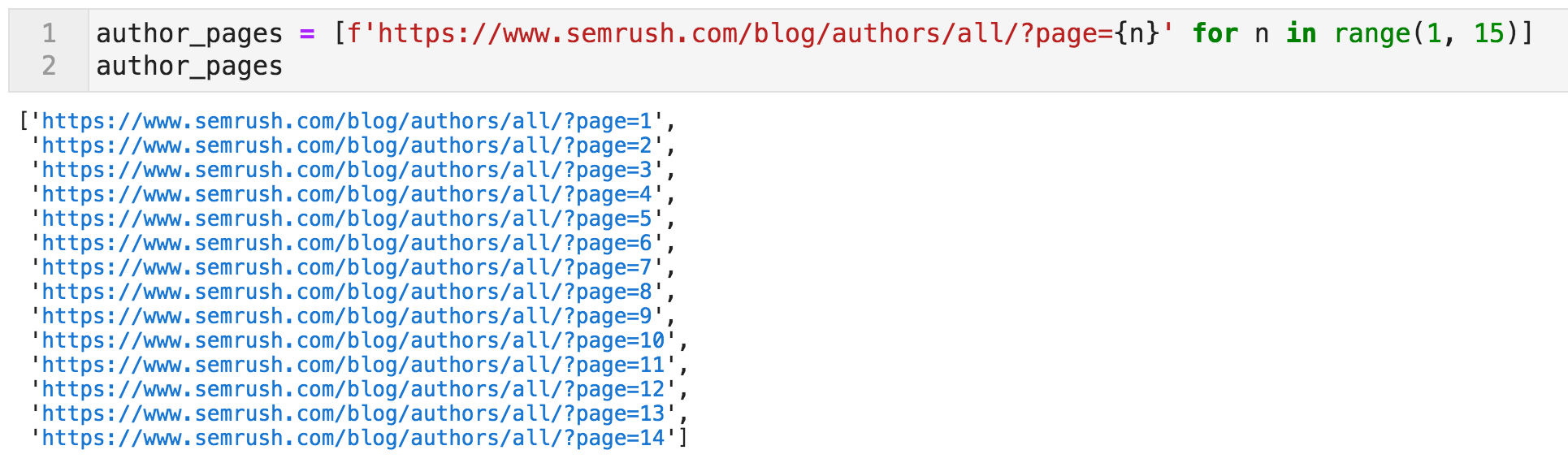
https://www.semrush.com/blog/authors/all/?page={n} — where “n” is a number ranging from one to fourteen.
We first start by generating a list of those pages. The crawler will be instructed to start here.
Code to create a list of URLs containing links to bloggers’ profiles
From these pages, the crawler should follow the links and from each profile page extract certain elements that we are interested in, using CSS selectors. If you are not familiar with CSS (or XPath) selectors, they are basically a way for you to specify parts of the page in a language that is more explicit and specific than “list items” for example, but also in a way that corresponds to how we think and view pages.
You most likely don’t want all the links from a page. You typically want something like “all the links in the top part of the page that have social media icons”.
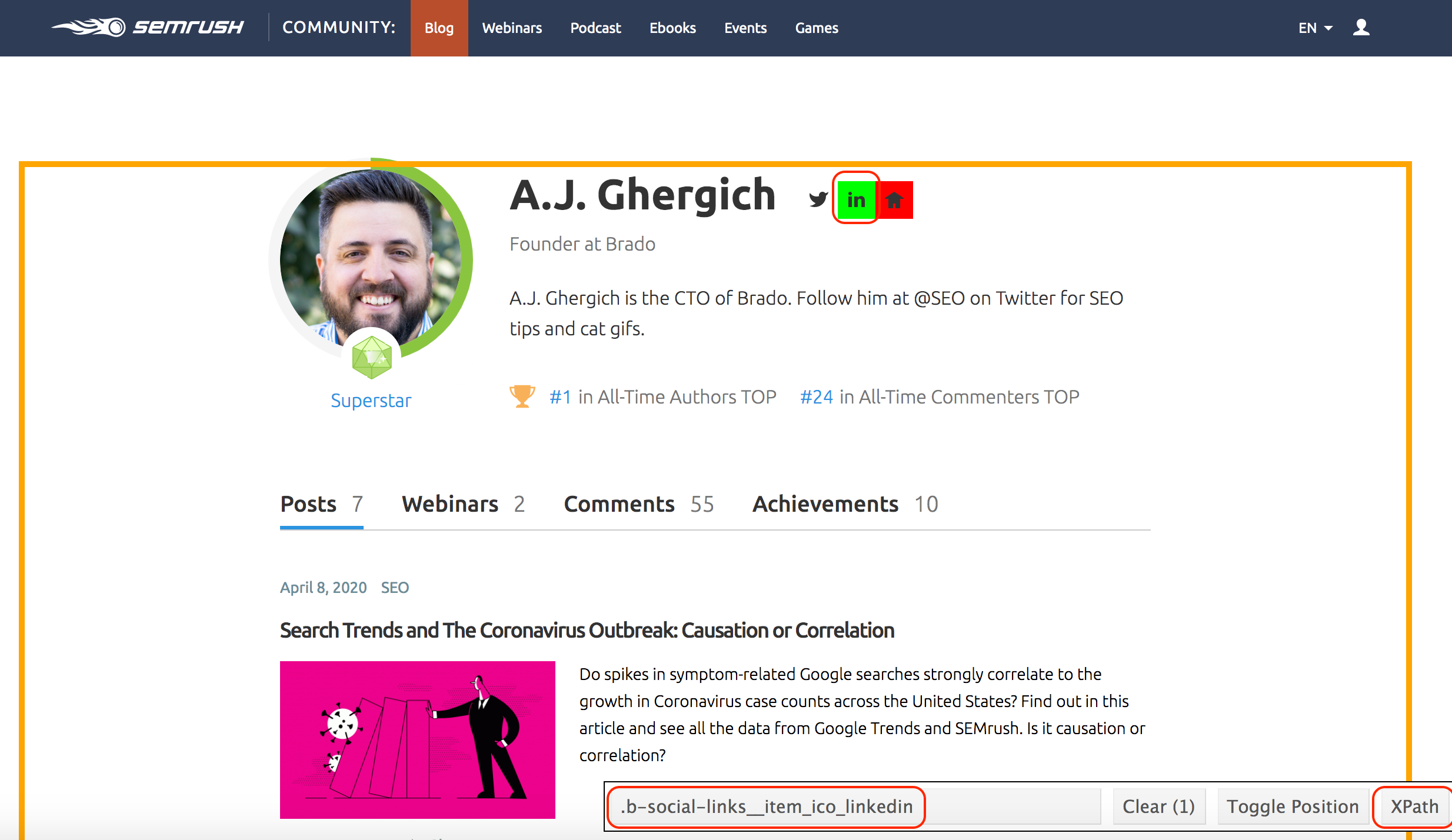
I use a nice browser tool called SelectorGadget to help me find the names of the selectors. Once you activate it, any click you make on a part of the page gets highlighted in green, together with all similar elements. If you want to be more specific, you can click on other elements to deselect them.
In the example below, I first clicked on the LinkedIn icon, which also selected several other links on the page. Then once I clicked on the Home icon, it deselected all other elements (that is why it is now in red – see image below), and I am given the selector that corresponds to this specific element.
At the bottom of the page, you can see .b-social-links__item_ico_linkedin, which will unambiguously identify the LinkedIn links on these pages. You can also click on the XPath button to get the equivalent pattern if you want. So this is how we specify to the crawler which elements we want. Meet A.J., our all-time #1 champion!
Using CSS and/or XPath selectors to extract page elements
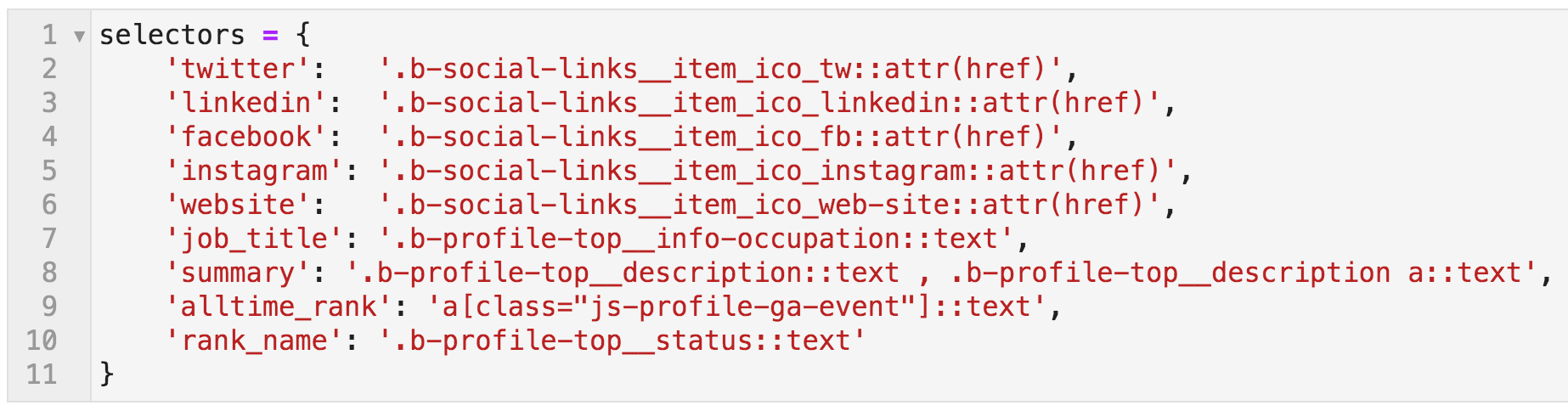
I did the same for other elements, and they are named below in this {key: value} mapping (Python dictionary).
The keys can be named whatever you want, and they will become the column names in the crawl output file. The values are what the crawler will extract. Note that the selectors end with ::text or ::attr(href). If you don’t specify that, you will still get the links extracted correctly, but you will get the whole link object:
<a href=”https://example.com>Link Text</a>. In each case, we specified whether we want the href or the text attribute.
CSS selectors: names mapped to the extraction patterns
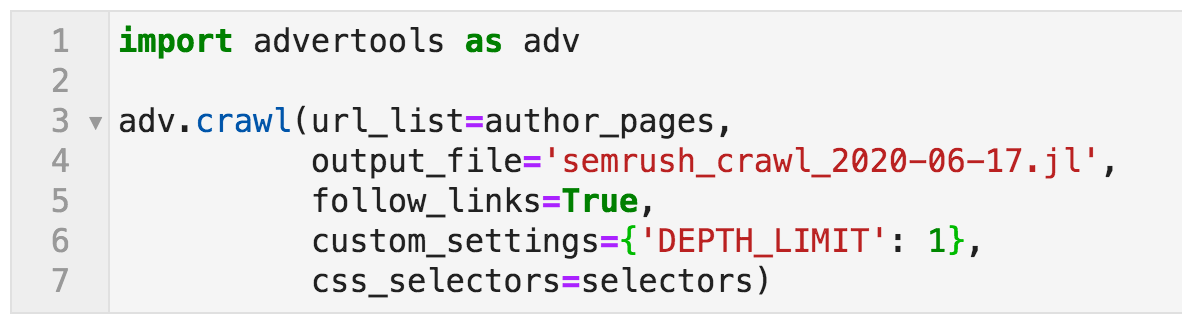
So now, we have the start pages ready, and we have the elements that we want to extract. To crawl, we use the command below:
Crawl command specifying various options
Let me explain:
import advertools as adv: activate the advertools package and use the alias adv to refer to it as a shorthand.
crawl is the name of the function for crawling, and it takes a few parameters for customizing its behavior.
url_list=author_pages: This is where the crawler will start crawling. author_pages is the name we gave to the list of the fourteen URLs that contain links to the bloggers’ profiles.
output_file: This is where we want the crawl data to be saved. It is always good to provide a descriptive name, together with the date. “.jl” is for “jsonlines”, which is a flexible way of storing the data, where each URL’s data will be saved in an independent line in the file. We will import it as a DataFrame, which can then be saved to CSV format for easier sharing.
follow_links=True: If set to False, then the crawler would only crawl the specified pages, which is also known as “list mode”. In this case, we want the crawler to follow links. What this means is that for every page crawled, all links will be followed. Now we don’t want to crawl the whole website, so we use the following setting to limit our crawl.
‘DEPTH_LIMIT’: 1: Yes, do follow the links you find on the initial pages, and crawl the pages you find, but only one level after the initial fourteen.
selectors: Refers to the dictionary we created to specify the data we want to be extracted.
There are many different options for crawling, and you can check the documentation if you are interested in more details. This takes a few minutes, and now we can open the file using the pandas function read_json, and by specifying lines=True (because it’s jsonlines).
Command to open the crawl output file using pandas
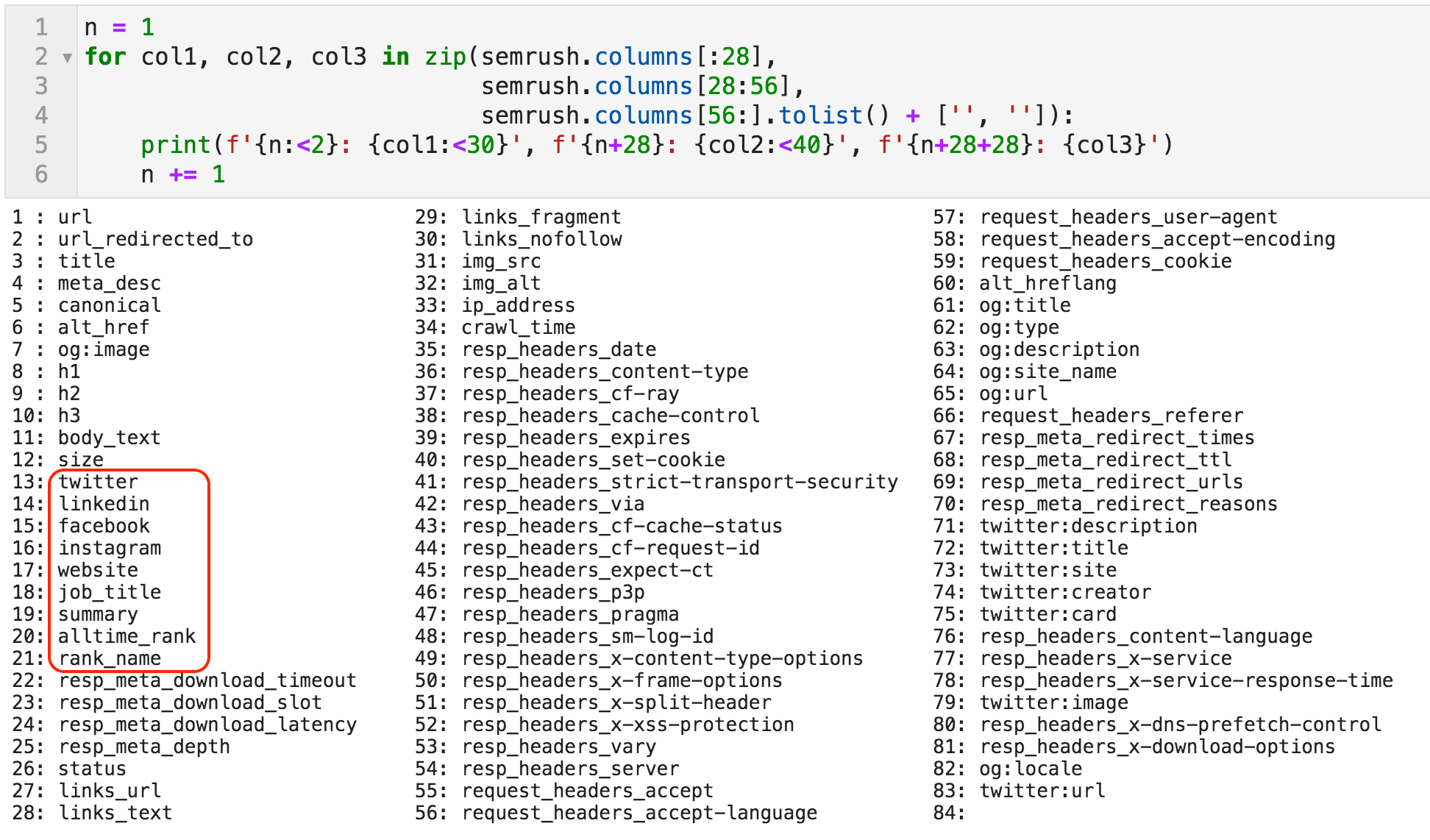
Now we have defined the variable semrush to refer to the crawl DataFrame. Let’s first take a look at the columns it contains. As you can see below, there are eighty-three columns. The majority are fixed, meaning they will always be present in any crawl file (like “title”, “h1”, “meta_desc”, etc.), and some are dynamic.
For example, OpenGraph data might exist on a page and might not, so some columns only appear if they are on the page. The columns that have social network names and the names we specified above would only appear if we explicitly specify them as we did in this example.
List of all the columns in the crawl file
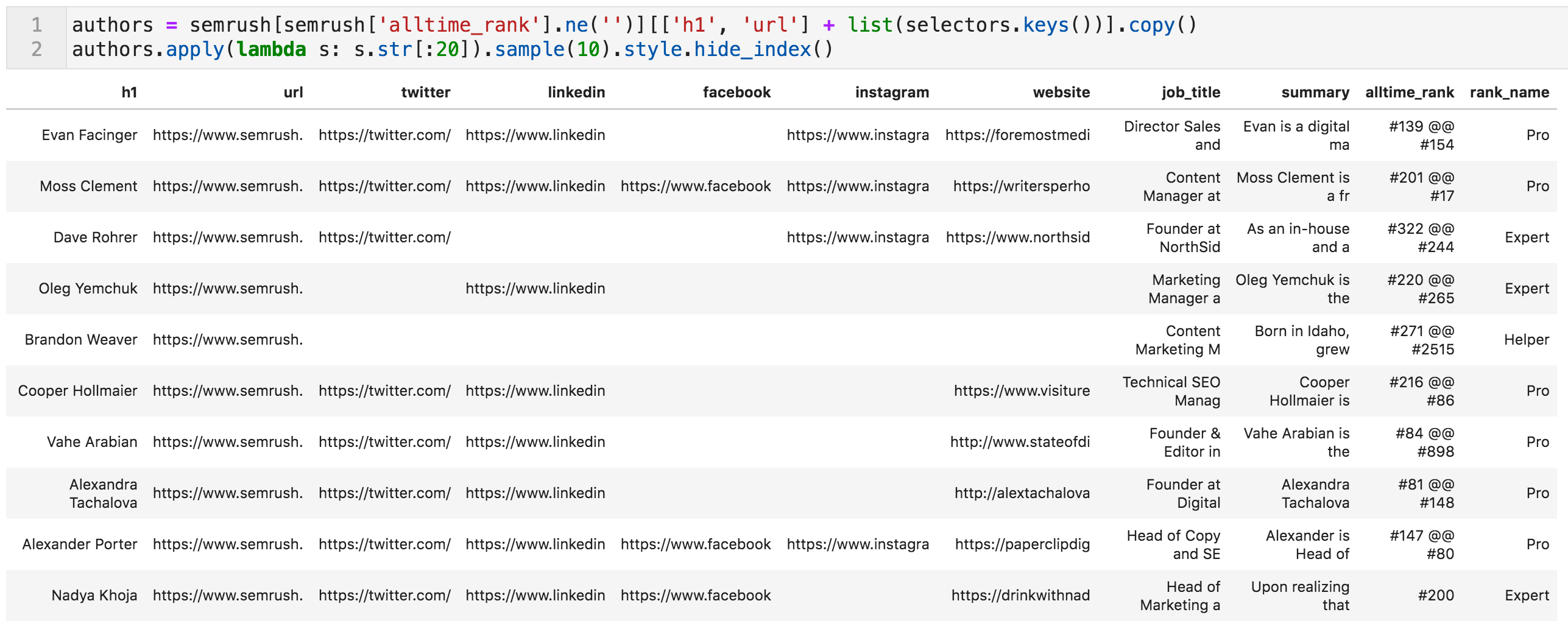
Since this is not an SEO audit, we are only interested in the extracted data related to the authors; we will now create a subset of the data. It basically says that we want the subset of semrush (called authors) where the cells of the column alltime_rank are not empty, and where the columns are “h1”, “url”, or any of the keys that we specified for extraction.
Random sample of the authors table (values truncated to fit on screen)
We are almost done. Some cleaning of the data is needed.
Cleaning Up the Data
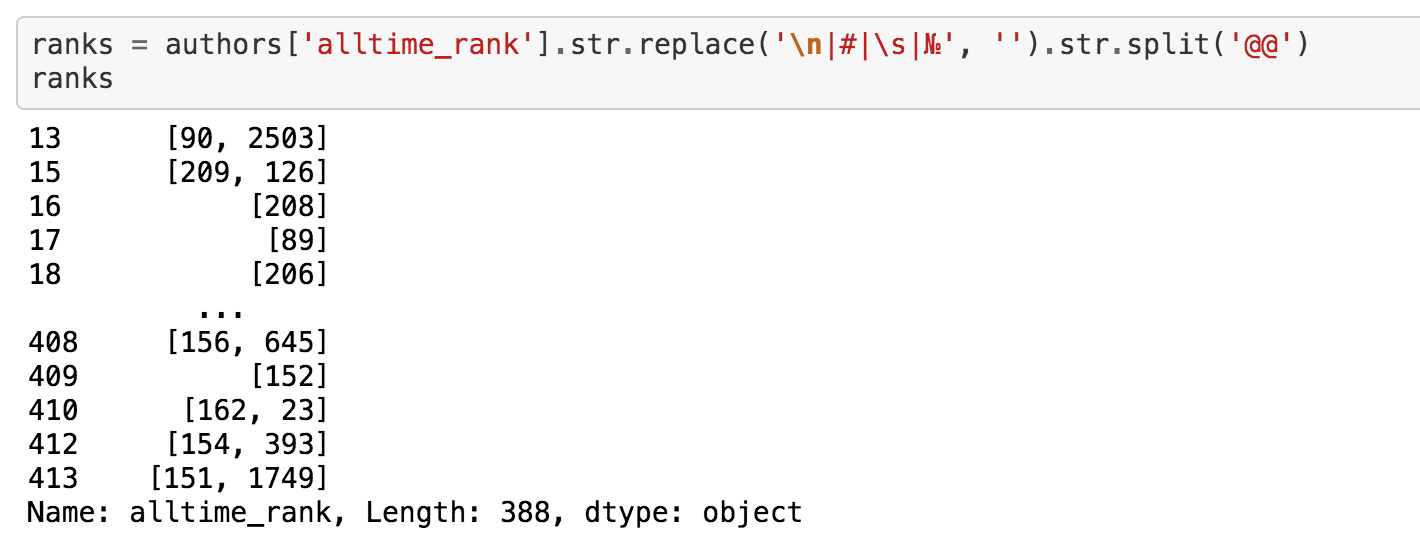
You might have noticed the additional characters in the alltime_rank column, as well as the fact that it contains two values; one for the rank in posts, and another for the rank in comments. The following code splits the two values and removes the noisy characters.
Code to remove unnecessary characters from “alltime_rank”
Now we can create two separate columns, one for each rank, and make sure they are integers so we can sort by those columns. In some cases where the blogger doesn’t have a rank for comments, we give them a rank of zero.
Code to create two new columns from “alltime_rank”
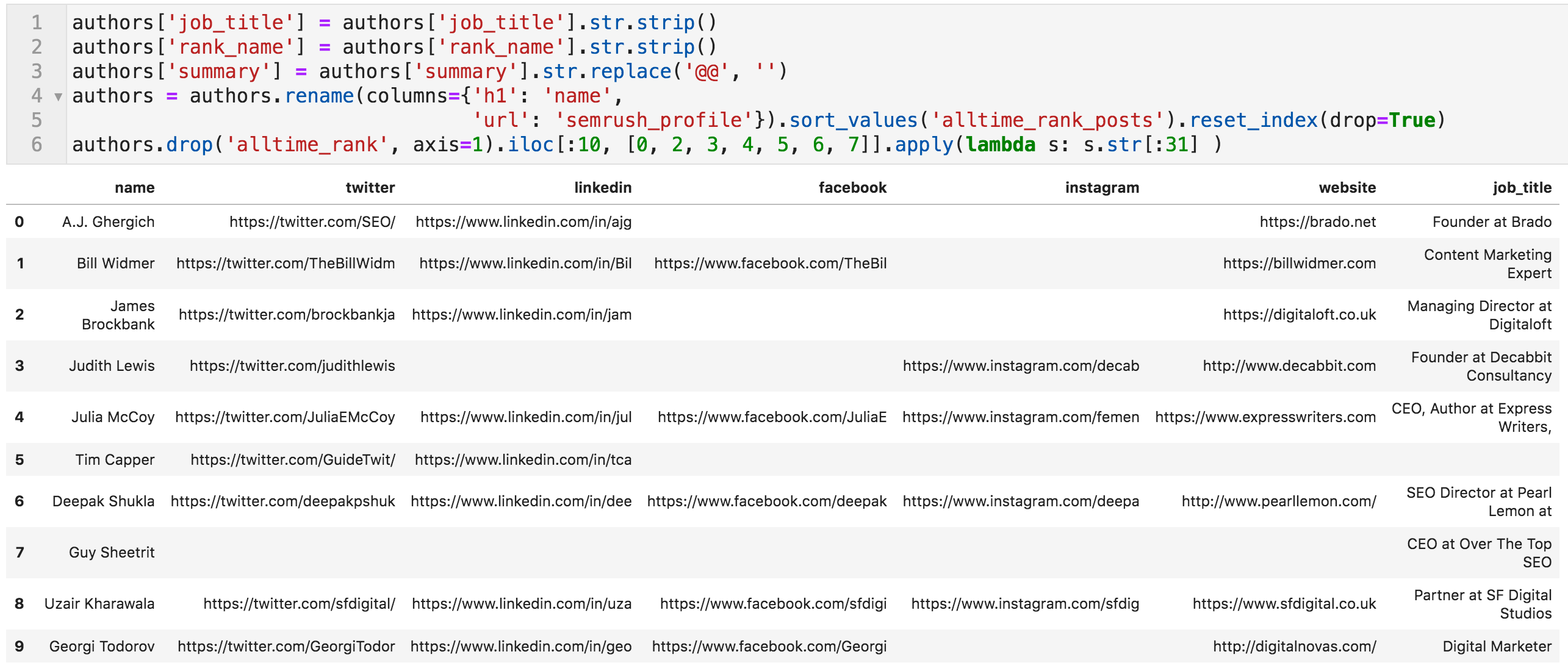
One final step. The columns job_title and rank_name contain some whitespace at the beginning and end, so we remove it. We also remove the delimiter appearing in the summary columns, which are two @ characters “@@”.
This is because many summaries contain links in them, and they are extracted as three or four elements, so we remove the delimiter. Finally, we rename “h1” to “name”, and “url” to “semrush_profile”, sort by “alltime_rank_posts”, and remove the column “alltime_rank”.
And we are done!
Code to make final edits, and the top ten bloggers (values truncated to fit on screen)
Let’s quickly check if the work seems to be correct. Let’s see how many rows and columns we have in authors:
Get the shape (number of rows and columns) of the DataFrame
388 rows and 13 columns. Weren’t they 393?
That is true. It seems there are five bloggers who have special profile pages that have the same data but in a different design (different CSS selectors). These are the “Columnists” of the blog. I have manually extracted their data and added them to the table, which you can see in the final semrush_blog_authors.csv file.
A very optimistic person once found a horseshoe on the floor and immediately thought, “Oh, now I only need three more horseshoes and a horse!”
This list is only one horseshoe.
The horse is the process of actually talking to those people, building real relationships, and finding a meaningful way to contribute to the network.
Now that you have a list of all the Twitter accounts, you might want to create a list to keep track of the people you find interesting. You might only be interested in a subset, so you can filter by the title or summary for profiles containing “content”, “SEO”, “paid”, or whatever you are interested in.
The blog is published in several languages, so you could do the same for another language. With all the LinkedIn profiles, you might consider creating or joining a specialist group and inviting people to it.
Jivox, a digital marketing company that drives engagement across paid and owned media, has announced the launch of Kairos, a new patented purchase prediction solution for the eCommerce market. Kairos will be powered by Jivox’s machine learning and artificial intelligence technology, allowing companies to enhance eCommerce marketing outreach with targeted user scores, and product advertising based on exhibited purchase intent.
According to Jivox, early testing has resulted in a 200% to 300% increase in conversions. Kairos aims to optimize conversion by combining real-time and first-party user data along with product intelligence.
“The key to success in engaging consumers online is scalable creative, data, and smart algorithms applied in real time to tailored ad creative,” Diaz Nesamoney, CEO of Jivox. “Kairos means ‘opportune moment’ in Greek, and that’s exactly what this technology is meant to do—capture the attention of a consumer at the right time with the right message—and convert those moments into sales.”
Jivox uses the in-memory clustered IQ Personalization Hub and the first-party identity solution IQiD to identify, store and process consumer data, obtained with consent. The IQ Personalization Hub processes trillions of data signals, making data available to Kairos for real-time decisions on product recommendations, pricing and offers.
Why we care. With many brands leaning heavily into eCommerce, personalized recommendations and offers is one way to differentiate from competitors.
Rodric J. Bradford is the Editor of MarTech Today and has worked in the marketing technology industry as both a journalist and corporate project manager.
Prior to joining MarTech Today Bradford served as Convention and Technology Beat Reporter for the Las Vegas Review-Journal’s Business Press publication and worked as Technology Reporter for Global Gaming Business, the world’s largest casino publication. In the corporate world Bradford has served as Technology Project Manager for CNA, Cigna, General Dynamics and Philip Morris.
Bradford is an alumnus of the University of Missouri-Columbia.
A quick definition: HTTPS stands for hypertext transfer protocol secure and is the encrypted version of HTTP. It is used for secure communication across the internet or a network. The communication protocol is encrypted using Transport Layer Security (TLS) or, formerly, Secure Sockets Layer (SSL).
Our journey in this article will be a deep dive into the world of HTTP vs. HTTPs, and how they work, and I will show you how to make sure your site survives a migration from one protocol to another.
In the beginning, SEOs had HTTP, a protocol used to deliver web pages to the masses. The web was simple, and website migrations existed solely from domain to domain or server to server. You didn’t have to worry about all that much beyond the usual redirects and making sure that your website migration went off without a hitch. Then came HTTPS.
New technologies always create new issues that one must solve to continue achieving the same (or better) results than before.
HTTP and HTTPS: Their Importance to the WWW
HTTP, or hypertext transfer protocol, is the entire backbone of the world wide web. It is the protocol used to process, render, and deliver web pages from the server-side to the client browser. HTTP is the means through which most of the web is displayed.
HTTP and HTTPS work through what are called requests. These requests are created by the user browser when the user performs some interaction with a website. This is a critical element in page rendering, and without it, you would not be using the world wide web as it exists today.
How it works: Let’s say that someone searches for “how to do a website migration”. The request is sent to the server, which then sends another request back with the query results. These results are displayed on the SERP (search engine results page) that you see when you complete the search.
All of this takes place in a manner of milliseconds. But, that is a very general overview of how hypertext transfer protocol works.
What is HTTP?
HTTP is the abbreviation for hypertext transfer protocol. This is the main method by which the data of web pages are transferred over a network. Web pages are stored on servers, which are then served to the client computer as the user accesses them.
The resulting network of these connections creates the world wide web as we know it today. Without HTTP, the world wide web (WWW) as we know it would not exist.
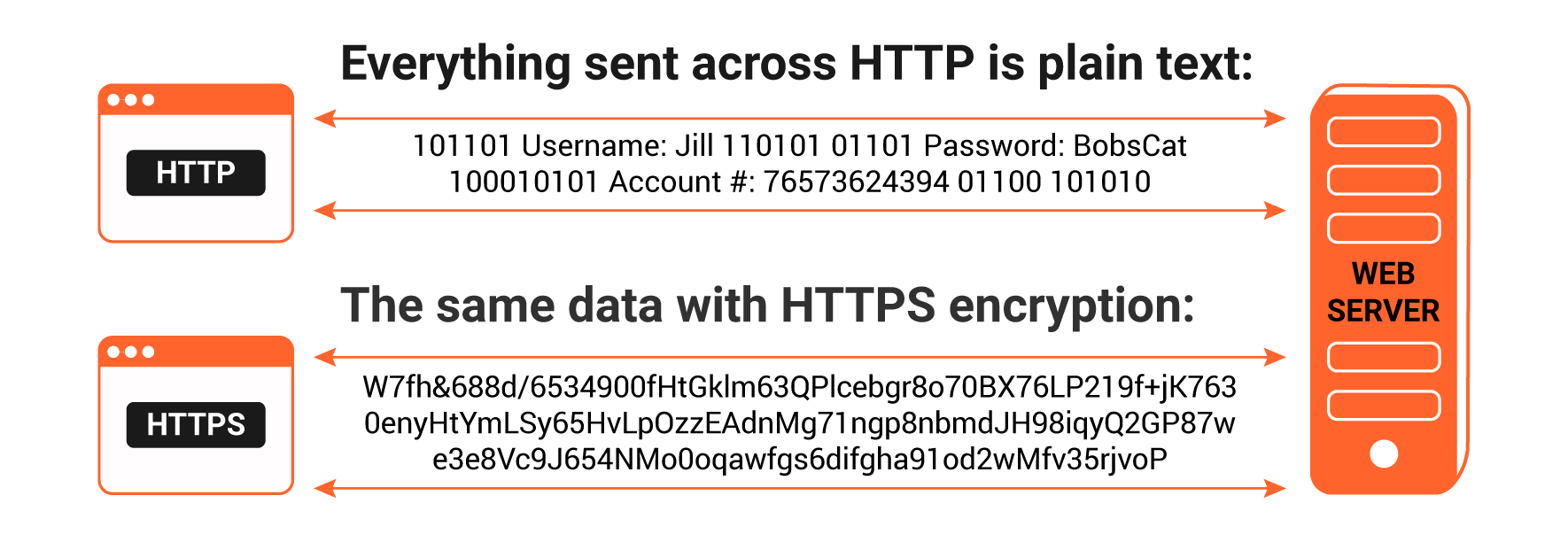
There is one major issue with an HTTP connection — the data that is transferred over an HTTP connection is not encrypted, so you run the risk of third-party attackers stealing the information. Any information transmitted over this network via HTTP is not private, so any credit card data and sensitive information should not be submitted if you are on an HTTP page.
What is HTTPS?
HTTPS is the abbreviation for hypertext transfer protocol secure, or secure hypertext transfer protocol if you are not a stickler for semantics.
Me, I am always up for some antics. (bonus points if you can guess the movie where that joke is from).
How Does HTTPS Work?
Unlike HTTP, HTTPS uses a secure certificate from a third-party vendor to secure a connection and verify that the site is legitimate. This secure certificate is known as an SSL Certificate (or “cert”).
SSL is an abbreviation for “secure sockets layer”. This is what creates a secure, encrypted connection between a browser and a server, which protects the layer of communication between the two.
This certificate encrypts a connection with a level of protection that is designated at your time of the purchase of an SSL certificate.
An SSL certificate provides an extra layer of security for sensitive data that you do not want third-party attackers to access. This additional security can be extremely important when it comes to running e-commerce websites.
Some Examples:
When you want to secure the transmission of credit card data or other sensitive information (such as someone’s real address and physical identity).
When you run a lead generation website that relies on someone’s real information, in which case you want to use HTTPS to safeguard against malicious attacks on the user’s data.
There are many benefits to HTTPS that are worth the slight cost. Remember, if the certificate is not present, a third-party could easily scan the connection for sensitive data.
What is TLS? How it Applies to HTTPS
TLS stands for transport layer security. It helps encrypt HTTPS and can be used to secure email and other protocols. It uses cryptographic techniques that ensure data has not been tampered with since it was sent, that communications are with the actual person the communication came from, and to prevent private data from being seen.
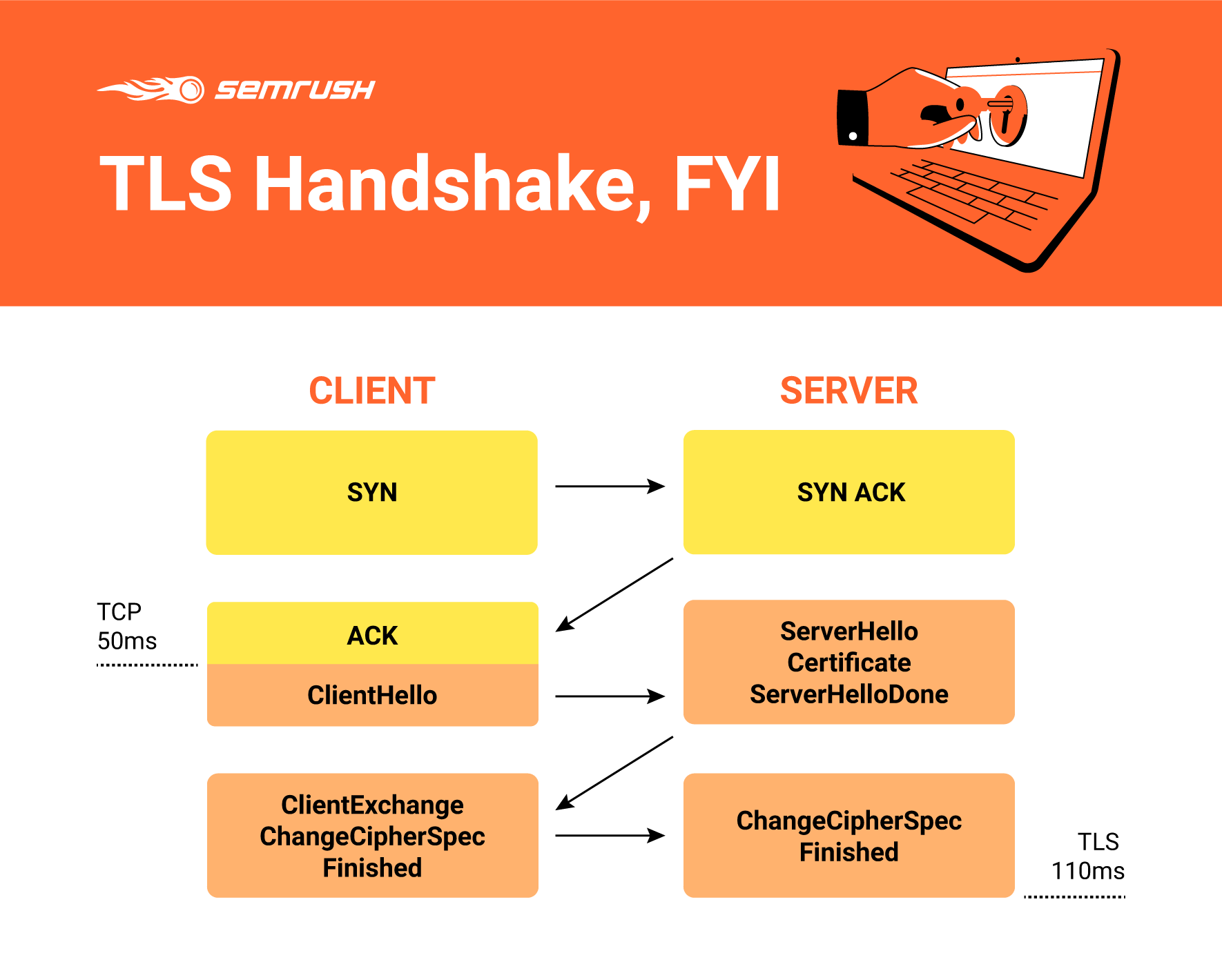
Things kick off with a TLS handshake, the process that kicks off a communication session that uses TLS encryption. This is where authentication takes place, and session keys are created. Brand-new session keys are generated when two devices communicate, from the two different keys working together. The result of this is deeper, more encrypted communication.
A Critical Step for HTTPS — Authenticating the Web Server
The most critical step for an HTTPS secure connection is ensuring that a web server is who they say they are.
That is why the SSL certificate is the most important part of this setup; it ensures the owner of the webserver is who they say the certificate says it is. It works very similarly to how a driver’s license works — it confirms the identity of the owner of the server.
A layer of protection from certain types of attacks exists when you implement HTTPS, making this a valuable staple of your website.
HTTP vs. HTTPS — HTTPS Builds Trust with Your Users
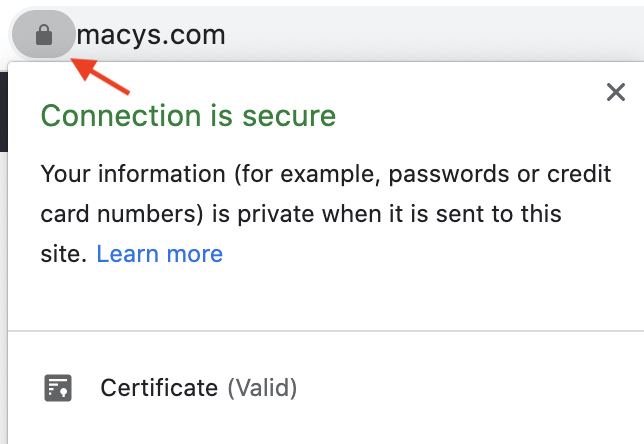
One big hidden benefit of HTTPS is that it helps build trust with your users. If you run an e-commerce site that accepts credit card data, the fact that a padlock appears on your site within the browser gives your users confidence that your site can handle credit card transactions without leaking data to prying eyes.
It will help users trust your site that much more than if it were an insecure site — and modern browsers warn users when sites are not “safe.”
With HTTPS, credit card data, passwords, private user data, and personal data are all encrypted with an industrial-strength level layer of security. This security is what will enable your site to continue remaining competitive against others in your niche.
Aside from protecting user data from prying eyes, https:// helps to protect your reputation. If you regularly have security breaches on your site, and user data is exposed, people will not want to use it. This can damage your online reputation beyond repair and can cost you in the long run.
HTTP Outliers
While outliers are few and far between nowadays, there are still outliers who have not made the full switch to https://. For certain outliers, this makes sense — if you are not serving users who regularly provide sensitive data for e-commerce or other reasons, you probably don’t need the increased better security.
In a perfect world, when everything is equal on a website, https:// is a tie-breaker for rankings. However, we seldom live in a perfect world when it comes to SEO. Thus, you are still able to rank when it comes to http://.
While the benefits of https:// are many, John Mueller has also said that HTTPS is a light-weight ranking factor, and that is it, but Google is on record as saying that “when everything else is equal, the ranking benefit of HTTPS is tie-breaker status.”
Migration SEO Issues: Moving from HTTP to HTTPS
There are many benefits to switching from HTTP to HTTPS in SEO, especially from an SEO perspective. However, unless you are familiar with the process, you can cause more harm than good.
You must let Google know about the transition. You need to choose the certificate that is best for your situation, set up Google Search Console, set up Google Analytics, update internal links, and update any relative URLs. Let’s look at each of these a bit more closely.
Inform Google About the Transition, and Mistakes to Avoid
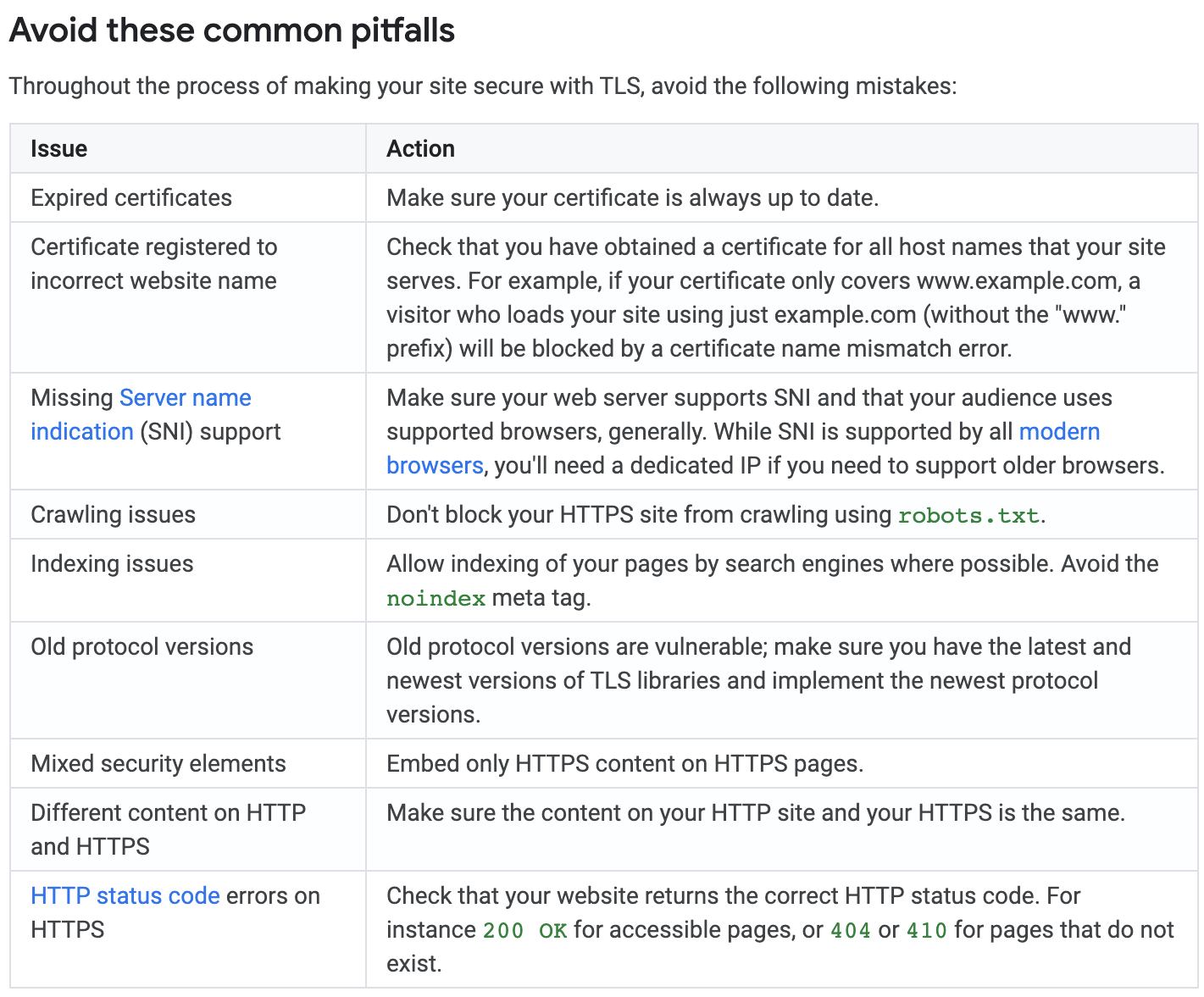
This step involves setting up another Google Search Console profile. Don’t disable your non-secure GSC profile. Instead, you need to keep all profiles active. Set up a new profile for the HTTPS version of your site and ensure that it continues collecting data.
Also, in Google Analytics, you must make sure that you set your profile to secure. Otherwise, you will not be tracking the right data.
Don’t forget to update data collection parameters in Google Tag Manager where applicable. In addition, if you use Bing Webmaster Tools, updating http:// to https:// during the migration will also be necessary.
You would be surprised how often I encounter mistakes in http:// to https:// transitions that were caused by a lack of developmental oversight on the initial transition process and not updating critical data tracking profiles.
These types of mistakes can lead to both underreporting and overreporting of data, both of which can spell doom for the accuracy of your SEO strategy decisions.
Choose the Right Security Certificate: SSL and Wildcard Certificates
You have SSL certificates for a variety of purposes. One for a single domain, another for multiple domains, not to mention Wildcard certifications. For smaller sites, a full wildcard certificate is usually not necessary. However, it can make your life much easier when working to control URL syntax across your websites.
An SSL certificate for a single domain is issued for one subdomain, or the single domain itself. An SSL certificate for multiple domains will allow you to secure the main domain name and up to 99 SANs, or subject alternative names.
The wildcard allows you to secure your initial website URL and any and all unlimited subdomains associated with it. What does this mean? This means that if you set up domain.maindomain.com and it is created with a wildcard certificate, it is automatically secure. You will not have to expend more effort in making sure that it fits within the existing security of your site. In other words, it will save you many headaches.
Clearly, the wildcard certificate is the clear winner here. But, as a robust certificate with many different features, it does cost more, so you will have to weigh the additional business expense and compare it with the features you will gain.
Make Sure All URLs Are Properly Updated Sitewide
There are some who recommend using only relative URLs for your resources. Assuming you are adept at managing the ongoing needs of your website, you don’t need to do this step. You just need to make sure that all on-site content is appended by the right protocol. And don’t forget your XML sitemap!
You would be amazed at how many audits I have done on sites that fail to complete this one step — making sure all of their content is secure.
It doesn’t matter if you use relative or absolute URLs so long as you keep them updated on-site. You can switch to relative URLs if you prefer, but if your site is built on absolute URLs, use a find-and-replace option with your database if your site allows it. This will help you eliminate all existing instances of mixed content.
Make sure that your URLs are properly pre-pended with https:// after you make the transition, and you should not experience any significant issues.
Don’t Prevent Google From Crawling Your New HTTPS Site
You must ensure that all elements are crawlable from your robots.txt. Unless you have a specific issue, such as a folder that really should not be indexed, then it makes sense to allow Google to crawl everything on the site, even CSS and JS files. If your site disallows the rendering of CSS and JS files, you could encounter problems.
An example of this is if you disallow a critical CSS or JS element from rendering on the page, then you can prevent Google from understanding the entire context of the page, which is an important part of achieving higher rankings. Also, in about 99% of cases, there is no reason to disallow CSS or JSS files in this manner.
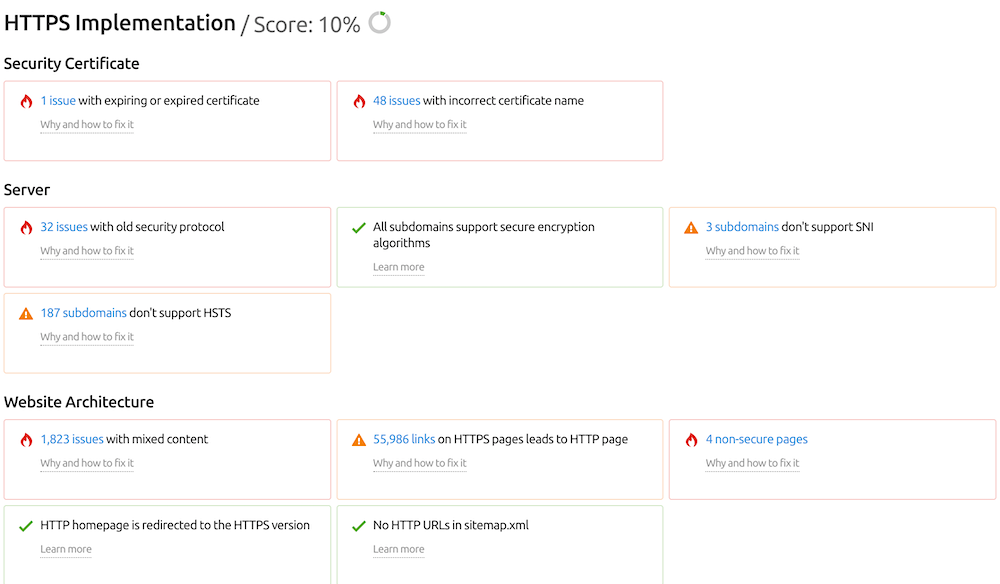
SEMrush’s Site Audit tool will give you a lot of helpful information regarding your HTTPS implementation. It shows you any problems you may have and offers recommendations for fixing them.
Double Check Everything During Your Migration
Regular, ongoing monitoring of your site is critical to achieving a successful website migration to https://. Check Google Search Console, Google Analytics, and double-check any other reporting software that you use. If you haven’t updated http:// to https://, you must do so as soon as is humanly possible. That way, you don’t run into further issues that can seriously harm your SEO efforts.
HTTP:// vs. HTTPS:// – Which is Really the Best?
If you are not well-versed in SEO, it is a daunting task to figure out the intricate details behind whether to choose a secure or insecure protocol. Here are a few points that might help you make a decision:
Are you an e-commerce store that deals with sensitive credit card information and personal data? Then securing your website with HTTPS is your best bet. It will help spread goodwill and trust to your online customers, and make sure that you don’t make the mistake of being too open to web attacks. Your online reputation will have a more positive positioning as well.
What if you are not an e-commerce store, but you deal with people submitting their information (e.g., through a lead gen site)? Then you want to use HTTPS. People count on the security of the web to protect them, along with their personal data from being compromised. This choice helps add yet another layer of trust and legitimacy to your company.
Should you use the free option of Let’s Encrypt? Well, that depends. Are you just starting out and you don’t have the budget for it? Then, this is a good option. But if you are a company that is making many thousands of dollars, using a more expensive option like GeoTrust or Comodo would be better. They both do the same thing when the implementation goes well, but in marketing, perception is important.
Whether you choose to stay http:// or make the move to https:// is up to you. But, when it comes to creating a more secure web, making the jump to https:// is a wonderful option to take advantage of.
This week I covered a bunch of topics including an interesting topic on do negative reviews on the web hurt your chances or ranking well in Google. Google’s John Mueller also told us to forget everything we’ve read about link juice. Bing launched its new Bing Webmaster Tools and added a new URL Inspection tool and a new Robots.txt tester tool. Bing also did some outreach to those who installed the new Bing WordPress URL submission plugin and had issues. Google Search Console added support for image license structured data and the Rich Results test tool support that markup also. Google said they plan on expanding the Rich Results test tool after the complaints from the SEO community. Google’s testing tools also support showing Web Story. Google Home smart displays, the Google Home Hub now shows how-to schema as tutorials. Google is sending notifications to those with job schema to add telecommute markup for remote jobs. Google is testing a new form of local Q&A boxes. Google local pack is also testing product carousels. Google My Business added a new attribute for black owned businesses. Google updated several of its Google Ads policies. Google Ads is testing sub-headlines that are hyperlinks. Google Top Stories is testing “for context” links below the main story. Google is testing thick gray borders in search. And for some reason Google had a “wear a mask and save lives” Doodle the other day but they removed it. Oh and if you want to help sponsor those vlogs, go to patreon.com/barryschwartz. That was the search news this week at the Search Engine Roundtable.
Make sure to subscribe to our video feed or subscribe directly on iTunes to be notified of these updates and download the video in the background. Here is the YouTube version of the feed:
Many new users to SEMrush ask this question and are not really sure what you can do with the SEMrush software. Obviously, many new users will start out on the free level before deciding to purchase a subscription.
To start your free level subscription, enter a query in the SEMrush search bar and you will automatically be prompted to register for your free account.
With a free account you can still use SEMrush, but you will be limited in your ability to pull data and use our tools.
So what can you do with a free account?
Domain and Keyword Analytics
10 Searches Per Day
You can perform 10 searches a day in our Domain Analytics and Keyword Analytics databases. This means you are only able to use the SEMrush search bar to pull a report 10 times before your daily limit is reached.
If you enter a domain into the search bar that would be considered one search. If you then click on any of the links to further reports within the Domain Overview report, this would also count as a search – bringing your total to 2 searches.
If your just testing out the software it may make sense that you only need to perform 10 searches a day. However, it is important to note that the next level paid subscriptions to allow for even more searches.
Pro users have access to 3,000 searches
Guru users have access to 5,00 searches
Business users have access to 10,000 searches
10 Results Per Search
Just like your daily search limit, your reports will be limited to only 10 results per search. For example, if you go into the Organic Positions report and query searchengineland.com, you would only be able to examine the first 10 keywords listed in that domain’s Organic Positions Report.
This 10 results per search limit will be the same in all other analytics reports as well. This includes Backlinks reports, Advertising Research reports and Keyword reports. In contrast, the paid subscriptions allow for even more results per search.
Pro offers 10,000 results
Guru offers 30,000 results
Business offers 50,000 results
Projects
As a free user, you can create and manage one Project. For those unfamiliar with our Projects section, each Project basically serves as a dashboard that will display a preview of each tools main metrics. Each project includes 12 individual tools.
If you want additional projects our Pro level package includes 5 Projects, with our Guru package including 50 Projects and our Business level package with unlimited projects.
However, if you decide to stay as a free user, even after setting up your project you will be limited in what you can do.
Pages to Crawl
Site Audit will provide you with an overall health score of your website as well as a list of issues found with the given website. As a free users, your Site Audit is limited to only 100 crawled pages. This includes crawls of given a domain, subdomain or subfolder.
This may suffice for certain websites, however, most websites have over 100 pages so it may be something to consider when thinking about what level account works best for you.
If you realize the free level account isn’t going to be enough you can look towards our paid accounts.
Pro level package allows you to crawl up to 100,000 pages per month
Guru allows for 300,000 pages per month
Business level package for 1 million pages per month.
Keywords to Track
The 10 keywords that are available for free users to track refers to our Position Tracking tool. This tool allows you to enter a domain, a list of competitors, a list of keywords to track and set a location and device type. Then, we will track the daily rankings of your domain and competitors on the results pages for this target keyword list.
This is a powerful tool that can provide you with localized ranking data on a frequent basis. Depending on your client size and the campaign, 10 keywords may not be enough for you to track.
Upgrading your account will give you the ability to track more keywords.
Pro level gives you 500 keywords
Guru level gives you 1,500
Business level gives you 5,000
If you ever need more keywords than what your plan provides, you can reach out to your account executive to add additional keywords to your account.
It is important to note that If you have multiple projects set up, these keywords are split amongst them, and not limited to each project.
For On Page SEO Checker, you are given a total of 10 SEO Idea units.
SEO Content Template and SEO Writing Assistant both give free users 1 template to create SEO content.
So if you create an SEO Writing Assistant template, the number of SEO Ideas units you have for your On Page SEO Checker will now be 9.
Keep in mind that these templates are for one keyword and therefore one keyword equals one unit.
To generate more than one template (or generate a template for more than one keyword), you will need to subscribe to a paid account.
To get more monthly units you will need to upgrade to a paid account.
Pro users get 500 SEO idea units
Guru users get 800 units
Business users get 2,000 units
Keyword Magic Tool Lists
As a free user, you can create 1 list in the Keyword Magic Tool. Lists are how you save your keyword research history in SEMrush. Your queries made in the Keyword Magic Tool are saved in Lists so you can quickly go back and reference them.
In order to create more than one list, you will need to subscribe to a paid account. Each query in this tool counts towards your daily limit of 10 queries in Domain and Keyword Analytics. All paid accounts are able to create 50 lists.
Topic Research Queries
Free users are limited to just 2 search queries in Topic Research. Entering a search query will generate you a list of potential subtopics based around your search. This is great for content marketers looking for a headstart in their brainstorming process.
Upgrading to a paid account will give you unlimited queries.
PDF Reports
My Reports makes it easy to build out PDFs from scratch. This way you’ll be able to clearly communicate the results of a website audit, competitive analysis or show any other progress for a marketing campaign. With a free account, you are able to schedule 1 PDF report within the My Reports section.
Pro users have 5 scheduled reports
Guru users have 20 scheduled reports
Business users have 50 scheduled reports
Now that you understand exactly what goes into your free level account, you may now have a little more insight into exactly what your account can do for you. You may decide that a free level account will work for you, which is more than okay!
However, if you do not think the free level will work and you are interested in other options we offer, you may want to look at our Prices page for more information.
If you are interested in using SEMrush in the long term or are looking for a custom package, please feel free to contact our sales team so that we can set your account up at a discounted rate along with all of the specifications you need!
If you still have questions about any of this information, please feel free to reach out to our Customer Success Team at +1-800-815-9959 (US) or send us an email at [email protected] You can also contact us on Twitter by using the #semrushcare hashtag.
I’ll get right to it. As an SEO I think you should care about brand performance.
This isn’t an “I know better than you” post. I don’t.
This isn’t a “you’re obsolete” post. You’re not.
What I’m going to do here is make a series of statements that I think you’ll agree with and I believe that, together, we’ll come to the conclusion that SEOs should be actively involved in brand decisions.
I think we’ll agree on that because we don’t have the option of saying “I’m not getting involved”. Because, like it or not, our brand interest is already affecting the performance we are held accountable for, so our best bet is to get ahead of it and use the data we have access to as SEOs for the benefit of our whole company. To get credit for the successes we’re contributing to and avoid the losses.
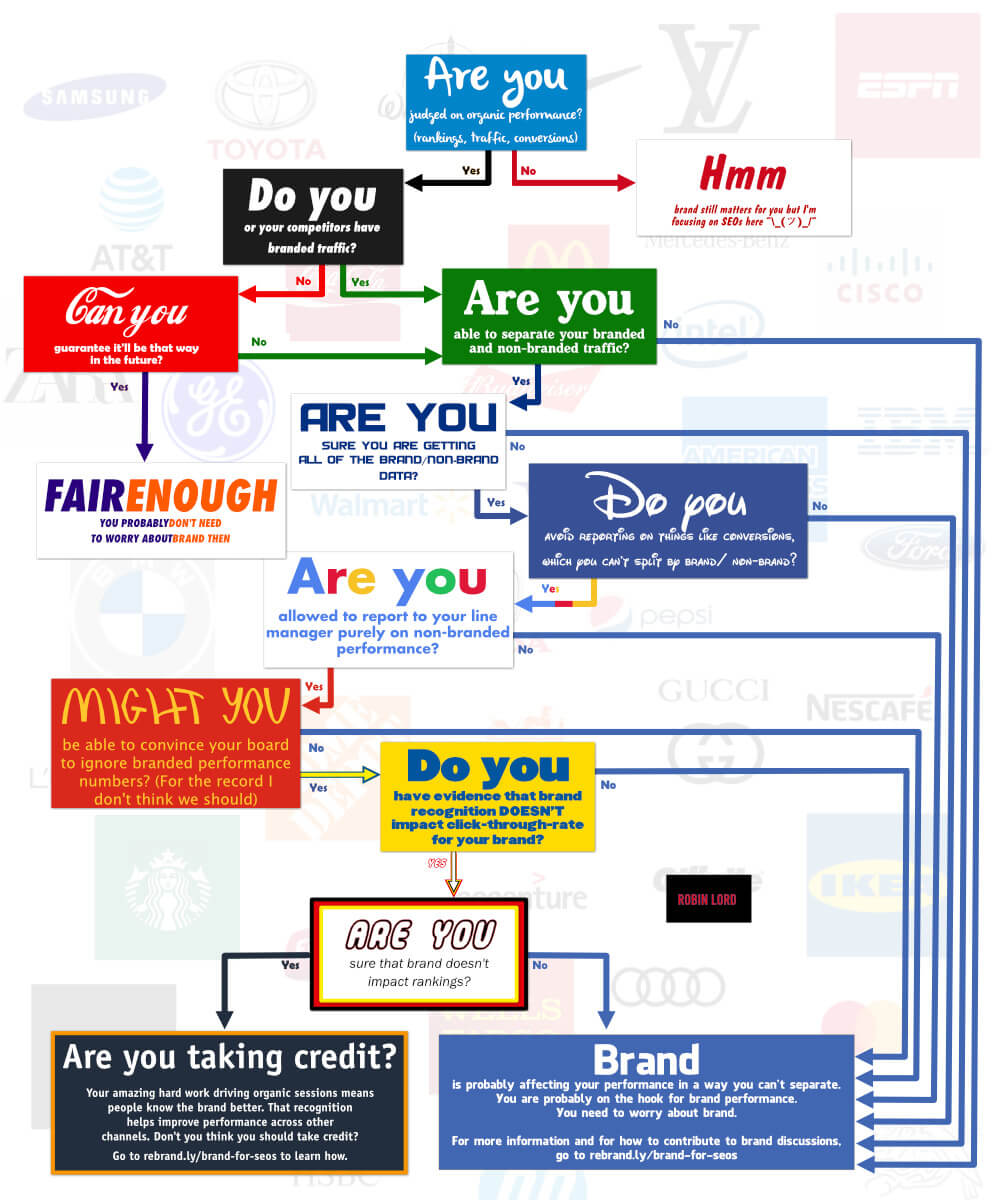
An SEO decision tree
It all boils down to the decision tree image below.
To use it, start at the blue box at the top and let yourself be guided by your answers to each question. After the decision tree, I’ll break down each question to show why I think they are relevant and why I think they lead us to caring about brand.
The questions
If you agree with me and you don’t need convincing – skip to the end for details on how we can be involved with brand performance. Through measuring success and helping to guide brand building efforts.
I’m not going to break down the first couple because I think they’re fairly self-explanatory. We’re focusing on the impact of brand for SEOs. If you’re not an SEO or you know brand just isn’t a factor in your industry then fair enough.
Are you able to separate your branded and non-branded traffic?
As an SEO, you’re likely judged on how many valuable sessions you can bring to the site through Google organic traffic.
If you are just reporting on total organic sessions, that number will include the sessions where people have searched or . But they will also include sessions where people have searched for your brand and, understandably, clicked through to your site.
That means that if more people start searching for your brand, you get more traffic. Great, you look good. It also means that if fewer people are searching for your brand then you look bad.
If we focus only on standard SEO tactics and overall organic performance, we don’t have full control over whether the numbers go up or down. We also won’t always have a good explanation for why the numbers are going up or down.
In this case our personal performance, the performance of our team, is impacted by demand for the brand in a way we can’t control for.
You should care about brand.
How can I separate branded and non-branded numbers?
One way is to use data from Google Search Console (GSC). GSC will give you data that is kind of like organic session numbers, broken down at keyword level.
You can see here that for two of my coding-themed keywords, I’ve had 436 and 102 clicks respectively. We can take those “click” numbers to be roughly similar to sessions.
Search Console data showing clicks and impressions for specific keywords.
So you can make one bucket that has every keyword which includes your brand name, misspellings of your name, and any terms which only refer to you or things you list on your site. You can make another bucket which includes everything else. You can then sum up those groups to get an idea of how many brand/non-brand sessions you’re getting over time.
You could do that manually by exporting data from the interface. You could use the excellent Search Analytics for Sheets plugin which will extract the data directly to Google Sheets. You could use code to extract the data day-by-day and put it straight into BigQuery (which is what we do with our clients). Whatever you do, I would use Regular Expressions (RegEx) to help with the categorization because people will be spelling your brand in a bunch of ridiculous ways when they search for you and matching RegExs avoids having to identify all the misspellings manually (if you’d like to learn RegEx, I actually made a game to help you).
As we’ll see in the next section, that won’t give you perfect data but separating everything out this way will give you some idea of how you’re getting on for brand and non-brand separately.
Are you sure you’re getting all of the brand/non-brand data?
Maybe you are separating out your traffic based on whether it’s branded or non-branded. Maybe you’re using one of the methods we spoke about in the last section to calculate the number of branded clicks.
The problem is, Search Console doesn’t give you all the data. Particularly if you ask for keyword-level data you lose some of it to sampling and some of it to protect the privacy of users if Google thinks that what they searched for is specific enough.
We said that we use Search Console clicks as a rough guide to the number of organic sessions (Google only). Below I’ve pasted the number of clicks that Search Console registered for my site and the number of Google organic sessions it registered, for the same time period.
Admittedly, this is a particularly bad example but Google Analytics is reporting 191 users arriving from Google Organic search for a total of 325 sessions whereas Search Console is reporting only 60 total organic clicks. That’s a lot of data missing.
Search Console clicksOrganic sessions
So if we use GSC data to measure brand, we might be able to see some fluctuations in interest but, if we’re using Google Analytics terminology, our data is basically sampled at 15%. There’s a lot of potential for us to think brand is going up when it’s actually going down.
It’s unlikely that brand interest is going to change enough between February and March that it has a considerable impact on your recorded performance as an SEO.
However, brand interest could change a lot over the course of a year, for example. We could lose enough branded sessions over the course of a year that this lost data makes a difference to your year-on-year session numbers. And it’s quite likely that you will be held responsible for that change. If we aren’t reporting specifically on brand changes over time it’ll be hard to say why.
So if we’re not getting all the data, we’re still in a position where changes in brand interest can change the overall numbers we’re responsible for. And we don’t have all the data to pick it apart.
You should care about brand.
Do you avoid reporting on things like conversions that you can’t split by brand/non-brand?
I want to be clear in this section – I think weshouldreport on conversions. Whenever we can, whatever we do should come back to business impact.
Branded sessions are highly likely to convert. By the time someone is searching for your brand, particularly by the time someone is searching for your brand plus a product you sell (i.e. “H&M dresses”) they are interested in buying specifically from you.
If you’re in an industry where customers tend to spend much more time researching, you’re probably using some kind of multi-touch attribution to see what channels are contributing to conversions. In that case brand could well come up multiple times, for example at the comparison stage (i.e. “Zendesk vs Freshdesk”) and then the final conversion decision (“Zendesk”).
Whether we’re just looking at conversions based on the last referring channel, or we’re using some kind of attribution, branded sessions are likely to be a significant chunk of the organic numbers we are reporting.
We can’t reliably split organic conversions into brand and non-brand because on-site analytics platforms can’t (or won’t) tell us what organic keyword brought a user to the site.
So if brand interest goes up organic will probably get credit for more conversions, and we will look good. If it goes down we will look bad. If we’re not paying attention, if we’re not involved in brand activity, these changes will be out of our control and we’ll be blind to the causes.
You should care about brand.
Are you allowed to report to your line manager directly on non-branded performance?
Even if we can split brand and non-brand, and our manager understands the distinction, if we’ve set KPIs based on the total number they are going to care about the total number.
So if we aren’t measuring brand changes, if we’re not participating in brand activity or brand planning, our success or failure is still somewhat outside of our control.
You should care about brand.
Can you tell your board to ignore non-brand performance numbers?
Again, I have to be clear here – I don’t think we should be doing this. We just need to be aware – this is what is required if we want to separate brand performance from SEO numbers.
If we took the stance that organic measurement shouldn’t include brand and shouldn’t include conversions, we might be able to convince our manager. But they probably have time to understand the nuance.
Their manager might not, or perhaps the level above them. Usually, at some point below board level, someone in the hierarchy doesn’t have time to think purely about organic non-brand clicks. They just need to know how much we’re getting through organic search.
In order to completely avoid being judged on changes in brand performance we would have to convince our entire company that whenever “organic performance” is mentioned it should only be in the context of non-branded clicks.
I don’t think we want to win this particular argument. Organic performance will be compared with paid, social, email. Those are all channels that are very good at talking money. If we’re not reporting on things like conversions it becomes a lot harder to justify investment in organic. That makes it harder to get more people on our team, to get space in the dev queue to make site changes, to get rises and promotions.
Even if we ignore the impact on our progression and workload, we aren’t doing SEO for the sake of it. We’re doing SEO to help our company to make money, and that means caring about conversions (and hence brand performance). These things affect whether our company will exist next year.
Even if we decide it’s worth it, it’s quite unlikely that we can get the whole company to only judge us on non-brand clicks. So if we’re not involved in brand decisions we don’t have control over the numbers we’re held responsible for.
You should care about brand.
Do you have evidence that brand recognition doesn’t impact click-through rate for your brand?
Say we completely ignore the purpose of SEO (to help the business make money) and we massively reduce our own influence by convincing everyone to judge organic performance based only on non-brand clicks. Because people are more likely to click on brands they know, we could end up getting less traffic for exactly the same hard-won position in a non-brand search, purely because people don’t know us.
So if we’re not measuring brand, if we’re not involved in brand decisions, we’re not fully in control of the numbers we’re reporting on.
You should care about brand.
Are you sure that branded searches don’t impact rankings?
Maybe we know (somehow) that click through rate isn’t impacted by brand. Or maybe we’re not even judged on organic traffic, maybe we’re judged on rankings for specific keywords through some kind of rank-tracking tool. The only wild card left is the rankings themselves.
To rank search results, Google has always needed a way to work out which sites are reliable and which aren’t. Initially the main solution was links. If we assume that links are still a major factor for Google in terms of trust, we know that generating links often involves getting attention and exposure across the internet (through things like press). Essentially – building a brand. What’s more, if people know your brand they are more likely to link to you.
So even if we take links at face value, they’re pretty deeply entwined with brand.
You could think we can generate links without building brand. Funnily enough – that is exactly why links have always been so problematic for Google. SEOs have worked out how to generate lots of fake links that don’t actually provide value for users, that don’t actually help users trust a brand. And trust is what Google wanted to measure from the very start..
Now, Google has lots more information about the internet than it used to. There are lots of other signs they could use to judge if something is reliable. For years, Tom Capper has been talking about brand being a better predictor of search rankings than links are. That doesn’t mean that Google has to know what a brand is, but it does mean that Google may be measuring a series of other factors which all, like links, are correlated with brand. In that case, even if we can directly manipulate some of them the way we can directly manipulate links, it’s much harder to know which levers to pull and the most direct way to try to impact the numbers we’re judged on, again, becomes brand.
There are also some stories filtering through the SEO industry, by way of pub chats, DMs and private groups, of people influencing rankings by driving up specific branded searches. The theory could be summed up with this example;
Google already knows lego.com is a good result for the search “Lego toys”
Google’s algorithms start to relate the concept “Lego” closely to the concept “toys”
Because the concepts are closely related Google starts to believe that lego.com is also a good result for the broader “toys” search.
I don’t have any direct data on this and don’t have any interest in us committing to rumours here so we’ll treat that as an interesting point but not one that we need to take as gospel.
This question has a less obvious answer than some of our others but there’s still some evidence here that we should pay attention to, and be involved in, brand, because it may well be impacting our rankings as well as everything else.
You should care about brand (if you disagree, go to the next section).
You answered “yes” to all the questions – are you taking the credit?
So, to get to this point we have to take the fairly extreme position that;
We’re separating non-brand traffic completely from brand
Every level of our company is judging us purely on non-brand clicks
We don’t care that channels like PPC will probably get more investment from our company because they can talk about conversions and we cannot
Brand recognition doesn’t impact click through rate
Brand interest isn’t impacting Google’s rankings
If links matter we’ll generate links without building brand
Google isn’t paying attention to other signs of brand strength
If you’re getting sessions for non-branded searches, that means that people are coming to your site when they might not otherwise. They are seeing your products, they’re knowing more about your brand.
As an SEO, when you aren’t benefiting from brand you are building brand. While we’ve focused purely on the SEO impact here, that brand awareness will affect your company’s marketing and success.
If you’re not measuring brand, if you’re not part of brand conversations, then you’re not getting full credit for all your hard work. You should care about brand.
Why SEOs are the perfect team to be involved in brand
You could argue that many teams are impacted by brand and I won’t disagree with you.
I think it’s important for SEOs to be involved in brand conversations because we are particularly vulnerable to untracked brand changes and because we regularly use tools and work with data that can help us estimate branded search.
As an industry, we’re also much more used to SEO involving longer-term investment. Perhaps because channels like paid social and paid search are so thoroughly tracked, it can sometimes be even harder to convince people to think less about those channels in terms of immediate ROI and more in terms of medium-term brand growth.
How to measure brand and inform brand activity
We have a couple of ways to track overall brand performance, you can use these to help benchmark efforts over time.
Direct traffic to the homepage: tells you about people putting your site into the address bar and landing directly on the homepage (so they definitely know your brand). It’s not specific to SEO and it’s not perfect but it helps you form a picture.
Total branded searches in Search Console: won’t give you all the data but by tracking total brand impressions you can see a trend in interest (for more information on this, check out the section above How can I separate branded and non-branded numbers?)
Guiding brand activity
Even better than seeing how well we’ve done – we can help our whole company know where to focus brand-building efforts.
Google Trends: is a fantastic source of information that can help you see what has been working for you or your competitors, and what states/locations/geographic areas to focus your activity on. That can inform everything from blog content and digital advertising, to newspapers to target and billboard placement.
Google Ads: can get you next-level brand data at product and city level. For example, you could use it to see if your customers are more likely to search for your dresses or your competitors’ (replace product as necessary). As with Google Trends, you can use that data to guide everything from on-site content and email campaigns, to advertising, events, and outreach.
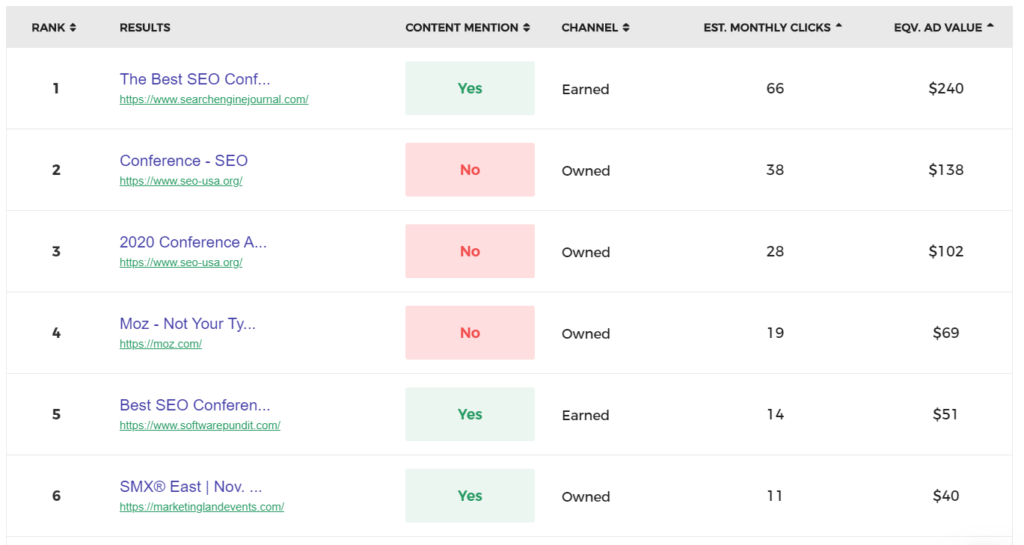
SERP ownership trackers: are increasingly common. For instance Visably (I have no affiliation but do have a free account, which you could get too) and SERP Sketch (I’ve heard of it but not used it). Rather than just telling you if you’re ranking for a specific keyword, they’ll show you if any of the pages in the top ten results mention your brand. That’s the kind of information you can use to select outreach targets.
Let’s do the interesting work
Brand isn’t the only factor we need to contend with in SEO but the way I see it, we either have the choice of reducing our roles, of closing off and taking less responsibility for the performance of our companies, or diving right in, understanding that brand is a part of our work and using the data we have access to, to help everyone.
Anything you think I’ve missed? I’d love to hear your thoughts.
Opinions expressed in this article are those of the guest author and not necessarily Marketing Land. Staff authors are listed here.
About The Author
Robin Lord is a consultant at Distilled/Brainlabs. He works with clients from Toronto to Singapore, on everything from technical site health to brand strategy. You can find his blogging and interactive learning games at therobinlord.com (the domain was a pricing decision – he’s not quite as arrogant as it sounds).