Sunday, 2 June 2019

In the battle for mobile engagement, branded apps hold untapped value

Consumers spend an overwhelming majority of their mobile internet time within apps. Recognizing this trend, the world’s biggest brands have developed apps as tools for providing services (like checking a bank balance) or making a purchase (through an e-commerce store). But many of these apps have untapped potential. Beyond basic transactions, branded apps can be used as powerful video delivery mechanisms that increase engagement and brand loyalty.

Especially as email open rates decline, apps can serve as a new way to connect with consumers with greater efficiency. Customers who have taken the time to download a brand’s app onto their device are some of the most loyal customers a brand has. This advocacy is ripe for brands to mine.

When a brand has an app and separately has video content, produced either for TV spots, social media or their website, there’s no reason these ingredients can’t be combined. The result is a powerful in-app content marketing hub that keeps the best customers engaged and keeps the brand top-of-mind. Some companies, like Nike and Red Bull, are already doing this well. To effectively market in a mobile world, brands need to think of their apps as mobile video mailboxes.

The fight for user attention

To better understand the underutilized value of branded apps, it helps first to recognize just how hard it is to reach consumers through more traditional TV and video channels. TV still comes first for so many marketers, and they invest their budget in a series of spots that will run for 30 or 60 seconds on the air. But with cord-cutting on the rise, it’s harder and harder to achieve the level of penetration TV advertisers achieved in the past. While audiences have switched to digital video, reaching them isn’t necessarily easier in that channel: 65% of consumers skip pre-roll video ads when given the option. With mobile viewership on the rise, brands must find new ways to keep their loyal customers truly engaged.

Maximizing efficiency

The efficiency imperative is front and center for most brands, and leveraging apps as another way to promote already-created video content delivers on that. By using their apps, marketers don’t have to buy media to retarget the consumers who love their brand. Instead, they can recycle content that they already have and hand it directly to the consumers who will be most receptive to its messaging.

The biggest obstacle is that the app developers and media teams are very likely working toward separate goals, and in many organizations, they may not be communicating regularly if they communicate at all. But investing time into connecting these disparate departments can yield great results for the company as a whole.

Constructing a content hub

Apps are purpose built. Airline apps are for purchasing tickets and checking in. Consumers download the AmEx app to access their credit card accounts. If the app development team is focused solely on that goal, there’s no reason to include a video player within the app, and no reason to consider content. No one explicitly downloads a banking app because they want to watch a three-minute video on smart investing tactics. But that doesn’t mean that customers aren’t interested in such content. A recent study from Hubspot found that 68% of consumers say video is their favorite way to learn about new products and services. Brands with a narrow focus can easily miss opportunities to increase spend and grow brand loyalty.

Brand’s don’t need to reinvent the wheel, but they can add functionality to make their apps something better. Users already love the AmEx app – it has a 4.9-star rating in the Apple App Store, based on 910,000 ratings. What if the app included video to promote different rewards packages and destinations that are available to cardholders? Or videos about their card features, to inspire consumers to spend a bit more? Heck, it could even host a library of the brand’s famous Jerry Seinfeld TV ads from years past, which have tens of thousands of views online, thanks to user uploads.

Pushing these videos directly to a user’s device and sending them screen notifications to tell them there’s something new for them to watch in the app is an easy, effective and innovative way to engage users. They can now watch these short videos during downtime: on a commute, standing in line at the store, waiting at the doctor’s office and other moments when they’re looking for content to entertain them.

Brands that relied so heavily on TV advertising in the past are still learning how to market appropriately in a mobile world. The video they’re producing to recruit new customers can live in the branded apps, doing double duty to re-engage loyal customers. Rather than have app and ad teams live in silos, brands need to think about how they can best combine resources to efficiently and nimbly engage with consumers in the modern, mobile-first world.


Opinions expressed in this article are those of the guest author and not necessarily Marketing Land. Staff authors are listed here.


About The Author

Daniel Hurwitz boasts more than 20 years of experience in digital marketing/media, AdTech, EdTech and HealthTech and is well versed in technology solutions to support mobile and video. A start-up specialist, Hurwitz led Sales at Evergage, GoNoodle and MapMyFitness (acquired by Under Armour in 2013). His writing has been featured on publications including PhocusWire, Martech Advisor and SalesTechStar.

This marketing news is not the copyright of Scott.Services – please click here to see the original source of this article. Author: Dan Hurwitz

For more SEO, PPC, internet marketing news please check out https://news.scott.services

Why not check out our SEO, PPC marketing services at https://www.scott.services

We’re also on:
https://www.facebook.com/scottdotservices/
https://twitter.com/scottdsmith
https://plus.google.com/112865305341039147737

The post In the battle for mobile engagement, branded apps hold untapped value appeared first on Scott.Services Online Marketing News.


source https://news.scott.services/in-the-battle-for-mobile-engagement-branded-apps-hold-untapped-value/

Saturday, 1 June 2019

Survey: Less than 10% of marketers to focus on Digital PR in 2019

Less than 10% of marketers to focus on Digital PR in 2019, wise or unwise

Zazzle Media has released their annual State of Content Marketing 2019 survey, which found that less than one in ten marketers (9%) will be focusing on Digital PR in 2019.

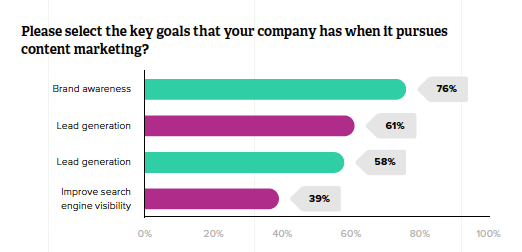
Despite this, over three quarters (76%) state that brand awareness is a key performance indicator for them.

Zazzle's content marketing survey

Not only this, but 25% of content marketers will be ceasing to participate in offline PR activity as it has been perceived as an ineffective channel for them over the recent years.

It seems there is an apparent disconnect between marketers’ desired goals and the tactics they need to carry out to achieve these.

So why are marketers seemingly less concerned about off-page distribution, and why should you make a case for Digital PR to hold a key position in your marketing activities?

Brand awareness

Whilst the creation of written blog content will appeal to people on the site, we need a mechanism that is going to drive these people towards the site first.

Digital PR can help users find your site in a more organic way rather than in a targeted advertorial manner.

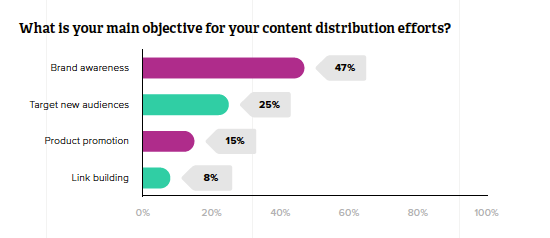
Zazzle's survey responses about content marketing efforts

The survey found that a quarter of marketers want to target new audiences through content distribution, but without Digital PR this will prove to be a difficult task.

Brand protection

PR allows you to control narratives and get involved with industry conversations which you would otherwise be unable to participate in. The digital aspect also allows you to receive real-time coverage updates which mention your brand’s name and put out an immediate response in an attempt to stem or enhance any positive or negative feedback. Protecting your brand, especially in the SERPs, is a powerful tool for PRs.

Read next: Organic reputation management & brand protection

Link building

A major perk of creating Digital PR campaigns is that they usually come with linkable assets that have a chance of being cited within media coverage.

Link building is an activity which has a reputation of relying on black-hat tactics for success, paying for links, directories, and the others. Digital PR allows you to avoid all these techniques and the risks associated with them and build some legitimate links from high authority publications.

Read next: Five proven content formats to maximize link acquisition with digital PR.

Managing director of Zazzle Media, Simon Penson, commented on the statistics:

“Brand awareness has appeared as one of 2019’s core focuses when it comes to brands content marketing efforts. Whilst this can be achieved through a number of marketing techniques, Digital PR is one of the strongest means of getting your name out there to new audiences.

2019 is shaping up to be an exciting year for content marketing, and Digital PR could be the key to giving your brand new audiences and visibility.”

What do you think of these findings? Let us know your thoughts on the results in the comments.

Kirsty Daniel is a Digital Marketing Executive at Zazzle Media. She can be found on Twitter .

Related reading

on-page SEO essentials
how to increase conversions: ideas, tools, and examples
achieving 80% email open rate
content formats proven to maximize link acquisition for digital pr

This marketing news is not the copyright of Scott.Services – please click here to see the original source of this article. Author: Kirsty Daniel

For more SEO, PPC, internet marketing news please check out https://news.scott.services

Why not check out our SEO, PPC marketing services at https://www.scott.services

We’re also on:
https://www.facebook.com/scottdotservices/
https://twitter.com/scottdsmith
https://plus.google.com/112865305341039147737

The post Survey: Less than 10% of marketers to focus on Digital PR in 2019 appeared first on Scott.Services Online Marketing News.


source https://news.scott.services/survey-less-than-10-of-marketers-to-focus-on-digital-pr-in-2019/

Search Buzz Video Recap: Google De-Indexing Bug Fixed, Google Discover Report, Google Assistant Ads & More

This week, we saw a lot of the Google ranking tools go nuts but it is probably related to the indexing bug. Google said after 6 days of trying they finally fixed the de-indexing bug. Google launched a new Google Search Console report to show you your Google Discover traffic, we can call it position minus one. Google Search Console launched a new search appearance filter for AMP Stories and Android Apps. Google also removed the non consolidated version of the performance report. Google dropped the sort by date filter for web search but added before: and after: search operators. With Google+ going away, Matt Cutts wants Google to bring back the + search operator. Google also has potential bugs with the rich results and mobile friendly status. Google is testing a more modern version of GoogleBot that can render the more modern web. Google cache is out dated but Google says don’t worry about it. Should Google index all of the web and not cherry pick the best to index? Google says if you are personalizing the experience of a user, tweak the content on the page versus redirect the user to a new page. Google posted SEO advice on Vue.js web apps. Google launched images in their sitelinks on mobile. Google Assistant has officially launched a new design this time with search ads. That was this past week in search at the Search Engine Roundtable.

Make sure to subscribe to our video feed or subscribe directly on iTunes to be notified of these updates and download the video in the background. Here is the YouTube version of the feed:

For the original iTunes version, click here.

Search Topics of Discussion:

Please do subscribe via iTunes or on your favorite RSS reader. Don’t forget to comment below with the right answer and good luck!

This marketing news is not the copyright of Scott.Services – please click here to see the original source of this article. Author: barry@rustybrick.com (Barry Schwartz)

For more SEO, PPC, internet marketing news please check out https://news.scott.services

Why not check out our SEO, PPC marketing services at https://www.scott.services

We’re also on:
https://www.facebook.com/scottdotservices/
https://twitter.com/scottdsmith
https://plus.google.com/112865305341039147737

The post Search Buzz Video Recap: Google De-Indexing Bug Fixed, Google Discover Report, Google Assistant Ads & More appeared first on Scott.Services Online Marketing News.


source https://news.scott.services/search-buzz-video-recap-google-de-indexing-bug-fixed-google-discover-report-google-assistant-ads-more/

Google Recommendations: Are they Helping or Hurting my Paid Search Strategy?

Let’s face it. There are plenty of rabbit holes to dig into when going through your Google Ads account.

google ads recommended settings

Collecting data, recognizing the trends for optimization and other paid search strategy efforts often do not come as quickly as we’d like. The problem? As digital marketers, time is not always on our side. We are expected to bring in results in a timely manner but some factors are slightly out of our control.

Cue in Google, who offers time-saving options, courtesy of their massive amounts of data. But do these options actually improve our campaigns?

Here are some experiences I’ve seen during my time working with various Google Ad accounts at Directive, a search marketing agency focused on B2B and enterprise. Let’s break them down together.

Targeting Tools

Setting up proper targeting is a crucial paid search strategy for your Google Ads campaigns. With search, you can control targeting through keywords you bid on as well as the match types you utilize.

With display, it is through the audiences you build or the ones available in the Google Ads platform.

See below:

Each campaign type also has options that allow Google to increase your targeting range.

With search campaigns, you have the option to show your ads to Google search partners. This extends the reach of Google search ads to hundreds of non-Google websites. These also can extend to YouTube and other Google sites.

Choosing this option includes a notification that informs you that “most advertisers include their ads on Google search partner sites.”

See below:

After auditing an account, we found a client of ours did indeed decide to include search partners and saw the following results:

We do see a large spike in conversion volume from search partners, but also a much higher cost-per-conversion.

Additionally, there is a 90.25% impression share from Google search, meaning there is still room to show ads there. Had more budget gone to Google search and a bit less to search partners, this client would have obtained conversions at a cheaper cost, and ultimately a lower cost-per-conversion in this campaign.

While setting up a display campaign, you can boost your reach through automated targeting.

See below:

Looks pretty great right? One of our clients set up a remarketing campaign using the above settings. Here was the overall performance:

Something did not seem right here!

By targeting users who are already familiar with your brand, you should have a better conversion rate than .25%, right? So what happened? Well, when looking at how the site visitors performed we saw the following:

And in comparison, this is how the set of conservative automation performed:

We see a massive difference here in performance. Even at “conservative” automation, 82% of the budget went towards automation, despite it performing much, MUCH worse.

Proper targeting is the foundation for success in your campaigns! Please keep this at the forefront of your mind.

If your goal is lead generation, avoid opting into automated targeting until you feel you are capped out. Even then, do not set and forget; you could be wasting spend on audiences you have no control over.

If your goal is awareness, these options are an excellent way to expand your reach, get more exposure, and drive more users to your site.

Bid Builder

If you’ve got a lot of keywords in your account, manual bidding can be quite a pain. Google’s smart bidding can alleviate the time-consuming chore of keeping track and adjusting your keyword bids. Additionally, they provide multiple options to fit the campaign’s needs:

  • Target CPA: Sets bids to get the most conversions possible while reaching your average cost-per-acquisition (CPA) goal.
  • Target ROAS: Sets bids to help you get the most conversion value while maintaining your target return on ad spend (ROAS).
  • Maximize Clicks: Sets bids to help you get the most clicks within your budget.
  • Maximize Conversions: Sets bids to help you get the most conversions within your budget.
  • Target Search Page Location: Sets bids to help you get your ads to the top of the page or on the first page of search results.
  • Target Outranking Share: Sets bids to help you outrank another domain’s ads.
  • Enhanced CPC: Adjusts your manual bids up or down to help you increase conversions.
  • Target Impression Share: Automatically sets your bids to increase your ads’ chances of appearing in the search page area you select.

These can all be beneficial options depending on your campaign goals. One of our clients had a campaign rich with conversion data, averaging around 200 conversions a month.

The more conversion data, the better, as Google’s algorithm can learn quicker and begin producing more “bang for your buck” in a shorter amount of time. We decided to run an experiment here testing out max conversions against the manual strategy and saw some pretty interesting results:

After a few weeks, we were not seeing much difference in terms of volume or conversion rate. The big difference here was in the costs associated with each strategy:

Using the automated strategy, our CPC’s went up a whopping 63%! So while conversion volume may not have grown, our CPA certainly did! We ended up ending the experiment and sticking with manual bidding.

This isn’t to say automated strategies are always going to be wasteful. We’ve used this strategy on many clients and have seen it deliver the best volume and lowest CPA one of our client’s campaigns had ever seen.

We’ve seen the Target CPA turn around performance and improve account level CPA. We have keywords that we want showing 100% of the time due to their value, and Target Impression Share worked towards accomplishing that goal.

The lesson here? Always experiment before switching over. We’ve seen varying results depending on the industry, offer, and branded vs. non-branded keywords. Personally, I’ve seen these strategies work best after the campaign has been running for a while and is well optimized. After it’s been up, experiment with Smart Bidding to get your campaign to reach that next level.

Creative Collaboration

So, everything we’ve talked about thus far has been on the backend, but what about the creatives your customers see?

Google has an answer for that as well in the form of responsive search and display ads!

With responsive search ads, you can input multiple headlines and descriptions and have Google mix and match to find a winning combination. Ideally, this frees up time from creating tons of different ad variants to try and find the winning combination of copy. Let’s take a look at one:

We can see a superb click-through rate, but not so great CPA. What is more troublesome is the inability to find out what exactly is wasting spend. If you click on the “view asset details” outlined above, you’ll be met with the following:

We can see the different combinations and the percentage of times they showed, but impression numbers are all you get; no conversion numbers, conversion rates, or cost-per-conversions associated with the combinations.

This prevents us from being able to double down on what is working, and pause what is not.

Responsive search ads could potentially be a game changer if each piece of copy had the previously mentioned stats to accompany, but without them, we cannot really analyze the copy winners and losers.

A certain combination served may get you a lot of clicks, but may not resonate with your landing page compared to another combination receiving fewer clicks. There’s just no way of knowing for sure at that moment.

On the display side, you can work with responsive display ads.

Rather than manually creating different banner ad sizes, you just upload an image and a few lines of copy to accompany. Then, Google is able to fit your ads in more placements and create various combinations like responsive search ads.

We tested one of these against our standard banner ads and got some excellent results. The top row shows the entire ad group’s metrics, while the bottom shows the responsive display ad’s:

The ad was responsible for more than half of the ad group’s conversions, despite being less than a quarter of the spend. Automation seemed to perform well here. Like responsive search, however, there is no way of understanding what is working or not. In this case we ended up just pausing the manually built display ads, and testing the responsive against another responsive to try and get a better grasp.

All in all, responsive ads can save you a chunk of time in the creative process but lack the insights to dive into what messages seamlessly transition users from ad to landing page and then to the desired conversion action.

These ads are worth having in your back pocket though, so test them out against your current ads and see how they perform for you!

Overview and Recommendations Refresh

Have a big account? Don’t know where to start?

These tabs within Google Ads give you general insights into various campaigns, ad groups, and keywords.

See below:

This tool helps you gain a high-level understanding of trends or abnormalities going on within your Google Ads account. For example, in the Overview section, we get insight into some words that triggered our ads, without having to dig through search terms:

If you’re seeing a lot of irrelevant terms here, it is a good indicator you need to go in and clean up your search terms and add some negative keywords. In the example above, we’ve outlined a word used in a search, which triggered our ad to show. This word is not relevant to our services, and therefore we would add this as a negative keyword.

Removing these types of words is crucial for reducing wasted spend and prevents your ads from being triggered by searches that are not related to what you offer.

The recommendations tab offers advice on where you should boost spend or expand your campaigns. Take the advice here with a grain of salt. Sometimes the recommendations may not have your campaign goals in mind.

For example, we were running a video campaign and were met with the following advice:

Seems pretty obvious that adding more money into our daily budget will earn us more video views, right?

But what about engagement metrics? Are these users actually making their way to the site? If they do, are they bouncing quickly? If they don’t, how many pages are they visiting?

The whole point of this campaign was to spread awareness for one of our client’s products and see if video ads enticed users to travel to the site. We cared more about how our audience was performing and whether they were making their way to the site to learn more after a teaser clip, than just showing a video to the masses.

The above recommendation does not provide those insights, only how to increase your cost and views. Click-through-rate, bounce rate, and pages per sessions are a better way to understand your goals and should be considered before adding more money to your daily budget for more views.  

Again, take everything on these pages as simply suggestions. Use them as a roadmap, as they can be good indicators of areas to dig into within your account. However, make sure you follow the breadcrumbs and investigate before blindly adding more funds.

More spend simply for visibility does not necessarily mean better account performance.

Final Focus

Setting up a Google Ads account to ultimately benefit your paid search strategy can be time-consuming and requires strategy and research.

With so much to do within the account, it is tempting to let Google take over and run on autopilot. However, taking shortcuts early on can provide subpar performance and wasted spend on your PPC campaigns.

But isn’t automation built to learn, adjust, and improve our search marketing efforts? To quote one of the most frequently used phrases in Directive’s pay-per-click department, “it depends.”

While these options are available to make your life easier, they are not guaranteed to work. Should you try them out? Absolutely. Optimize, then test, but keep a close eye on what is happening within your account. Do your due diligence and ensure there are no holes in your search marketing campaigns that allow automation to hemorrhage your paid search budget.

This marketing news is not the copyright of Scott.Services – please click here to see the original source of this article. Author: Max Serrato

For more SEO, PPC, internet marketing news please check out https://news.scott.services

Why not check out our SEO, PPC marketing services at https://www.scott.services

We’re also on:
https://www.facebook.com/scottdotservices/
https://twitter.com/scottdsmith
https://plus.google.com/112865305341039147737

The post Google Recommendations: Are they Helping or Hurting my Paid Search Strategy? appeared first on Scott.Services Online Marketing News.


source https://news.scott.services/google-recommendations-are-they-helping-or-hurting-my-paid-search-strategy/

Google Search Console Performance Report AMP Stories & Q&A Rich Results Search Appearance Filter

The same day Google launched the new Discover performance report in Google Search Console, Google announced they also now let you see your AMP Stories traffic. I have not seen any examples of AMP Stories showing up in these reports, so I cannot share any real screen shots but Google did announce it on Twitter.

Here is the tweet:

Google also seems to have added Q&A rich results as a filter too, which I do not have either.

I went ahead and mocked up what the search appearance filter in the performance report might look like but again, this is a mock up – I do not have any sites that do AMP Stories in my Google Search Console account:

If you have any screen shots to share, I’d love to see it. Post the image in the comments or send it to me @rustybrick.

The help document does mention it, it says under the search appearance filters “AMP stories – a visual storytelling format built on AMP that enables a user to tap through full screen images and videos.” The cached version from April 2nd does not mention AMP Stories specifically.

Also in that cached page is no mention of “Q&A rich results” but in the new updated page it has it listed as a filter “Q&A rich results – A Q&A page rich result.” More on Q&A schema is over there.

So you got not just Android apps but also AMP Stories and Q&A rich results as new filters this week in the Google Search Console performance report and a brand new Discover performance report – yay!

Forum discussion at Twitter.

This marketing news is not the copyright of Scott.Services – please click here to see the original source of this article. Author: barry@rustybrick.com (Barry Schwartz)

For more SEO, PPC, internet marketing news please check out https://news.scott.services

Why not check out our SEO, PPC marketing services at https://www.scott.services

We’re also on:
https://www.facebook.com/scottdotservices/
https://twitter.com/scottdsmith
https://plus.google.com/112865305341039147737

The post Google Search Console Performance Report AMP Stories & Q&A Rich Results Search Appearance Filter appeared first on Scott.Services Online Marketing News.


source https://news.scott.services/google-search-console-performance-report-amp-stories-qa-rich-results-search-appearance-filter/

Ebikes At Google On Environment Day

Ebikes At Google Environment Day

It looks like Google had a set up for an ebike, electronic bike, vendor to show up at Google’s environmental day to sell bikes to Googlers? Here is a photo on Instagram of the event, in fact, there were dozens of tents set up for this event.

This happened at the Google headquarters, the GooglePlex, I believe yesterday.

This post is part of our daily Search Photo of the Day column, where we find fun and interesting photos related to the search industry and share them with our readers.

This marketing news is not the copyright of Scott.Services – please click here to see the original source of this article. Author: barry@rustybrick.com (Barry Schwartz)

For more SEO, PPC, internet marketing news please check out https://news.scott.services

Why not check out our SEO, PPC marketing services at https://www.scott.services

We’re also on:
https://www.facebook.com/scottdotservices/
https://twitter.com/scottdsmith
https://plus.google.com/112865305341039147737

The post Ebikes At Google On Environment Day appeared first on Scott.Services Online Marketing News.


source https://news.scott.services/ebikes-at-google-on-environment-day/

What Can I Do With A Free Account From SEMrush?

Many new users to SEMrush ask this question and are not really sure what you can do with the SEMrush software. Obviously, many new users will start out on the free level before deciding to purchase a subscription. 

To start your free level subscription, enter a query in the SEMrush search bar and you will automatically be prompted to register for your free account.

With a free account you can still use SEMrush, but you will be limited in your ability to pull data and use our tools.

So what can you do with a free account?

Domain and Keyword Analytics

10 Searches Per Day

You can perform 10 searches a day in our Domain Analytics and Keyword Analytics databases. This means you are only able to use the SEMrush search bar to pull a report 10 times before your daily limit is reached.

If you enter a domain into the search bar that would be considered one search. If you then click on any of the links to further reports within the Domain Overview report, this would also count as a search – bringing your total to 2 searches.

If your just testing out the software it may make sense that you only need to perform 10 searches a day. However, it is important to note that the next level paid subscriptions to allow for even more searches. 

  • Pro users have access to 3,000 searches

  • Guru users have access to 5,00 searches

  • Business users have access to 10,000 searches

10 Results Per Search

Just like your daily search limit, your reports will be limited to only 10 results per search. For example, if you go into the Organic Positions report and query searchengineland.com, you would only be able to examine the first 10 keywords listed in that domain’s Organic Positions Report.

This 10 results per search limit will be the same in all other analytics reports as well. This includes Backlinks reports, Advertising Research reports and Keyword reports. In contrast, the paid subscriptions allow for even more results per search. 

  • Pro offers 10,000 results

  • Guru offers 30,000 results

  • Business offers 50,000 results

Projects

As a free user, you can create and manage one Project. For those unfamiliar with our Projects section, each Project basically serves as a dashboard that will display a preview of each tools main metrics. Each project includes 12 individual tools.

If you want additional projects our Pro level package includes 5 Projects, with our Guru package including 50 Projects and our Business level package with unlimited projects.

However, if you decide to stay as a free user, even after setting up your project you will be limited in what you can do.

Pages to Crawl

Site Audit will provide you with an overall health score of your website as well as a list of issues found with the given website. As a free users, your Site Audit is limited to only 100 crawled pages. This includes crawls of given a domain, subdomain or subfolder. 

This may suffice for certain websites, however, most websites have over 100 pages so it may be something to consider when thinking about what level account works best for you.

If you realize the free level account isn’t going to be enough you can look towards our paid accounts.

  • Pro level package allows you to crawl up to 100,000 pages per month

  • Guru allows for 300,000 pages per month

  • Business level package for 1 million pages per month.

Keywords to Track

The 10 keywords that are available for free users to track refers to our Position Tracking tool. This tool allows you to enter a domain, a list of competitors, a list of keywords to track and set a location and device type. Then, we will track the daily rankings of your domain and competitors on the results pages for this target keyword list.

This is a powerful tool that can provide you with localized ranking data on a frequent basis. Depending on your client size and the campaign, 10 keywords may not be enough for you to track.

Upgrading your account will give you the ability to track more keywords.

  • Pro level gives you 500 keywords

  • Guru level gives you 1,500

  • Business level gives you 5,000

 If you ever need more keywords than what your plan provides, you can reach out to your account executive to add additional keywords to your account.

It is important to note that If you have multiple projects set up, these keywords are split amongst them, and not limited to each project.

SEO Ideas units

SEO Idea units are shared between three different tools: SEO Content Template, SEO Writing Assistant and On Page SEO Checker. 

For On Page SEO Checker, you are given a total of 10 SEO Idea units.

SEO Content Template and SEO Writing Assistant both give free users 1 template to create SEO content.

So if you create an SEO Writing Assistant template, the number of SEO Ideas units you have for your On Page SEO Checker will now be 9.

Keep in mind that these templates are for one keyword and therefore one keyword equals one unit.  

To generate more than one template (or generate a template for more than one keyword), you will need to subscribe to a paid account. 

To get more monthly units you will need to upgrade to a paid account.

  • Pro users get 500 SEO idea units

  • Guru users get 800 units

  • Business users get 2,000 units

Keyword Magic Tool Lists

As a free user, you can create 1 list in the Keyword Magic Tool. Lists are how you save your keyword research history in SEMrush. Your queries made in the Keyword Magic Tool are saved in Lists so you can quickly go back and reference them. 

In order to create more than one list, you will need to subscribe to a paid account. Each query in this tool counts towards your daily limit of 10 queries in Domain and Keyword Analytics. All paid accounts are able to create 50 lists.

Topic Research Queries

Free users are limited to just 2 search queries in Topic Research. Entering a search query will generate you a list of potential subtopics based around your search. This is great for content marketers looking for a headstart in their brainstorming process. 

Upgrading to a paid account will give you unlimited queries.

PDF Reports

My Reports makes it easy to build out PDFs from scratch. This way you’ll be able to clearly communicate the results of a website audit, competitive analysis or show any other progress for a marketing campaign. With a free account, you are able to schedule 1 PDF report within the My Reports section.

  • Pro users have 5 scheduled reports

  • Guru users have 20 scheduled reports

  • Business users have 50 scheduled reports

Now that you understand exactly what goes into your free level account, you may now have a little more insight into exactly what your account can do for you. You may decide that a free level account will work for you, which is more than okay!

However, if you do not think the free level will work and you are interested in other options we offer, you may want to look at our Prices page for more information. 

If you are interested in using SEMrush in the long term or are looking for a custom package, please feel free to contact our sales team so that we can set your account up at a discounted rate along with all of the specifications you need!

If you still have questions about any of this information, please feel free to reach out to our Customer Success Team at +1-800-815-9959 (US) or send us an email at [email protected] You can also contact us on Twitter by using the #semrushcare hashtag.

This marketing news is not the copyright of Scott.Services – please click here to see the original source of this article. Author:

For more SEO, PPC, internet marketing news please check out https://news.scott.services

Why not check out our SEO, PPC marketing services at https://www.scott.services

We’re also on:
https://www.facebook.com/scottdotservices/
https://twitter.com/scottdsmith
https://plus.google.com/112865305341039147737

The post What Can I Do With A Free Account From SEMrush? appeared first on Scott.Services Online Marketing News.


source https://news.scott.services/what-can-i-do-with-a-free-account-from-semrush/