Tuesday, 1 May 2018

The best alternative keyword research tools

Keyword research is an integral part of any search engine optimization strategy – and it doesn’t have to cost a fortune.

Keyword research takes up a significant chunk of time, and this is the case for many marketers, website owners and content creators. But it is something that has been expanding outward toward small and medium business owners as well, as having a fully optimized website is a necessity in running a company with any kind of online presence.

In the past, it was a matter of putting in the leg work – often for hours a day – to find the best keyword strategy. Today it is much simpler as more tools have been developed to make the job much faster and easier than ever before. Unfortunately, many of those tools are costly and over budget for anyone but enterprise level brands.

To keep things more affordable you can use alternative tools – often several to compensate – that are low cost, or even completely free. Here are some keyword research tools that you won’t believe don’t cost a cent.

Ubersuggest
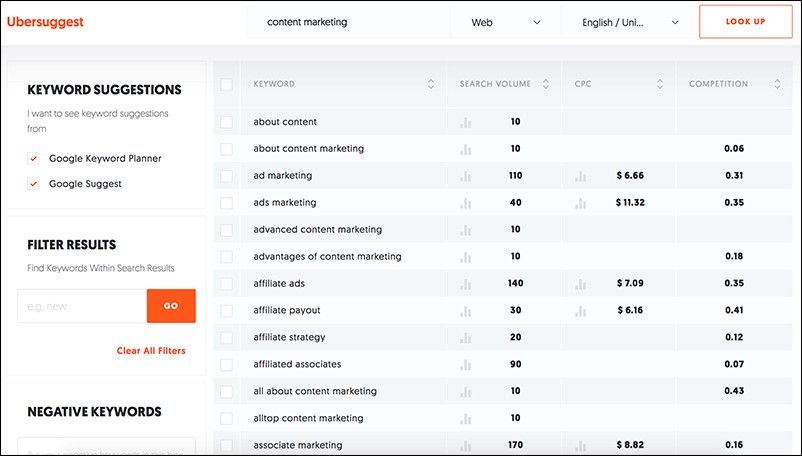
Ubersuggest can be used for both content research (and to help surpass any idea blocks) and keyword research tool. By entering a phrase or keyword, choosing the medium (i.e. web, images, Yahoo) and language preference, the platform will give you a list of related searches, along with search volume, CPC, and rate of competition by percentage.

For example, searching for “content marketing” gives 913 results with an overall volume of 18,100, a CPC of $23.25, and a competition rate of 0.58. Scrolling down gives you a breakdown of all the variants and how that changes, such as “affiliate ads” having a volume of 140, CPC of $4.70, and a competition rate of 0.36.

The tool requires no login and, unlike Keyword Planner (which shows a range), it shows the actual search volume and competition level.

Google Correlate

Everyone knows about Google Keyword Planner and probably uses it, as it is the most accurate keyword tool on the web if your aim is to target Google search.

However, you may not have heard about Google Correlate, which is a very helpful and effective tool that works by taking searches and correlating them with trends happening both on the web and out in the real world. It establishes patterns that you might have never realized existed, and even lets you compare based on time period – both long and short term.

Keyword.Guru

Do you want to know what is popular on all major search engines, and not just Google? Keyword.Guru is a great tool that takes live searches and lets you know the moment you start typing what suggestions it has, so you can see what people are searching for at any given time.

There aren’t any real metrics, but not everyone likes to deal with numbers. This tool is less technical than some, but more accessible if you just want to see what searches are most common without all the associated information, which can be overwhelming to even seasoned keyword researchers.

Soovle
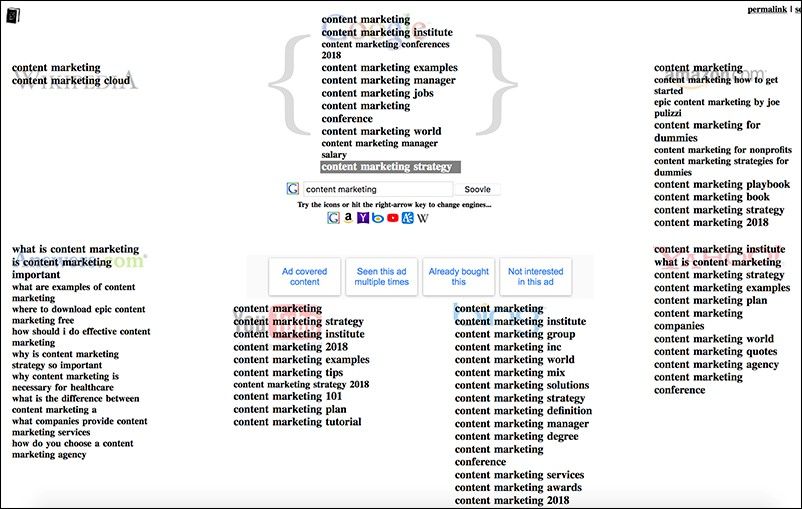
Google, Bing, Yahoo, Amazon, Wikipedia, and YouTube: what do they have in common? Soovle covers all of them, which makes it easier to get a good grasp of what is going on through multiple channels.

Being able to search YouTube for video content, Wikipedia for educational articles, and Amazon for sales info is especially helpful for getting a broader glimpse of the current state of search on the web. Soovle doesn’t generate any numbers for each keyword, but lets you quickly get a general idea of what interests your audience across a range of channels.

Akin to Keyword.Guru, it does it on the same page and with live search updates.

Bulk Keyword Suggest Tool
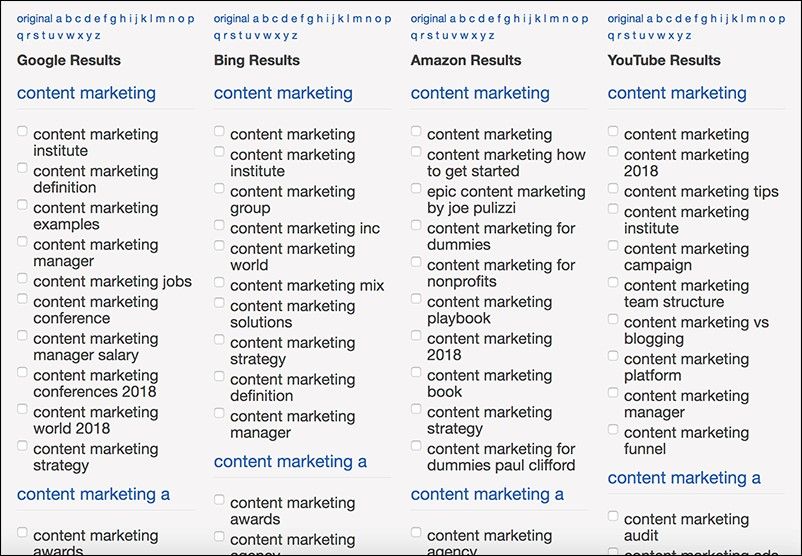
Bulk Keyword Suggest Tool allows you to dig into auto-suggest results from Bing, Amazon and YouTube. It was created by SEOchat and uses core terms to build a wider circle of phrases for use.

It is simple to use, easy to read and very fast to search. You can run a second or third bulk suggest and compare, then export your results or only specific ones based on how you click.

Bonus: Awesome freemium tools

Serpstat
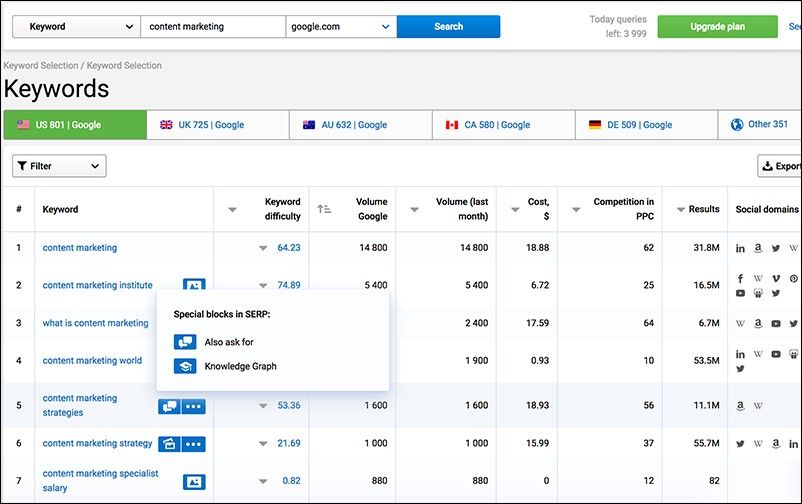
Serpstat is a growth-hacking tool, and an effective at that. It has paid versions starting at $19 per month, allowing you to graduate to new levels as your business grows. However, there is also a free version that works with different iterations of Google based on country.

Serpstat calculates keyword difficulty for each search query, shows “special elements” (which inform us on search intent) and social media domains ranking for each term, and offers advanced filters to dig deep into each keyword list. It is also one of the few tools that also works on Yandex.

The graphs that are generated are simple bar graphs that effectively break things down and make it easy to understand at a glance.

WordStream
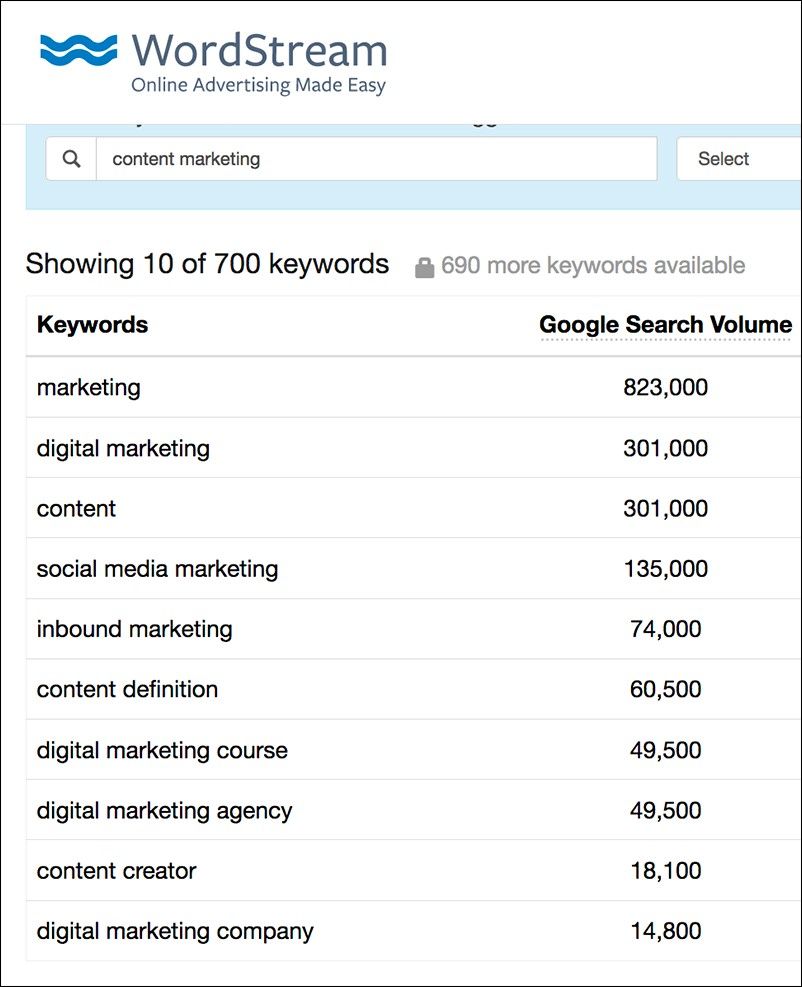
WordStream has a freemium model and its full featured tool is around $260 per month with a discount option to pay annually. However, it also has a free, limited version that I like to use because it allows you to specify industry if you wish.

That makes it a little bit easier if the key phrase you are working with it more general and could apply to unrelated fields. You can also specify based on country, which is great if you don’t want to automatically target a US audience (something that many tools do since it is the largest Google market).

Do you have a tool you feel deserves to be on this list? Let us know in the comments.

Related reading

This marketing news is not the copyright of Scott.Services – please click here to see the original source of this article. Author: Ann Smarty

For more SEO, PPC, internet marketing news please check out https://news.scott.services

Why not check out our SEO, PPC marketing services at https://www.scott.services

We’re also on:
https://www.facebook.com/scottdotservices/
https://twitter.com/scottdsmith
https://plus.google.com/112865305341039147737

The post The best alternative keyword research tools appeared first on Scott.Services Online Marketing News.


source https://news.scott.services/the-best-alternative-keyword-research-tools/

Hooray! Google My Business descriptions are back

Google My Business (GMB) recently brought back the business description field, which has caused those of us working in the local search industry to say “hooray” and raise eyebrows.

Here are a few things you should know about the description and some useful tips to help you make the most of this new change.

1. It shows at the very bottom of the Knowledge Panel

The visibility of the description is really poor, which makes me question how much effort to put into creating it.

It shows below the address, below questions and answers (Q&A), below Google Posts and below customer reviews. Because its visibility is poor, I would suggest utilizing Google Posts for messages you want to be right in front of your customers’ eyes.

2. It does not replace the editorial summary

Editorial summaries are the small descriptions that appear at the top of the Knowledge Panel for popular businesses. Not all businesses have these; they are manually written by Google and cannot be altered. Businesses that have editorial summaries can still add the GMB description. It will show above the Knowledge Panel.

3. GMB descriptions are no-shows on Google Maps or Google Maps app

Google My Business (GMB) descriptions do not show up on Google Maps on either browser or the Google Maps app. They only appear in Google search when the Knowledge Panel is visible. Editorial summaries, on the other hand, show in both.

[Read the full article on Search Engine Land.]


Opinions expressed in this article are those of the guest author and not necessarily Marketing Land. Staff authors are listed here.


About The Author

Joy Hawkins is a Local SEO expert who is a part of Google’s Top Contributor program & MapMaker Regional Leads program. She regularly contributes to many online communities in the Local SEO world, including the Google My Business forum (Top Contributor), the Local Search Forum (Top Contributor), and the Local University Forum (Moderator). She also a contributor to the Moz Local Search Ranking Factors survey. Joy currently works as a product consultant at Imprezzio Marketing in Toronto. She also loves to blog on her own time about things pertaining to Local SEO.

This marketing news is not the copyright of Scott.Services – please click here to see the original source of this article. Author: Joy Hawkins

For more SEO, PPC, internet marketing news please check out https://news.scott.services

Why not check out our SEO, PPC marketing services at https://www.scott.services

We’re also on:
https://www.facebook.com/scottdotservices/
https://twitter.com/scottdsmith
https://plus.google.com/112865305341039147737

The post Hooray! Google My Business descriptions are back appeared first on Scott.Services Online Marketing News.


source https://news.scott.services/hooray-google-my-business-descriptions-are-back/

LinkedIn Targeting – How to Create Targeted Audiences That Scale

LinkedIn has more than 430 million members… and there are about as many ways to target them on the platform (not really, but there are a lot of targeting options!). It’s easy to fall into the trap of heaping as many targeting layers as you can in order to sculpt that perfect audience of qualified people. But this ends up being an exercise in how to exclude as many people as possible instead of including those who are relevant to your business objectives.

For this post, we’ll focus on Sponsored Content ads and the tools and tips you can use to target a more precise audience, while still achieving scalable reach.

Sponsored Content lets you go beyond the reach of your Company Page followers to target relevant audiences interested in your company. Basic audience targeting includes demographic options such as age, gender, etc. However, the platform has much more detailed information on its users that you can use for precise, professional micro-targeting; such as company industry & size, job title, job seniority, job function, years of experience and relevant skill sets. You can go even further and more surgically target individuals based on specific companies & groups, company connections, followers, and that’s just for starters.

There’s always a precarious balancing act between relevant targeting and audience size. A fine line between raising awareness and shaping perception versus driving quality leads or generating sales. If your targeting is too specific, you may only reach a small audience. Too broad and you’re wasting time and money.

Here are some ways to help you create a relevant, albeit robust audience.

Do your research, specifically on the platform

Once you know the audience group or type that you are trying to reach, begin with a LinkedIn profile search and see what profile characteristics that audience has in common. What combination of skills and job titles do they have in common? Are they at similar levels of seniority? Do they work in similar industries? How about geography? Is there an opportunity to restrict targeting to be more precise by limiting where your ads might appear? Profile searches can be very revealing and often uncover different options for relevant targeting.

Combine targeting features, but avoid hyper targeting

While having a tightly controlled and well-sculpted audience is often ideal, make sure that your potential audience size is large enough to meet your objectives. If you’re running Sponsored Content we typically target an audience of at least 250,000 – obviously this varies.

In many cases, hyper-targeting can make your conversion rates look great, but you might be missing out on opportunities to increase overall revenue. Try testing Titles versus Skills targeting. Job titles are good for hyper-specific targeting and there are more than 28,000 titles to choose from! But Skills can find larger audiences that are still relevant and allow for scale.

Also, try targeting by job function, which has fewer options but still produces relevant results. It’s all about striking a balance. Target specific industries (or industry segments) in specific regions. Testing these combos allows you to bid more aggressively for specific groups, which can improve conversion rates, cost per acquisition metrics and the creation of more relevant retargeting segments.

Speaking of retargeting…

Retargeting is one of the most effective means of shortening or closing the business cycle. Use LinkedIn’s retargeting capabilities to follow-up with prospects or customers that have viewed specific pages of your site or performed specific actions.

Release the robots (or in this case the algorithms)

One of the best audience models on Facebook is the Lookalike – LinkedIn has a similar capability. To create the Lookalike audience, LinkedIn analyses the characteristics and patterns of your target audience to find other people who are most likely relevant to your objectives. Click the “Audience Expansion” box and LinkedIn’s algorithms will build larger, relevant audiences for you.

The secret to staying young is to lie about your age

Be careful when using age as a targeting layer because it is often calculated using the user’s year of graduation – close enough, but maybe not. Because users of the platform share their information directly, targeting information on LinkedIn is typically more reliable than other platforms.

But age is still a societal sticky point. (Despite asking, I never knew my grandmother’s real age until one day the year of her birth was accidentally slipped into a casual conversation – even then I had to do the math myself to find out her exact age!) Targeting by seniority or years of experience often leads to better results.

Break out the book of matches

You’re probably leveraging your existing data on other platforms like Google and Facebook and LinkedIn now has the same capabilities. With Matched Audiences, you can upload a list of email addresses from your existing contact list to either include or exclude them from your campaigns.

Dive into the demographics and identify winning segments

Once you have enough data from broader audience testing, you can develop specific audience segments using the Demographics tab found in the Campaign Manager. This information is great for seeing how your content performs with different segments of your target audience(s). Use these findings to more strategically plot your content and audience segmentation strategies.

For instance, if larger audience segments are getting clicks from irrelevant segments you can include them (or tweak your content). Likewise, if you are getting really good results from other audience segments you can increase spend and capture more reach with the right people.

Keep your eye on the prize

Running successful campaigns on LinkedIn takes time, testing and continuous improvement. As you experiment more and start to gain more precise insights that you can use to fine-tune your campaigns your ads will perform better. Test restricting individual campaigns to a couple of relevant targeting parameters and then switch budgets to the approach that most closely hits your goals.

And as always, try some of these targeting options and let us know how you’re doing!

This marketing news is not the copyright of Scott.Services – please click here to see the original source of this article. Author: Steve Burnett

For more SEO, PPC, internet marketing news please check out https://news.scott.services

Why not check out our SEO, PPC marketing services at https://www.scott.services

We’re also on:
https://www.facebook.com/scottdotservices/
https://twitter.com/scottdsmith
https://plus.google.com/112865305341039147737

The post LinkedIn Targeting – How to Create Targeted Audiences That Scale appeared first on Scott.Services Online Marketing News.


source https://news.scott.services/linkedin-targeting-how-to-create-targeted-audiences-that-scale/

Second Batch Of Google Mobile-First Indexing Began

Yesterday we reported that Google mobile-first indexing notifications first started going out yesterday morning. We also reported that soon, Google will begin the second wave of expanding the mobile-first indexing to a “bigger” set of sites. Well, it looks like the two are related.

Google’s Takeaki Kanaya said on Twitter that it appears the notifications are part of the second wave that we have seen. He said it in Japanese, but Kenichi Suzuki pointed me to it and said he is confirming this is the second batch we were talking about the other day.

This translates to:

Perhaps it was the second team in this article that I started receiving from last night. By the way, we do not plan blogs especially about this matter. Because the last blog was just that announcement.

Kenichi Suzuki told me looks like the notifications we got yesterday were ones sent by the second batch, according to Takeaki-san.

Anyway, it is a good reference for timeline purposes.

Forum discussion at Twitter.

This marketing news is not the copyright of Scott.Services – please click here to see the original source of this article. Author: barry@rustybrick.com (Barry Schwartz)

For more SEO, PPC, internet marketing news please check out https://news.scott.services

Why not check out our SEO, PPC marketing services at https://www.scott.services

We’re also on:
https://www.facebook.com/scottdotservices/
https://twitter.com/scottdsmith
https://plus.google.com/112865305341039147737

The post Second Batch Of Google Mobile-First Indexing Began appeared first on Scott.Services Online Marketing News.


source https://news.scott.services/second-batch-of-google-mobile-first-indexing-began/

Publisher Group Blasts Google Over Forcing GDPR Liability On Small Publishers

We discussed a few months ago how Google dumped the GDPR responsibilities on their AdSense publishers and customers, as opposed to taking responsibility themselves for the liability. Well, it resulted in a massive publisher group of 4,000 publishers writing a scathing 5-page letter to Google’s CEO that tells him their handling of this “severely falls short.”

Barry Levine covered this letter and the fallback on this whole thing extremely well at Martech Today – so check it out there. Let me give you the SEO/webmaster feedback from WebmasterWorld:

I wonder if it is Google’s strategy to make to turn this GDPR thing into one massive confusing mess for everyone.

I am beginning to wonder whether the EU’s strategy is to turn it into a massive confusing mess.

Big business has the resources to deal with this, that is lawyers and developers to allow them to find solutions that will make them untouchable. Whereas small business will be vulnerable. As a very small independent business the risk is pretty small, if any one comes after you close and get a job. But the businesses that have the most at risk are the large small businesses or mid-sized companies, where simply closing your doors is not a feasible option. It may be ultimate outcome but certainly not the desired one. So if barriers are created preventing small firms from growing into big firms, then the big firms will be more secure than ever, and thus will be i n a position to do what they like. FB in front of the US Congress or UK parliament is a perfect example.

I am not surprised by all the reaction from the publishing world, I am just surprised it took so long for this to come out.

GDPR is in 25 days from now – are you ready?

Forum discussion at WebmasterWorld.

This marketing news is not the copyright of Scott.Services – please click here to see the original source of this article. Author: barry@rustybrick.com (Barry Schwartz)

For more SEO, PPC, internet marketing news please check out https://news.scott.services

Why not check out our SEO, PPC marketing services at https://www.scott.services

We’re also on:
https://www.facebook.com/scottdotservices/
https://twitter.com/scottdsmith
https://plus.google.com/112865305341039147737

The post Publisher Group Blasts Google Over Forcing GDPR Liability On Small Publishers appeared first on Scott.Services Online Marketing News.


source https://news.scott.services/publisher-group-blasts-google-over-forcing-gdpr-liability-on-small-publishers/

Google Lists Google Australia With Google Canada Home Page

I often search for different Google property home pages, so if I want to see the home page of Google Australia, I’d Google [google australia] to be given www.google.com.au – FYI, that no longer works, you need to change the setting on the location footer to see what you would see in Australia – but this is how Google worked for ages beforehand.

Anyway, I still do this, because it is force of habit, and I’ve never seen Google rank the wrong property. If you search today for [google australia] Google will list google.ca, the Google Canada property. Canada is not even close to where Australia is.

click for full size

It is not related to the local change Google made back in October, because I know, I checked this result dozens of times since.

Danny Sullivan of Google responded on Twitter saying he would look into it:

Forum discussion at Twitter.

This marketing news is not the copyright of Scott.Services – please click here to see the original source of this article. Author: barry@rustybrick.com (Barry Schwartz)

For more SEO, PPC, internet marketing news please check out https://news.scott.services

Why not check out our SEO, PPC marketing services at https://www.scott.services

We’re also on:
https://www.facebook.com/scottdotservices/
https://twitter.com/scottdsmith
https://plus.google.com/112865305341039147737

The post Google Lists Google Australia With Google Canada Home Page appeared first on Scott.Services Online Marketing News.


source https://news.scott.services/google-lists-google-australia-with-google-canada-home-page/

Big, Fast, and Strong: Setting the Standard for Backlink Index Comparisons