Monday, 1 May 2017

Google’s Chrome will add new ‘Not secure’ warnings later this year

Google has announced new efforts within Chrome to encourage webmasters and site owners to move their sites to HTTPS. Later this year, Google’s Chrome browser will show a warning message on pages that have search boxes or forms to fill out.

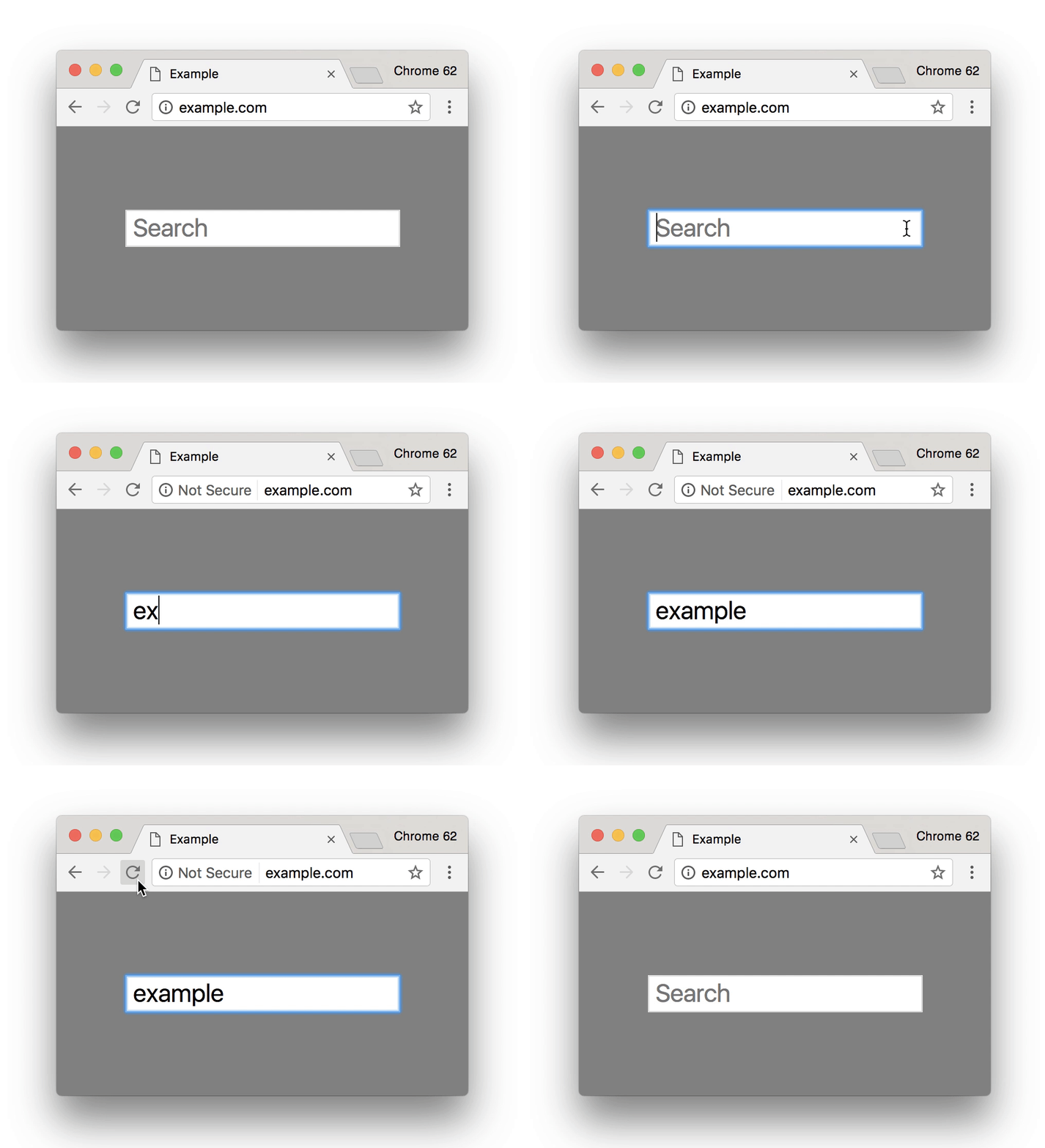
Google said, “[in] October 2017, Chrome will show the ‘Not secure’ warning in two additional situations: when users enter data on an HTTP page, and on all HTTP pages visited in Incognito mode.”

Here is the timeline for this Chrome launch:

Here is a GIF of how it will function:

Chrome recently added that pages with logins are required to be over HTTPS and even sent out webmaster warnings about the change.

Ultimately, Google wants to mark any web page over HTTP as insecure — but that will take them some time to accomplish.


Go to Source
Author: Barry Schwartz

For more SEO, PPC & online marketing news visit https://news.scott.services

The post Google’s Chrome will add new ‘Not secure’ warnings later this year appeared first on Scott.Services Online Marketing News.


source https://news.scott.services/googles-chrome-will-add-new-not-secure-warnings-later-this-year/

How to unlock marketing’s creative side for martech success

B2B marketers think of marketing technology (martech) as a necessary evil. Understandable. Most marketers got into the profession because of the ability to create, connect and communicate. Not many want to deal with tools, integrations and bits and bytes all day.

According to a recently released research report by the MarTech Council, the number one reason marketers avoid martech is that it’s NOT fun. They prefer to work on the creative side of things: programs, campaigns and so on. Yet they admit that martech is essential for success in today’s customer-focused, data-driven world. We have a major disconnect.

We know that, done well, marketing technology provides incredibly powerful capabilities that can increase business impact by:

  • arming marketers to better engage and serve our customers with unique experiences.
  • guiding us on where to invest precious marketing spend.
  • automating mundane, time-sucking tasks that take away from creative work.
  • getting us a seat at the executive table by equipping us with intelligence and ROI data.

To truly maximize martech’s business impact, we need to make it more fun. Here are ways to increase martech adoption and impact by making it more accessible, creative, and even fun.

[Read the full article on MarTech Today.]


Some opinions expressed in this article may be those of a guest author and not necessarily Marketing Land. Staff authors are listed here.


Go to Source
Author: Scott Vaughan

For more SEO, PPC & online marketing news visit https://news.scott.services

The post How to unlock marketing’s creative side for martech success appeared first on Scott.Services Online Marketing News.


source https://news.scott.services/how-to-unlock-marketings-creative-side-for-martech-success/

10 experts advise how to powerfully pair growth marketing with SaaS product development

Software as a service, or SaaS, has been experiencing quite a boom over the past few years, and it doesn’t appear to be slowing down anytime soon. Statista reports that from 2010 to 2016, the industry grew from $10.7 billion in annual revenues to a cool $32.8 billion.

The opportunities are huge for SaaS marketers — particularly those who are already in the market and poised to continue growing rapidly. On the other hand, the more SaaS products hit the market, the harder it becomes to continuously draw the kind of buzz you need to drive sustained growth.

That’s why SaaS often has growth mechanisms baked into the product experience itself. Customer acquisition for SaaS companies becomes much easier if the product can bring in new users and more dollars on its own.

Regardless of where you stand on the growth hacking debate (meaningless buzz term or a revolutionary discipline?), many of the biggest SaaS success stories we’ve seen in recent years are closely tied to the growth hacks that helped them build momentum.

Typically, there’s a product feature that brilliantly drives growth, or there’s a feature that’s so on-point with the needs of target users that buzz becomes inevitable.

Consider the classic example of Dropbox’s incentivized referrals, built into the app’s onboarding experience. Whenever a user signed up, they were given the opportunity to earn more free storage space for getting their friends to use it, too. Because referred users also benefited from the exchange, the product quickly took on a life of its own, cementing this feature’s place in the pantheon of brand advocacy marketing.

Or look at how Square’s visionaries knew that mobile point-of-sale systems equipped with card readers were destined to be in high demand. Before Square entered the market, many small business owners couldn’t accept credit card payments because they couldn’t afford the necessary merchant registration fees and requirements. As consumers shifted away from cash in favor of plastic, micropreneurialism was on the rise, and the rest is history.

The good news for product and marketing pros is that SaaS development pretty much always goes hand-in-hand with agile methodology. Rapid iterations make for constant opportunities, as there’s always an upcoming dev cycle to aim for with a new feature that can change the game.

So how can SaaS makers and marketers bake growth into a product’s features? Let’s see what the experts have to say.

The best way to identify the features that’ll help drive growth is to compile loads of data and feedback. By combining qualitative and quantitative data, you can truly understand what your users want, which is what they will eventually find most useful. And that’s how features drive SaaS growth — by delighting users, so they feel good about spreading the good word among their peers.

The more agile you can be with these processes, with quick cycles of gathering requests, measuring various aspects of app use and building out the things that are most in demand, the faster your growth will be.

Pekka Koskinen, founder and CEO at Leadfeeder

The best way to understand what kind of features to develop in your SaaS product is to use the product yourself and talk with other users. From other users, you can get lots of great incremental improvement ideas, but typically they cannot think of features that will get your product to the next level. This is why it’s important for you to use the tool in your own business, to validate that the product really solves what it’s supposed to.

If you cannot use the tool in your own business, try to work as closely as possible with some key customers where you can test your ideas. After implementing the product features, make sure you have analytics in place to see if the feature really drives growth in your business.

The best way to conceive of SaaS features is to use the product yourself for the exact use case you’re trying to solve for. For example, when we built our app Wordable, I knew what features were important for our developer to build because I needed the product for myself.

After we built and launched our core product, we identified new features we hadn’t thought of by launching to a wide audience and asking for feedback. For example, we launched on AppSumo and Product Hunt and then got a ton of feedback quickly about features that we hadn’t even thought of building from new users.

To prioritize which features will actually drive growth, we keep a tally of how many times we get asks for certain features — when we see something come up multiple times, we prioritize that feature to build because [not having it] is likely hindering people from purchasing. Feedback from current and trial users is one of the best ways to identify new features you need to grow.

Kenny Rueter, co-founder at Kajabi

At the end of the day, customers aren’t using your product merely because of its features. In fact, many times, adding features will not only fail to increase sales, but it will actually increase the churn as the product becomes more and more bloated and hard to use. Putting more features into a product almost never translates into more sales.

On the contrary — an app which takes its users from their “before” state to their desired “after” state as quickly and simply as possible will have astronomical growth.

Steve Rayson, director at BuzzSumo

It is important to avoid feature bloat when developing a product, as this just builds up technical debt and cost. In my view, new features should be those that really help users to perform a specific task easily and quickly. Ideally, this will be a task the user does regularly to improve stickiness.

For me, it is often much better to focus on small improvements to your core current features than to chase new features. Can you make your current product better and simpler? Incremental improvements add up over time. You want your product to be the very best at doing the job it does. Focus on that and not additional features.

Nadya Khoja, director of marketing at Venngage

Ask your users. There is no point in spending your time and money building in a feature that upon release no one [cares] about. Instead of learning the hard way, start by identifying your stickiest users — the ones that use your product religiously. Send them a survey including three to five of the features you are thinking about building, but haven’t gotten around to yet.

This is a great way of validating if it’s something people actually want. And chances are if your stickiest users are going to find value in that offer, use that to promote your tool and acquire more users.

This process also works if you don’t have some ideas narrowed down. Ask your users why they decided to try out your tool in the first place. It will inspire a lot of ideas about how you can build more similar features in the future that excite people and make them run to you with a credit card in hand.

Praval Singh, product and marketing manager at Zoho Social

Involving all of your users in deciding your product road map is just getting too many cooks involved. A lot of SaaS companies do that, but I believe the customer doesn’t always know what she wants, so I wouldn’t recommend this approach. I’d much rather do closed-group discussions with a set of users from diverse personas.

But one of the best ways to grow a SaaS product is by closely monitoring your users to understand their behavior and identify the gaps. For example, look out for users who signed up in the last four weeks and identify where they get stuck, where they drop out and where their behavior differs from what you expected. These gaps then become the genesis for new feature ideas that lead to prototypes and finally, validation.

This path is key to the growth of a product and an important function of a product manager for a SaaS product.

Matthew Spurr, founder and COO at Quuu

An excellent way to identify potential growth-driving features for your SaaS product is to reverse-engineer your ultimate goal. So you identify your desired KPI (Key Performance Indicator) to measure your success — make sure it’s realistic and achievable, though. For example, let’s say $100K MRR (monthly recurring revenue).

Next, you should list the issues that are prohibiting you from currently achieving said goal. Then, using these barriers to success, you can begin to identify the potential ways to overcome them with your team.

If you use this approach, it channels your collective thinking in a more productive way and focuses you on the areas of your business that will genuinely move the needle, as opposed to simply thinking what feature might be cool to add in speculatively.

Customer feedback is key to growing your SaaS company. The key, however, is to do this at all stages of the customer life cycle. You can do this in-app, with tools like Intercom or Qualaroo. You can do this after they churn, by sending out a small email. You can do this by setting up a support portal.

No matter how you approach this in your company, you need to set yourself up as a learning organization, or you’re doomed. Take these learnings, and build them out into new features. Don’t spend months making them, though. Take the lean startup approach and add them as quick as possible in a way that you can learn the most and see if it truly brings value.

Sean Bestor, head of content at Sumo

Two tips: Listen to your users and segment your data. The first option is the easiest; why build something and hope users love it when you can ask and build things they want? It’s the easiest way to keep users and make your product stronger. Serve your current customers and you serve your future ones, too.

Data segmentation is tougher, but here’s the big lesson: Sometimes you don’t need more features; you just need to market your existing features better.

Knowing where audience hangs out is a huge advantage. Look at Airbnb. Early on, they struggled to get new users. But then they saw their target audience was almost exclusively using Craigslist. So instead of building out new features to lure Craigslisters to their site, they built a way to post Airbnb listings on Craigslist. The rest is history. You’d be surprised how strong your core product is when you reach the right audience.

In conclusion

The above experts have all helped to create successful software companies, yet they disagree on some key aspects of product development. For example, are user surveys useful for deciding what growth-driving features to develop? While many experts see this as key, others are more wary.

Here are some of the pieces of advice that seem to unite our experts, as opposed to dividing them:

  • Iterate quickly.
  • Use your own app.
  • Segment your users when gathering feedback.
  • Validate ideas before and after developing them.
  • Emphasize efficiency in the user experience.
  • Identify why people leave.
  • Use your business goals as your guide.

As SaaS continues to boom, with more products being rolled out on a daily basis, it’s getting harder to differentiate and find sustainable success. On the other hand, as software users become increasingly accustomed to trying out new tools, it’s easier than ever for new players to get in on the game.


Some opinions expressed in this article may be those of a guest author and not necessarily Marketing Land. Staff authors are listed here.


Go to Source
Author: Ben Jacobson

For more SEO, PPC & online marketing news visit https://news.scott.services

The post 10 experts advise how to powerfully pair growth marketing with SaaS product development appeared first on Scott.Services Online Marketing News.


source https://news.scott.services/10-experts-advise-how-to-powerfully-pair-growth-marketing-with-saas-product-development/

Why your explainer video matters to your B2B customers


Video is on the way to becoming one of the most effective means of communication with your B2B customers.

In 2016, the B2B industry saw video marketing become a serious game-changer. Video’s power lies in the fact that it can attract and retain the attention of potential buyers by immersing them in a visual or interactive story. Our brains love storytelling; narratives engage us deeply and can make us relive them in our imagination.

Even though some B2B marketers may be still cautious about using video, data shows they shouldn’t be: 54 percent of senior executives share work-related videos with co-workers every week, which illustrates video’s solid place in B2B communication.

Among the different video formats that you can produce, your explainer video is the top priority. This is a short clip between 30 and 90 seconds that gives a succinct and appealing description of your product or service. It can be used across all of your online channels.

An explainer video is a winning marketing asset; you should not delay in creating one. It can give your potential customers a quick and powerful overview of how your brand can help make their lives better.

Let’s look at the reasons why so many B2B brands are crafting explainer videos and evaluate what yours should do to make a strong impact.

Deliver a clear and powerful message

Why are explainer videos so effective in reaching your B2B customers? One key differentiator is that they can win people’s attention in less than a minute.

An explainer video’s goal is to offer your customers an easy-to-digest message, paired with visual explanations via animations or motion graphics. Videos grab attention and facilitate understanding. They are even more helpful if you’re offering a complex or highly technical product or service.

A succinct explainer video should deliver a straightforward message that describes what you do, without getting bogged down in details. Sixty seconds of video should allow for about 145 words, which means you must be truly concise in crafting your message. The time limit of 30 to 90 seconds helps you focus on the most important information.

One of the missions of your explainer video must be to answer your audience’s questions before they have even asked them. It can even help save resources by cutting down potential back-and-forth with prospects proactively.

Start with the overall concept. Begin by formulating the problem that your business is solving for your customers. After that, you need to identify the unique value proposition to communicate through the video. Finally, shape this into an attractive and meaningful script.

If you have copywriting and video talent in-house, this could be a great project for them. If you don’t, look for help from professionals. They can assist you in identifying your key message so that your potential customers quickly understand your offer and its added value. The explainer video is probably the first content this audience will see from you, and first impressions matter.

Build a consistent brand image

Another reason for creating an outstanding explainer video is that it can immensely help your branding. Your leads have multiple points of contact with your business, from your website and social media to your sales and support staff. While these communication channels may already be aligned, a consistent and powerful video can further develop your brand’s image. It can also help set a clear branding style and tone in case there are discrepancies.

An explainer video can unify your messaging and deliver coherent information to your potential and current customers. Instead of turning it into a demo of your product or services, you can use video to focus on the benefits that your buyers receive by working with you.

The exact messaging, language and visuals in the explainer video should be based on your business’s branding. From word choice and value proposition to visual elements and story line, every detail should be in alignment with the image you are communicating across all channels. That’s how you help your customers recognize your distinct style and start associating the values you embrace with your brand.

Pay special attention to the call to action (CTA) in your explainer video. This statement should cue your audience what their next step should be. It should be easy to understand, human and relatable. If you want people to check out a free trial, read a white paper you have crafted or get in touch with your sales personnel, the CTA is the place to clearly communicate this.

Stand out from the crowd

Your explainer video needs to be remarkable if it’s to serve as a branding and differentiating tool.

You can choose among a number of approaches when creating your video to make it memorable. Some of the most popular and effective options include cartoon style or animated character videos, whiteboard animation, motion graphics, stop-motion and 3D animation.

Animated characters are great for humanizing your brand and making it approachable. Whiteboard videos are useful for explaining complicated concepts by visualizing them in a simple form. If you need to communicate abstract ideas, motion graphics and 3D animation are effective. Stop-motion animation is an elaborate approach typically used in the creative fields.

There are myriad video production options that you can explore, including typography, screencasts and live action. Your video partner should be able to advise you on what’s the best approach for your brand’s idea based on the concise idea and script concept you prepare.

Don’t forget about the video voiceover. The narrative of the story should flow naturally. It’s best to hire professional voiceover talent with experience in explainer videos. Make sure that the tone matches your overall branding and the purpose of the video. But also, try to keep it fresh and engaging, so that 60 seconds doesn’t seem like an eternity for your audience.

Besides the production style, there are additional ways you can boost the effect of your explainer video. The most important tip is to talk about an easily relatable problem and make it seamless for people to understand your point. You can achieve this by using humor (but only when it makes sense) and shaping the story in a witty and engaging way.

Then you also need to make sure you spend enough resources on the distribution of your video. Just publishing it on your website is not enough. You should share it on your social media channels, include it in your email signature and send it to your email list. The purpose is to make customers notice and engage with your video.

Start crafting your exceptional explainer video

Making a powerful explainer video certainly takes effort, but it can bring results for your brand in the form of higher conversions. It’s an essential element of any B2B marketing mix today.

What tips do you have for crafting the best explainer video? Share your insights with us on Facebook, Twitter or our LinkedIn Group.


Some opinions expressed in this article may be those of a guest author and not necessarily Marketing Land. Staff authors are listed here.


Go to Source
Author: Alexander Kesler

For more SEO, PPC & online marketing news visit https://news.scott.services

The post Why your explainer video matters to your B2B customers appeared first on Scott.Services Online Marketing News.


source https://news.scott.services/why-your-explainer-video-matters-to-your-b2b-customers/

Study: Q1 Google Display Network placements

One of the best ways to fill the early part of the online marketing funnel is to advertise on Google’s network of partner sites, the Google Display Network (GDN). Essentially, these are websites that are either showing AdSense ads or websites that show ads from DoubleClick (some of the GDN inventory is actually “remnant” inventory that no one made specific placement buys for on DoubleClick).

SEMCopilot, our AdWords management software for PPC account managers, collected data throughout Q1 from both beta testers and paying customers’ AdWords accounts; here is some analysis of their GDN placements.

How our data is organized

To make analysis of placements quick, SEMCopilot’s “Placement Insights” feature automatically sorts placements into 40+ categories. Google has its own categories you can use for exclusion purposes; we assume that most customers are already blocking porn or adult sites and so on. The purpose of our categories is to gain insights into where ads are running, for brand protection purposes and for performance analysis.

Based on our users data, the sites we’ve categorized represented 96 percent of the impressions they received on the Google Display Network in Q1.

Why bother categorizing sites?

Because of the number of sites on the GDN, simply examining a placement report is a pretty fruitless effort for most AdWords account managers. At best, they typically look at the top several hundred… then, when the number of clicks they are looking at gets down to one or two, they stop looking further. It’s a very long tail of sites.

Thus, organizing placement reports into categories makes it much easier to glean actionable insights. Below are actual quotes from users who have examined our Placement Insights Report — they’re illustrative of the surprises one often discovers:

“Hey, my ads are running on dating sites!”

“Hmm… what are all these political sites?”

“Whoa, why are my ads running on eBay?”

“What the heck are my ads doing on all these foreign-language sites?”

“Wow, [category] really gets a lot of conversions. Maybe I should do a placement campaign targeting those sites and bid up on them.”

The categories we examined

Most marketers can intuitively look at categories and rapidly decide on certain ones that won’t work for them. For instance, if you’re selling architectural design services, “Comic and Anime” is unlikely to be a high-performing category.

That said, for remarketing campaigns, you’re following your audience around, so who knows? Maybe they like those kinds of sites! The key is always to analyze your conversions and cost/conversion by category; then you can get a sense of where your advertising dollars should best be allocated:

categories

SEMCopilot’s Placement Insights Categories

Okay, where are the ‘fake news’ and ‘extremist’ categories?

You can’t read Search Engine Land or Advertising Age these days without seeing tons of articles about “brand protection,” “fake news,” or how Google is profiting from some ads on some horrible website or allowing ads to run on some pro-ISIS website, or whatever. Just for the record, we’re not in a position of judging what news is fake or who is extreme, and we eagerly await Google’s improvements in those areas. That said… well, there are news sites, and there are news sites.

We do have a “News” category which contains mainstream news sites. We also have a “Viral Amusement” category that contains the type of websites I’m sure you’re familiar with — they appear to be newsy, but articles have provocative photos, with headlines ending in  “…and you’ll never believe what happened next!”– usually next to some AdSense ads about reducing belly fat (you know, those ads with the cartoon drawing of bananas).

Certainly some “fake news” sites may appear in our “Viral Amusement” category, but this is simply because we find that these types of sites don’t really perform as well as mainstream news sites do. And from a brand protection standpoint, often the pictures are NSFW and could result in your upper management asking you, “Why are our ads running on these sites?”

So, which categories performed best and worst in Q1?

Below are the four highest average cost-per-conversion categories across all SEMCopilot customers (top) and the four lowest (bottom).

Highest and Lowest Cost-per-Conversion Categories in Q1

Highest and Lowest Cost-per-Conversion Categories in Q1

One amazing anomaly that resulted in a very actionable idea

As we were examining the data, one thing really stuck out. Based on our categorization scheme, 96 percent of our customers’ impressions were covered. But the “Uncategorized” sites, while representing only 4 percent of impressions, represented 25 percent of spend, 35 percent of clicks, and a whopping 65 percent of conversions!

Our first theory was that this must be some sort of click fraud. Maybe there are sites out there on the GDN using bots that are automatically filling out forms, resulting in worthless leads, in the hope that you’ll placement target or bid up on them. We took a look, and although we did find four or five sketchy-looking sites with suspiciously high conversions, the volume wasn’t enough to influence the numbers much.

No, when we took the “Uncategorized” category and started categorizing the *converting* sites within it, we found that the vast majority (over 90 percent) were parked domains! Not only that, they were parked domains that were variations on the customer’s brand name!

As it turns out, parked domains are a GREAT place to advertise

For years, Google AdWords reps have been scolding me for leaving Parked Domains on in GDN campaigns. Clearly, they have been disabling them as a suggestion on some sort of checklist. I’ve always left them on because I suspect that people mistyping your brand name may navigate to your site.

Our data clearly bears this out; most of these suspicious-looking conversions were simply from parked domains that were either misspellings of or slight variations on the customer’s brand name. So they are really brand navigational queries. It may be irksome to pay a domain that is infringing, or maybe close to infringing on your trademark, but trust me, you want those customers.

Just don’t advertise on all of them

Of course, not all parked domains will perform well; only ones that are similar to your brand name seem to do the trick. I would suggest turning them on for a quarter and discovering which ones are working. Create a placement campaign for those, and bid way up on them — then turn off the AdWords “parked domains” category in your original campaign.

We roll out new features on a monthly basis, so rest assured I’ve just added a “Parked Domains” category into the hopper. This should make it really easy for our customers to identify likely brand variation domains that they should placement target.

In conclusion

The biggest actionable takeaways I see from the data are:

  • YouTube may be worth testing placement targeting on, provided you layer on other targeting methods such as keyword targeting, due to its low CPA.  Note that I don’t mean video campaigns, I mean simply running GDN text (now called “responsive” format) ads targeting YouTube.
  • Political sites actually have the potential to perform great for you, provided you’re not too worried about brand protection implications. (By “political sites,” I am largely referring to political news sites — e.g., breitbart.com, huffingtonpost.com, and so forth.) It could be they simply are less popular with advertisers and thus have not been bid up as much as more mainstream news sites. In fact, with the recent campaign against breitbart.com, I would imagine you can pick up a lot of traffic there at bargain CPCs.
  • You’re absolutely crazy if you aren’t bidding on traffic on parked domains. Try it yesterday!

Some opinions expressed in this article may be those of a guest author and not necessarily Search Engine Land. Staff authors are listed here.

Go to Source
Author: Ted Ives

For more SEO, PPC & online marketing news visit https://news.scott.services

The post Study: Q1 Google Display Network placements appeared first on Scott.Services Online Marketing News.


source https://news.scott.services/study-q1-google-display-network-placements/

How AI & Machine Learning Will Impact Paid Advertising

You may have heard that robots are taking over your PPC. Well, maybe not to that extreme, but machine learning and AI is a hot topic in the PPC world right now. With all of these new automation tools coming out, it’s easy to wonder where the industry is heading. But don’t worry about machine learning controlling us – we’ll teach you how to use it to control your audiences and tune them into where you want them to be.

In this new live webinar, Acquisio’s Marc Poirier and Hanapin’s Jeff Baum will discuss what’s happening with AI and machine learning today, tips to use them to your advantage, and what will be happening in the future.

You’ll get expert PPC tips like:

  • How to use machine learning to optimize ad copy and targeting
  • Using new Google features, like smart display campaigns
  • Effective bidding strategies using machine learning

Presented by:


Marc Poirier                        Jeff Baum

Go to Source
Author: Bonnie Pogorelc

For more SEO, PPC & online marketing news visit https://news.scott.services

The post How AI & Machine Learning Will Impact Paid Advertising appeared first on Scott.Services Online Marketing News.


source https://news.scott.services/how-ai-machine-learning-will-impact-paid-advertising/

8 technical issues holding your content back

Technical SEO has certainly fallen out of fashion somewhat with the rise of content marketing, and rightly so.

Content marketing engages and delivers real value to the users, and can put you on the map, putting your brand in front of far more eyeballs than fixing a canonical tag ever could.

While content is at the heart of everything we do, there is a danger that ignoring a site’s technical set-up and diving straight into content creation will not deliver the required returns. Failure to properly audit and resolve technical concerns can disconnect your content efforts from the benefits it should be bringing to your website.

The following eight issues need to be considered before committing to any major campaign:

1. Not hosting valuable content on the main site

For whatever reason, websites often choose to host their best content off the main website, either in subdomains or separate sites altogether. Normally this is because it is deemed easier from a development perspective. The problem with this? It’s simple.

If content is not in your main site’s directory, Google won’t treat it as part of your main site. Any links acquired on subdomains will not be passed to the main site in the same way as if it was in a directory on the site.

Sistrix posted this great case study on the job site Monster, who recently migrated two subdomains into their main site and saw an uplift of 116% visibility in the UK. The chart speaks for itself:

We recently worked with a client who came to us with a thousand referring domains pointing towards a blog subdomain. This represented one third of their total referring domains. Can you imagine how much time and effort it would take to build one thousand referring domains?

The cost of migrating content back into the main site is miniscule in comparison to earning links from one thousand referring domains, so the business case was simple, and the client saw a sizeable boost from this.

2. Not making use of internal links

The best way to get Google to spider your content and pass equity between sections of the website is through internal links.

I like to look at a website’s link equity as a heat which flows through the site through its internal links. Some pages are linked to more liberally and so are really hot; other pages are pretty cold, only getting heat from other sections of the site. Google will struggle to find and rank these cold pages, which massively limits their effectiveness.

Let’s say you’ve created an awesome bit of functional content around one of the key pain points your customers experience. There’s loads of search volume in Google and your site already has a decent amount of authority so you expect to gain visibility for this immediately, but you publish the content and nothing happens!

You’ve hosted your content in some cold directory miles away from anything that is regularly getting visits and it’s suffering as a result.

This works both ways, of course. Say you have a page with lots of external links pointing to it, but no outbound internal links – this page will be red hot, but it’s hoarding the equity that could be used elsewhere on the site.

Check out this awesome bit of content created about Bears Ears national park:

Ignoring the fact this has broken rule No.1 and is on a subdomain, it’s pretty cool, right?

Except they’ve only got a single link back to the main site, and it is buried in the credits at the bottom of the page. Why couldn’t they have made the logo a link back to the main site?

You’re probably going to have lots of pages on content which are great magnets for links, but what is more than likely is that these are probably not your key commercial pages. You want to ensure relevant links are included between hot pages and key pages.

One final example of this is the failure to break up paginated content with category or tag pages. At Zazzle Media we’ve got a massive blog section which, at the time of writing, has 49 pages of paginated content! Link equity is not going to be passed through 49 paginated pages to historic blog posts.

To get around this we included links to our blog posts from our author pages which are linked to from a page in the main navigation:

This change allows our blog posts to be within three clicks of the homepage, thus getting passed vital link equity.

Another way around this would be with the additional tag or category pages for the blog – just make sure these pages do not cannibalize other sections of the site!

3. Poor crawl efficiency

Crawl efficiency is a massive issue we see all the time, especially with larger sites. Essentially Google only has a limited amount of pages it will crawl on your site at any one time. Once it has exhausted its budget it will move on and return at a later date.

If your website has an unreasonably large amount of URLs then Google may get stuck crawling unimportant areas of your website, while failing to index new content quickly enough.

The most common cause of this is an unreasonably large number of query parameters being crawlable.

You might see the following parameters working on your website:

https://www.example.com/dresses

https://www.example.com/dresses?category=maxi

https://www.example.com/dresses?category=maxi&colour=blue

https://www.example.com/dresses?category=maxi&size=8&colour=blue

Functioning parameters are rarely search friendly. Creating hundreds of variations of a single URL for engines to crawl individually is one big crawl budget black hole.

River Island’s faceted navigation creates a unique parameter for every combination of buttons you can click:

This creates thousands of different URLs for each category on the site. While they have implemented canonical tags to specify which pages they want in the index, this does not specify which pages are to be crawled, and much of their crawl budget will be wasted on this.

Google have released their own guidelines on how to properly implement faceted navigation, which is certainly worth a read.

As a rule of thumb though, we recommend blocking these parameters from being crawled, either through marking the links themselves with a nofollow attribute, or using the robots.txt or the parameter tool within Google Search Console.

All priority pages should be linked to elsewhere anyway, not just the faceted navigation. River Island have already done this part:

Another common cause of crawl inefficiency arises from having multiple versions of the website accessible, for example:

https://www.example.com

http://www.example.com

https://example.com

http://example.com

Even if the canonical tag specifies the first URL as our default, this isn’t going to stop search engines from crawling other versions of the site if they are accessible. This is certainly pertinent if other versions of the site have a lot of backlinks.

Keeping all versions of the site accessible can make four versions of a page crawlable, which will kill your crawl budget. Rule redirects should be setup to redirect any request and the non-canonicalization version of the page to 301 redirect to the preferred version in a single step.

One final example of wasted crawl efficiency is broken or redirected internal links. We once had a client query the amount of time it was taking for content in a certain directory to get indexed. From crawling the directory, we realised instantly that every single internal link within the directory was pointing to a version of the page not appended with a trailing slash, and then a redirect was forcing the trailing slash on.

Essentially for every link followed, two pages were requested. While broken and redirected internal links are not a massive priority for most sites, as the resource required to fix them does not outweigh the benefit, it is certainly worth resolving priority issues (such as issues from links within the main navigation, or in our case entire directories of redirecting links) especially if you have a problem with the speed with which your content is being indexed.

Just imagine if your site had all three issues! Infinite functioning parameters on four separate sites, all with double the amount of pages requested!

4. Large amounts of thin content

In the post Google Panda world we live in, this really is a no brainer. If your website has large amounts of thin content pages, then sprucing up one page on your website with 10x better content is not going to be sufficient to hide the deficiencies your website already has.

The Panda algorithm essentially makes a score of your website based upon the amount of unique, valuable content you have. Should the majority of the pages not meet the minimum score required to be deemed valuable, your rankings will plummet.

While everyone wants the next big viral idea on their website, when doing our initial content audit, it’s more important to look at the current content on the site and ask the following questions: Is it valuable? Is is performing? If not, can it be improved to serve a need? Removal of content may be required for pages which cannot be improved.

Content hygiene is more important initially than the “big hero” ideas, which come at a later point within the relationship.

5. Large amounts of content with overlaps in keyword targeting

We still see websites making this mistake in 2017. For example, if our main keyword is blue widgets and is being targeted on a service page, we might want to make a blog post about blue widgets too! Because it’s on our main service offering, let’s put a blurb on our homepage about blue widgets. Oh, and of course, you also have a features of our blue widgets page.

No! Just stop, please! The rule of one keyword per page has been around for nearly as long as SEO, but we still see this mistake being made.

You should have one master hub page which contains all the top line information about the topic your keyword is referencing.

You should only utilize other pages should there be significant search volume around long tail variations of the term, and on these pages target the long tail keyword and the long tail keyword only.

Then link prominently between your main topic page and your long-tail pages.

If you have any additional pages which do not provide any search benefit, such as a features page, then consider consolidating the content onto the hub page, or preventing this page from being indexed with a meta robots noindex attribute.

So, for example, we’ve got our main blue widgets page, and from it we link out to a blog post on the topic of why blue widgets are better than red widgets. Our blue widgets feature page has been removed from the index and the homepage has been de-optimized for the term.

6. Lack of website authority

But content marketing helps attract authority naturally, you say! Yes, this is 100% true, but not all types of content marketing do. At Zazzle Media, we’ve found the best ROI on content creation is the evergreen, functioning content which fulfils search intent.

When we take a new client on board we do a massive keyword research project which identifies every possible long tail search around the client’s products and services. This gives us more than enough content ideas to go about bringing in at the top of the funnel traffic that we can then try to strategically push down the funnel through the creative use of other channels.

The great thing about this tactic is that it requires no promotion. Once it becomes visible in search, it brings in traffic regularly without any additional budget.

One consideration before undergoing this tactic is the amount of authority a website already has. Without a level of authority, it is very difficult to get a web page to rank for anything well, no matter the content.

Links still matter in 2017. While brand relevancy is the new No.1 ranking factor (certainly for highly competitive niches), links are still very much No. 2.

Without an authoritative website, you may have to step back from creating informational content for search intent, and instead focus on more link-bait types of content.

7. Lack of Data

Without data it is impossible to make an informed decision about the success of your campaigns. We use a wealth of data to make informed decisions prior to creating any piece of content, then use a wealth of data to measure our performance against those goals.

Content needs to be consumed and shared, customers retained and engaged.

Keyword tools like Storybase will provide loads of long tail keywords with which to base your content on. Ahrefs content explorer can help validate content ideas by comparing the performance of similar ideas.

I love also using Facebook page insights on custom audiences (by website traffic or email list) to extract vital information about our customer demographic.

Then there is Google Analytics.

Returning visits, pages per session, measure customer retention.

Time on page, exit rate and social shares can measure the success of the content.

Number of new users and bounce rate is a good indication of the engagement of new users.

If you’re not tracking the above metrics you might be pursuing a method which simply does not work. What’s worse, how can you build on your past successes?

8. Slow page load times

This one is a no brainer. Amazon estimated that a single second increase to their page load times would cost them $1.6 billion in sales. Google have published videos, documents and tools to help webmasters address page load issues.

I see poor page load times as a symptom of a much wider problem; that the website in question clearly hasn’t considered the user at all. Why else would they neglect probably the biggest usability factor?

These websites typically tend to be clunky, have little value and what content they do have is hopelessly self-serving.

Striving to resolve page speed issues is a commitment to improving the experience a user has of your website. This kind of mentality is crucial if you want to build an engaged user base.

Some, if not all, of these topics justify their own blog post. The overriding message from this post is about maximising a return of investment for your efforts.

Everyone wants the big bang idea, but most aren’t ready for it yet. Technical SEO should be working hand in hand with content marketing efforts, letting you eke out the maximum ROI your content deserves.

Related reading

Go to Source
Author: Tom Smith

For more SEO, PPC & online marketing news visit https://news.scott.services

The post 8 technical issues holding your content back appeared first on Scott.Services Online Marketing News.


source https://news.scott.services/8-technical-issues-holding-your-content-back/